Hey Richardo,
You download the plugin from the staging and u upload it to the live!
It should be working properly
Replies for tickets on suppota
Hey Richardo,
You download the plugin from the staging and u upload it to the live!
It should be working properly
Hello,
Instead of hide_past could you try adding event_past_future=”future” to the shortcode?
Hey Patrick,
Sorry inside the panic missed that, I am updating it!
Hey
Sorry wrong ticket I posted 🙂
I am deploy the updates here to you, wit hthe new changes
Ah, I see the issue 🙂
Time in database should be in utc, can u ask the hosting provider to change the server time to UTC please?
So it can sync with the user location time?
If you go to EventON > Tickets > Upon add to cart redirect customer to > select Do not redirect, allow adding more tickets to cart, users can select different tickets without refreshing or leaving the page.
Please try on http://dev2.myeventon.com/events/test-51/. Try yourself on http://dev.myeventon.com/wp-admin/
Hello,
Please check our answers in your other ticket #200344.
Hello,
1. wp-login.php page leads to “Forbidden You don’t have permission to access this resource.” error. Could you check?
2. Please check Event Lists: Ext add-on: https://www.myeventon.com/addons/event-lists-extended/. Using it you can select Date Range to show events from:
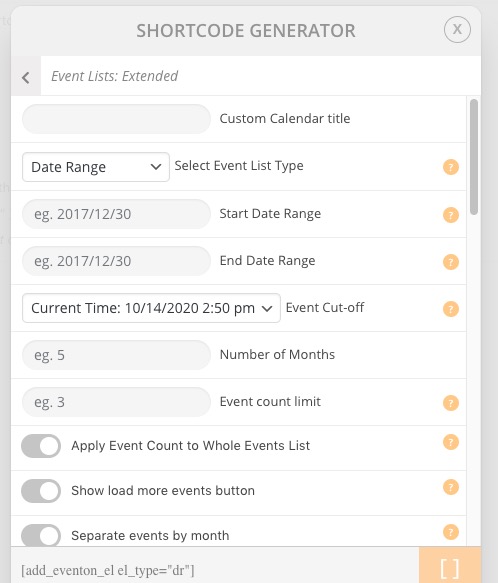
Try on http://dev.myeventon.com/wp-admin/
3. You need Event Lists: Ext as well. Please check this demo page: https://addons.myeventon.com/event-lists-extended/. Try on http://dev.myeventon.com/wp-admin/
4. If you don’t sell tickets please check RSVP add-on: https://www.myeventon.com/addons/rsvp-events/
I cannot access your site you must have IP address blocking on- I get a 403 forbidden
with regards to ticketing- when do they purchase the ticket? If they purchase the ticket there and then- then tickets would be what you are after
however if they pay when they collect their ticket (not an effective way to guarantee sales) then you can get away withj the RSVP addons which is a way to register for the event but not pay for it
I’ll need access to the site to understand your questions- some screenshots would be good as I don’t understand Not N & J
Hello,
By default Wishlist is not visible on Tile Design. However, please add this CSS code to EventON > Styles (If you don’t see any change, EventON > turn off Write styles to header > save settings > turn on Write styles to header):
.ajde_evcal_calendar.boxy .eventon_list_event .evcal_desc .evcal_desc3 { display: block !important; }