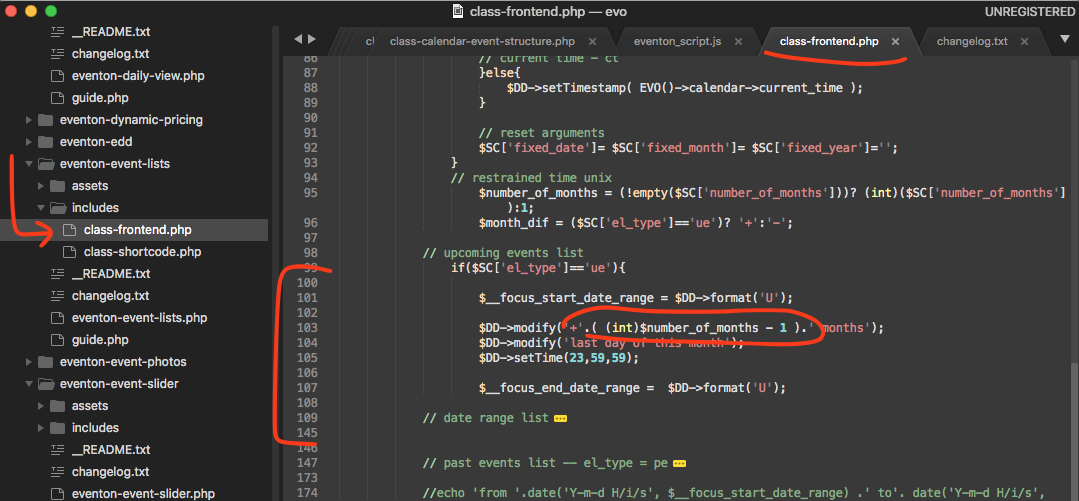
Thank you very much for pointing this out I have found the issue here is the patch fix and I am going to release an update to event lists ext. addon which will aldo have this fix 🙂
If you have more questions, kindly send us a new ticket and we would be more than happy to help you resolve your issues!
I use Bluehost. However, as I understand it, caching only benefits the 2nd time a visitor visits a site. Or maybe I’m mistaken. I found this article speaking of the benefits of caching – https://winningwp.com/what-is-website-caching-and-why-is-it-so-important/
Which plugin do you prefer?
Hello Beti, let me see if I can answer your questions 🙂
1. here is a better picture of our licenses https://docs.myeventon.com/documentations/licensing-eventon-products/
2. 1 EventON license = 1 site. Those are codecanyon terms. if it was used on more sites, it was violating the license terms.
3. If you buy eventON addons from myeventon.com – definitely you can subscribe for multisite license which are upto 5 sites or upto 25 sites and you can choose those at the time of purchase.
4. Are you able to go into myeventon.com/my-account? you can upgrade the license from there. Let me know if you are not able to access the account.
Unfortunately, it seems there is some kind of incompatibility issue between EventON and the theme. Could you try contacting the theme developer and ask about this issue?
Hello there.
I didn’t work. I created a new event from scratch.
Here is the result: https://synchronicity.global/events/taller-equipos-de-alto-desempeno-nivel-1-octdec2020/
It still has the dates issue, a bit different but all the same issue.
Ok. Will try and report back.
In the meantime, what is your supported way to duplicate events? Do you have a plug-in for that? Did I miss some functionality in the plug-ins I might already have?
Or also for the schedule. AFAIK there is no way to copy the schedule from another event, so you always have to manually input it.
I don’t see a cache plugin on your site- who are you hosting with? (for example siteground have a hosting cache plugin that speeds up load times by at least 40%)
cache plugins help load things faster, but it would be handy to know where your site is hosted
In the past on my own site- I created a 1 day event and added a schedule- then made it a 2 day event and I have issues, so it could be simply – make the event from scratch might fix the issue you are currently having (and we can then address this issue in future versions)
while you wait for ashan
can you create a new event (not duplicate) create it from scratch
and set the start and end dates and click sAVE
then do your schedule and click save- and see what happens