Looks great! Can you please detail what changes you have made to make it work and provide us with the code delta so that we can apply it again when we update the Eventon plugin?
Archives: Replies
Replies for tickets on suppota
Reply to: tickets(199819)
Hello,
According to CodeCanyon and our license policies you must purchase a separate license for each domain name on which you plan to use the plugin (or add-on).
But we don’t have the access for the EventON calendar account and we will never have.
Unfortunately, we unable to access your account on CodeCanyon either. Please contact Envato (CodeCanyon) to solve this.
That is why I have created this account and purchase this add-ons but the add-ons works only on one sit?
I cannot find any add-ons among your purchases. Could you send us Order IDs?
Reply to: tickets(199757)
Ashan,
Could you check this?
Reply to: tickets(199757)
Thank you for your messages, I am going to assign this ticket to Ashan and he will be able to take it from here and find you a solution. Please allow some time for him to get back to you, we greatly appreciate your patience and thank you for being a eventon customer! Also please disable any IP blocking on your site if there are any.
Reply to: tickets(199793)
Ashan,
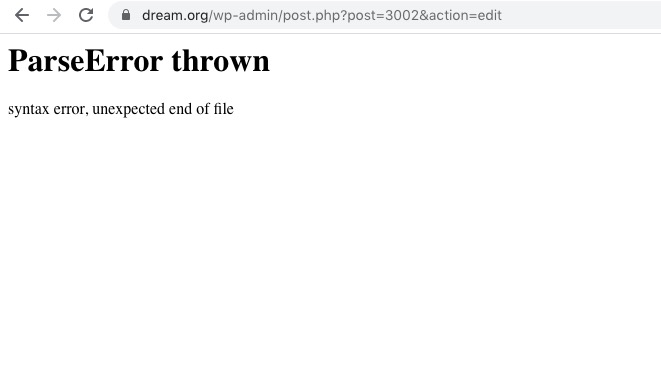
Similar issue: https://helpdesk.ashanjay.com/ticket/i-get-an-error-on-my-single-ticket-page-in-admin-panel-parse-error-syntax-error/
I copied the file from Reply to: 199672 but it didn’t help.
Couild you check?
https://dream.org/wp-admin/post.php?post=3002&action=edit
Reply to: tickets(199557)
Hi Ashish
We downloaded 2.9.1 from themeforest a couple of days ago. What is the latest version and where can we download it?
Ken
Reply to: tickets(199793)
Thank you for your messages, I am going to assign this ticket to Ashan and he will be able to take it from here and find you a solution. Please allow some time for him to get back to you, we greatly appreciate your patience and thank you for being a eventon customer! Also please disable any IP blocking on your site if there are any.
Reply to: tickets(199951)
Hello,
It seems that for the theme Events page is considered an archive.
You can try following this instruction:
PROTIP: If the /events page does not work due to theme/plugin conflicts, create a new page, call it “Events Directory” Insert eventon shortcode and use that as your main events page which will have a URL ending like /events-directory. This would be a perfect solution if you have conflicts with /events slug.
OR Contact the theme developer and ask if there is an option to disable Page Header.
Reply to: tickets(199819)
Hello,
I enabled the addon from base dashboard. I am managing my web through the main addon dashoabord.
Reply to: tickets(199961)
Hello,
Could you go to EventON Settings > enable Remove schema data from calendar:
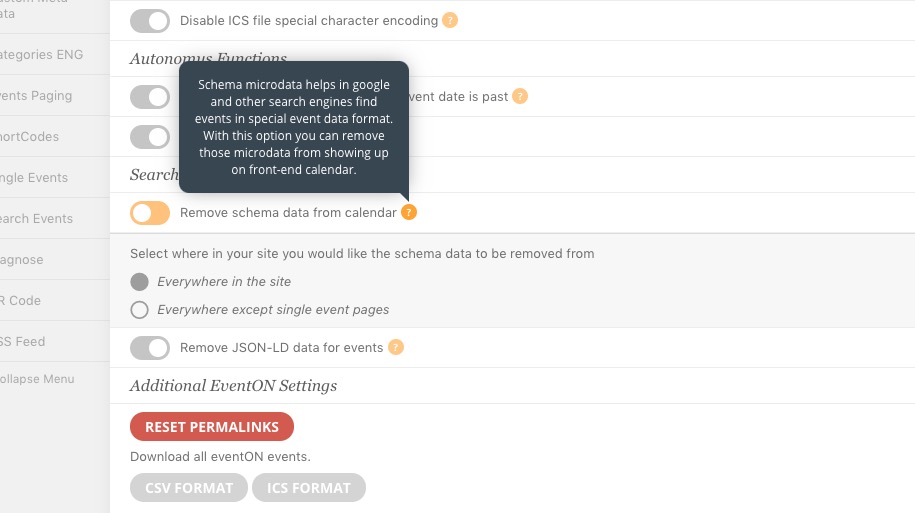
Schema microdata helps in google and other search engines find events in special event data format. With this option you can remove those microdata from showing up on front-end calendar.
Please check my suggestion and let me know.