Thanks for all that!
Rob
Replies for tickets on suppota
Thanks for all that!
Rob
Hi,
I have a question regarding this Sunday hide you proposed.
Not sure if I’m clear 🙂
Thanks!
Ramy
Other than a customization request it is unfortunately not something we would work on as only you have requested it
Well.. I never received an answer to the question I asked.. and if it gets delayed by a day or two.. the team is always eager to closet the tickets !!
Please send us wp-admin access to your site as a private message for us to further assist your situation.
Sorry to say I do not know of any- but most would work- all you are doing is putting the calendar shortcode on a page and in your case that page is not hidden behind a membership
so with the tickets addon you could set up a price to purchase tickets individually – you probably would set the price high to encourage people to buy a membership
you would also have RSVP on the event- set to logged in users only and select the user role that is allowed to RSVP (see screenshot)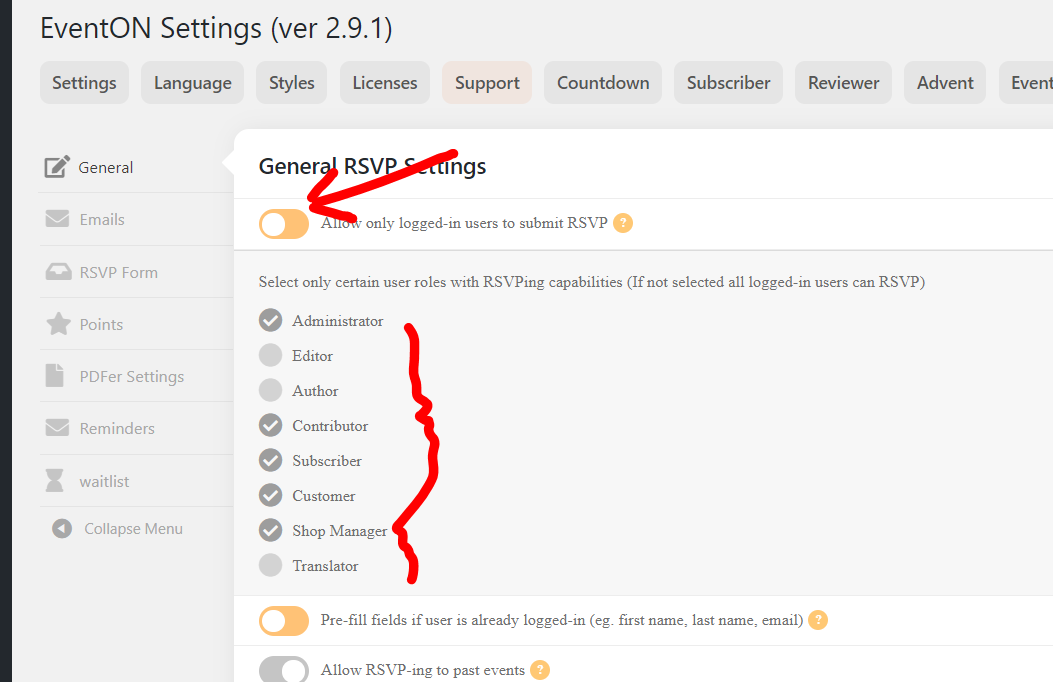
Using the above system you simply need a membership plugin that allows you to sell a membership which is pretty much all of them. Most membership plugins create a new user role such as “members” (which would then appear in the list of user roles you can allow to rsvp)
you put the calendar on a page- if they are logged in as a member- they can RSVP, if they are not logged in as a member they have to buy a ticket
(on the event itself you may wish to add a “custom meta data button” that links to the join the membership page (custom meta data allows you to create additional fields on your event- found in Myeventon>>>>settings>>>>custom meta data- after creating those buttons or fields
you would activate them in myeventon>>>>>settings>>>>event card data) but we can show you custom meta data down the track if its confusing
if you are just selling virtual events as the membership benefits- the membership plugin you need is really basic, you could probably get away with a free plugin that has a woocommerce method of buying a membership
On the my-account page create by woocommerce- you could place the RSVP manager shortcode
I am currently building a streaming video website in Australia for users to add their own events and it has a ticketing system where I own a cut of the ticket price but I have found these 2 free plugins helpful in the creation of the members area (I am not actually using a membership site tho- I am using a vendor site so my users create a free account as a vendor)
this one here: https://wordpress.org/plugins/user-menus/ allows you to control what a user or logged out user sees on the menu or if they even see a menu (you can have user based menus for example)
this one https://wordpress.org/plugins/autocomplete-woocommerce-orders/ is essential for making payments marked as completed when paid via credit card or paypal
the downsides of using this system is that tickets and RSVP don’t speak together
so if you have a maximum capacity of 100 viewers and you sell 54 tickets- that doesn’t tell RSVP that only 46 tickets are available- that probably could be done with customization but that just costs more- you could probably set the tickets to 15 capacity and RSVP to 85 for example
Thanks – so the events would be available to buy as singles – OR – they could have a membership to gain access to all events.
Have you heard of a membership plugin that works with Eventon in this way successfully?
Thanks again,
Rob
I don’t see anything. I don’t think it’s creating pages, just making one event page that shows an expandable list. The website is lukeleegaule.com.
could you provide a link to the page
and also wp-admin would help if we find the css to fix it
Please send us wp-admin access to your site as a private message for us to further assist your situation.