RSVP uses different Additional Fields. Please go to EventON > RSVP > RSVP Form > Additional Field.
Archives: Replies
Replies for tickets on suppota
Reply to: tickets(176607)
And when I remove this ( event_type_2=”1370,1412″ ) still the same problem.
https://artslandia.com/test/
Reply to: tickets(196064)
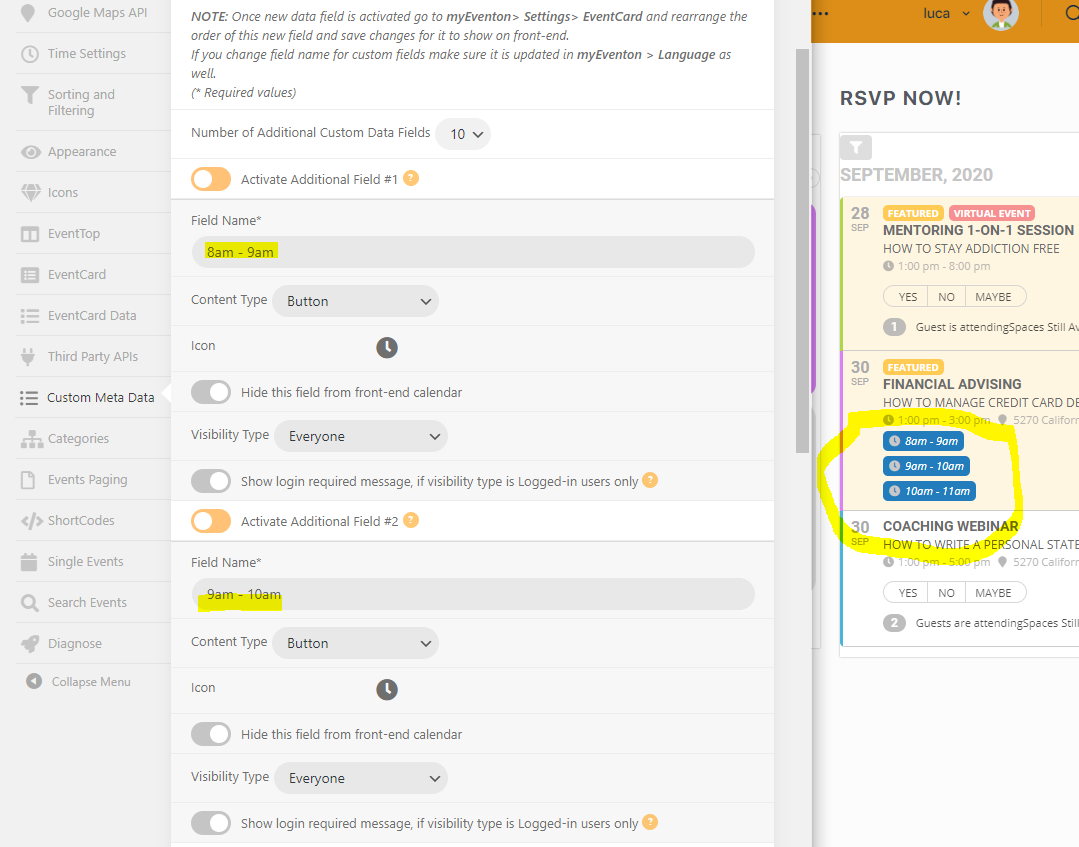
Hi, Artem, thanks so much for the code and it works wonders now for the rsvp widget! :))))
On the AF1, I am adding the fields under EVenton-> custom metadata. And yes, I have the latest version of the addon. Pls see the screenshot of the AFs I have added. It shows up on the calendar but I cannot click on it to RSVP. Maybe I did it wrongly?
Reply to: tickets(197095)
I solved the Problem… with that Code:
[add_eventon_el number_of_months=”25″ event_count=”5″ event_count_list=”yes” show_limit=”yes” show_limit_ajax=”yes” show_year=”yes” event_past_future=”future” hide_past_by=”ss” ux_val=”3″ show_et_ft_img=”yes” hide_end_time=”yes”]
Thanks!
But now there is another big problem:
If I directly type in a city name when I go to the homepage it works very fine. But if i click just one time the “load more”-Button, I can not find a city again. For example: I search for “Berlin” directly: It works! But if I click once a time “load more” under “Berlin” I cannot search again for any city…
Do you know what I mean? You can try at: https://martinfrankkabarett.de/#termine
Thank you!!!!
Reply to: tickets(197105)
Ok great had to add it to my theme CUSTOM CSS field and worked.
Still have a lot of padding around it in the desktop and mobile version
https://uploadir.com/u/lwqrnzxt
https://uploadir.com/u/jv1ohb0p
Thanks a lot for your kindness!
Reply to: tickets(197099)
Hey Ben,
I will send the request tomorrow, it is a little bit late here 🙂
Reply to: tickets(197099)
Basilis has accepted the job for 1
Reply to: tickets(176607)
All EventOn plugins have been deleted and reinstalled.
Like mentioned above – it has something to do with the tiles I think. Here is a page you can look at: https://artslandia.com/test/
If you login, you can see the code we use:
[add_eventon jumper=”yes” jumper_offset=”2″ jumper_count=”3″ cal_id=”pdx1″ event_type=”1444″ event_type_2=”1370,1412″ month_incre=”+1″]
[add_eventon jumper=”yes” jumper_offset=”2″ jumper_count=”3″ tiles=”yes” tile_bg=”1″ tile_style=”1″ tile_count=”3″ cal_id=”pdx2″ event_type=”1444″ event_type_2=”1370,1412″ exp_so=”yes” event_type_5=”NOT-all” etc_override=”yes” month_incre=”+1″]
Reply to: tickets(197112)
Hello,
Please go to Edit Event > RSVP > enable Show only certain additional fields in RSVP form (separated by commas):

In some cases you need to update an event with the option enabled in order to show the text area.
Reply to: tickets(197095)
Hi! I tried it. It works now with event_count=”15″ until the End of the next Month and than comes: “No more Events”… The same break where the list repeated last time… I tried so much things… Please help me. Tank you so much.