currently reviews are activated individually on each event by wp-admin
I am going to assign this to Ashan to see if there is a way to activate it default for all action user uploaded events as I would like that on my site as well
Replies for tickets on suppota
currently reviews are activated individually on each event by wp-admin
I am going to assign this to Ashan to see if there is a way to activate it default for all action user uploaded events as I would like that on my site as well
Can you please get back to me on my previous message. If we only exchange one message per day it will never work and we are starting to sell tickets in just a few days.
THANK YOU!
when you create an event – it automatically creates a single event page- look underr Events>>>>> and you will see a list of the events

Booking addon requires both eventon Tickets and Woocommerce in order to work
> as it will be picked up from the browser during the event creation.
No, we can not do that, as the field will not be pre-filled. We can only convert the dates after they fill them 😉
No, approv al will not have to do something with this at all. We only change dates on the front end with JS replacing/converting the time zone on the loading of the page 🙂
Nothing will be impacting form the data that are fetched through the Database.
We only do that for the end-user, so we can convert to local time.
To start:
1. https://paypal.me/Basilakis/180usd
2. WordPress Access
3. Admin Access
Please share those, procced with the payment and I will do the rest 🙂
That sounds great. I believe in this case we will not need to ask the event organisers about their time zone, as it will be picked up from the browser during the event creation.
Quick questions, on our platform all of the events once created, have to be approved and published by admins who are currently based in the UK, won’t this mess up the event timing if the event was originally created by the organiser in like New York based his local time? If this is the case, we can still require for the event organiser to indicate the time zone of the event start time as long as for the end user it all gets covered into his local time
Hello,
Please follow this guide: https://docs.myeventon.com/documentations/how-to-show-various-information-in-eventtop/
Hello,
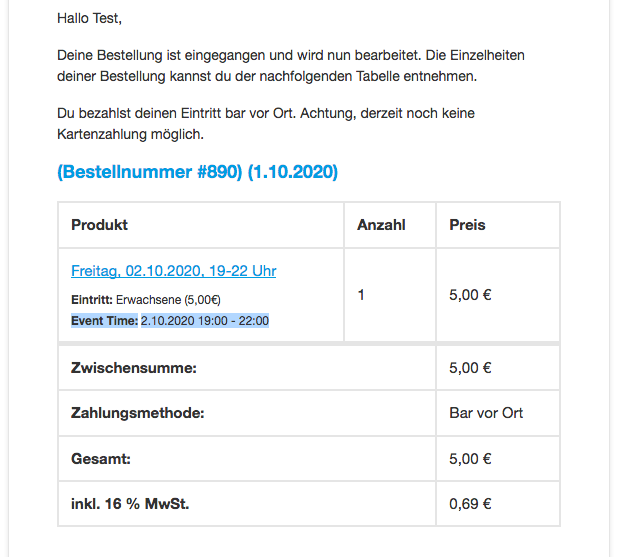
You can customize Event Tickets email templates by following https://docs.myeventon.com/documentations/customize-ticket-email-template/.
It seems that https://helpdeskx.s3.amazonaws.com/wp-content/uploads/2020/10/01075535/Bildschirmfoto-2020-10-01-um-16.52.20.png is coming from WooCommerce, so the only option is to customize the source code.
You can also send us a customization job request by creating a new ticket in here and selecting Customization Request as the category.
It’s very unfortunate, everything could have been resolved a lot faster over Zoom!!!
Can you then apply those changes on tjff.com (the wp access is the same)
Also, did you see my message:
the time is gone which is good however I lost the days which is a problem. Can you please help.
Hello,
It seems that the problem is in default WooCommerce Variations you used. Please use Variations add-on instead: https://www.myeventon.com/addons/ticket-variations-options/