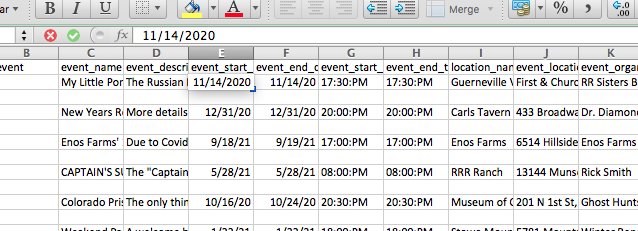
One thing I did just notice about the file. Visually the data field appears as mm/dd/yy but if you double click it, the cell reveals mm/dd/yyyy.
Replies for tickets on suppota
One thing I did just notice about the file. Visually the data field appears as mm/dd/yy but if you double click it, the cell reveals mm/dd/yyyy.
Here you go. https://www.dropbox.com/s/9ifsks4cduf6yw9/706-3.xml.csv?dl=0
You can download it here. https://www.dropbox.com/s/9ifsks4cduf6yw9/706-3.xml.csv?dl=0
Everything is the latest version.
please try again,
vassily1985@gmail.com
JetSummer19857@
Great If you have any further questions or concerns please create a new ticket.
Hello,
Please add this CSS code to EventON > Styles (If you don’t see any change, EventON > turn off Write styles to header > save settings > turn on Write styles to header):
.eventon_events_list .eventon_list_event .event_description p.remaining_count { display: none !important; }
Hello,
Your date and time formats should look like this
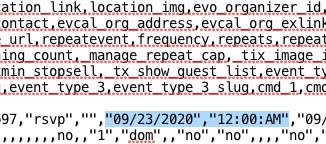
event_start_date & event_end_date – Start/End date in format mm/dd/YYYY
event_start_time & event_end_time – Start/End time in format h:mm:AM/PM
Could you send us a link to the file you are trying to import?
May I try the instructions mentioned in this documentation?
Excellent, many thanks I think this should work nicely.
Hello,
Please go to EventON > ICS Import > Process ICS File > Run Now.
You can also try importing manually for a test and if everything is correct change it to Daily.