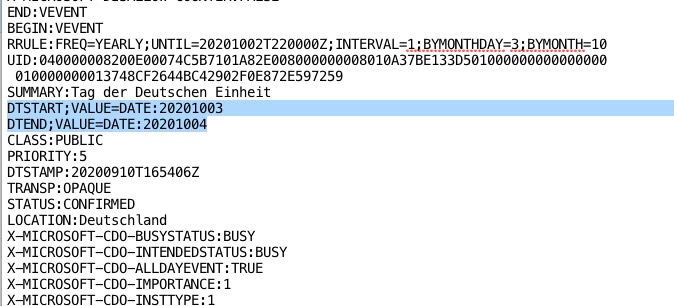
I checked your file and it seems the problem is that Start and End times are different:
So EventON imports everything correctly. Maybe there is some kind of option in Outlook that makes All Date events Start and End dates the same?
Unfortunately, “Disable auto detect all day events based on ICS event time” doesn’t help in this case.
“PÄDAGOGISCHER TAG” is All Date event so it has no time to show, while “DER KLANG MEINES KÖRPERS – DIR” is a regular event with date and time. Please try going to EventON > Time Settings > Allow universal event time format on eventCard > add d. F H:i
Hello,
Please send us wp-admin access to your site as a private message for us to further assist your situation.
Please also send us event’s name with the added script and button.
Hello,
I cannot access wp-admin dashboard? Could you allow it?
Please also go to wp-admin > Settings > Permalinks > try clicking Save Changes.
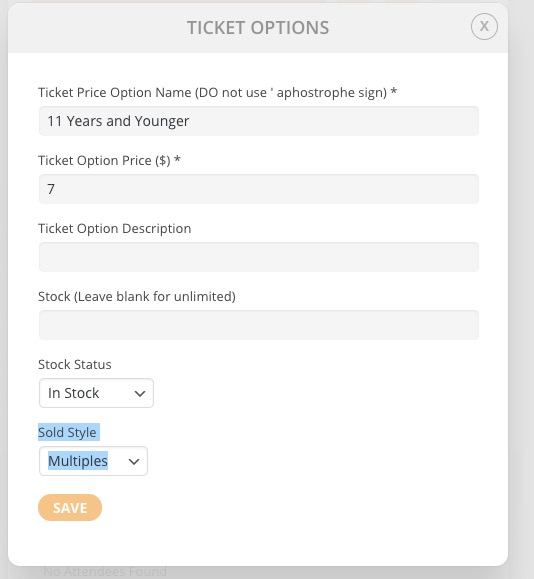
Ah yes, of course. Please check “Sold Style: Multiples”:

ux_val=”4″ and ux_val=”4a” have similar effect on calendar’s loading time. If this didn’t help please try different suggestions from the guide.
Could you also check if removing one of the calendars reduces the loading time?
No. That quote was for just adding ability to add more than one organizer.
For all the features you have mentioned, it will cost more.
Thanks to the link of https://docs.myeventon.com/documentations/why-my-site-and-eventon-page-loading-slow/. I didn’t know about that page.
On that page, it says:
#5 Open events in single event page
Since single events addon is incorporated in eventon you can also try below method to improve load times.
In your eventon calendar shortcode add ux_val=’4′ this will make all the events open in a new page. When eventon calendar loads, by default it loads all the event details (eventcard content) into the page as well (unless specified with ux_val=’4′) This will take long time to load if you have a lot of events with lot of content. By making ux_val=’4′ eventcard content will not load when the calendar loads. It will only load just the eventTop content – making calendar HTML load faster on client end and server-side with less queries run to grab eventCard data. With this method, user clicking on event from a calendar will open a new single event page where they can get all the information about the event.
We have seen multiple users try this method (#5) and have their calendar load times improves drastically.
Does a ux_val=’4a‘ have the same impact as ux_val=’4’ on calendar load time? Because we’re already using the value of 4a in the shortcode.
Hello,
Can I please have an end date? This was supposed to be done last week. We requested a 1-week turnaround and it’s been almost 3.
Thank you
Hello,
I had messaged you to let us know if anything is not working within 5 days as it is the support period for customization work.
I will check this time and fix if anything is not working ,however, please note that if anything stops working in the future, it will need to be paid for the fix because customization is one-time work contract.
The demo site doesn’t have the ticket variation in there. So I can’t add the second ticket price like I am needing.