Please check screenshots and make sure you have set everything correctly.
Replies for tickets on suppota
Please check screenshots and make sure you have set everything correctly.
I have changed the sidebar to the shortcode generator widget so you can copy and paste the full calendar shortcode into that once it loads in
I have been looking over your events- for example this one: https://www.williamsburgfamilies.com/wp-admin/post.php?post=414735&action=edit
the read more part is not an actual workable link its http://Amazing upcoming events at the Hennage Auditorium at the Art Museums of Colonial Williamsburg
and thats on multiple events- which would cause issues (I doubt thats the cause of the slowness but it would add to it)
can you deactivate all plugins except eventon and see if the calendar loads fast?
I spoke with a programmer and he mentioned that the calendar in the sidebar (on every page of our site) is being pulled by the EventON FullCal, and that widget doesn’t have options to set a UX. So the calendar page is a problem but also the widget calendar. Thanks….
its located in Myeventon>>>>settings
if you provide wp-admin access we can sort it out for you
I offered to go in there and set it up for you? it would take all of 2 minutes to do if you give wp-admin access
as you bought it through codecanyon you’ll have to go through them to get the refund- we don’t handle the payment of that
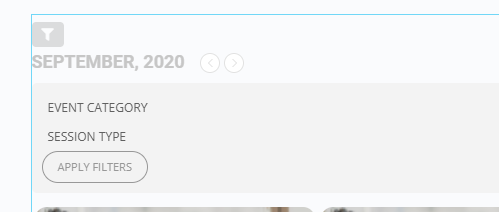
HI, the code that shows vertically attached is using your generator as a widget ESE: (Note I use Elementor Pro)
[add_eventon cal_id=”Main_Cal” event_count=”12″ show_limit=”yes” ics=”yes” cal_init_nonajax=”yes” evc_open=”no” accord=”yes” show_et_ft_img=”yes” etc_override=”yes” eventtop_style=”1″ tiles=”yes” tile_count=”3″ exp_so=”yes” filter_type=”select” filter_relationship=”OR” tile_bg_size=”thumb” tile_style=”0″ hide_so=”no” ux_val=”1″ filter_show_set_only=”no” tiles=”yes” tile_count=”3″ tile_bg=”1″ tile_height=”250″ ]
the same shortcode put as WP will show the filter horizontally, which is a prefered way.
4. I have created a location, and there is no Google lookup on this edit location function to pick up the address via Google API ( I have other addons that auto picks address via the same google API). Any reason it is not working this Edit Location page (anything I need to enable?) Subsequently, there is no Google lookup capability in the event display thru the calendar.
btw, I cannot attached more than 1 image to explain the difference here on your ticketing system.
I don’t find:
“show eventON styles only on calendar pages from eventon settings”
I don’t have that in my setting.
But the code of Kristoffer Sundqvist work.
Thanks.
But it’ll be better if this option “Load eventON scripts and styles only on eventON” work, and if Eventon don’t put code everywhere on our website.
Hello there, we have sent you a reminder 3 days before this was renewed automatically. as mentioned in our refund terms https://docs.myeventon.com/documentations/terms-and-conditions-and-refund-policy/ if you no longer wish to renew, the subscription can be cancelled during that time.
I have refunded you via other ticket.
I have refunded your order. If you have more questions, kindly send us a new ticket and we would be more than happy to help you resolve your issues!