Can't open Event Card from Event List
Hello
I hve installed version 4.6.1.
Clicking on the event calendar does not display the event card, but increases the height of the tiles.
To display calendar I use short code [add_eventon_el tiles="yes" tile_bg="1" tile_style="1" tile_count="4" number_of_months="8" etc_override="yes" hide_mult_occur="yes" event_type_2="22"].
Pictures show screen befor and after mouse click.
Best regards Richard
- Mar 23,2024 AT 11:10AM - 2 years ago-
-
Mar 23,2024 AT 11:13AM -
Posted 2 years ago
- #345954
I’ve forgotten pictures.
https://drive.google.com/file/d/1AhZTRjv01V4V2ijTbXNqEs7oeAg3fq0P/view?usp=sharing
https://drive.google.com/file/d/1buiT2UHDTRg3puPuP4CcxDr6A6PwhbK5/view?usp=sharing
-
Mar 23,2024 AT 11:25AM -
Posted 2 years ago
- #345958
Stejný problém, velký problém!
-
Mar 23,2024 AT 11:27AM -
Posted 2 years ago
- #345959
Same problem…
-
Mar 24,2024 AT 12:38PM -
Posted 2 years ago
- #346032
Hello,
No issues on our test site:
https://dev2.myeventon.com/test-456/
Could you make sure there are no additional CSS that affect CSS? Also try clearing your browser cache manually.
-
Mar 24,2024 AT 1:17PM -
Posted 2 years ago
- #346069
it does the same error on your test site
-
Mar 24,2024 AT 4:43PM -
Posted 2 years ago
- #346089
I have the same error with the latest update.
popyentradas.com -
Mar 25,2024 AT 5:50AM -
Posted 2 years ago
- #346179
You are exactly right, sorry for not noticing.
Thank you for your messages, I am going to assign this ticket to Ashan and he will be able to take it from here and find you a solution. Please allow some time for him to get back to you, we greatly appreciate your patience and thank you for being a eventon customer! Also please disable any IP blocking on your site if there are any.
-
Mar 25,2024 AT 8:45AM -
Posted 2 years ago
- #346259
same problem, I have modified php version and nothing appened.
My theme is Avada and if I try to deactivate Avada builder I had the same problem…
-
Mar 25,2024 AT 11:58AM -
Posted 2 years ago
- #346366
Could you try adding ux_val=”3″ to your shortcode?
-
Mar 26,2024 AT 1:32AM -
Posted 2 years ago
- #346511
Hi,
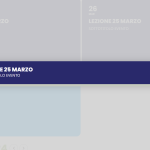
I added ux_val=”3″ to shortcode and now when i click on tiles i can’t open event page but a BROKEN lightbox appears on the screen with only event title. See attached image
Thanks
-
Mar 26,2024 AT 2:10AM -
Posted 2 years ago
- #346518
For your additional info, I get the same errors even if I change the theme Avada with Twenty Twenty-Four.
-
Mar 26,2024 AT 4:10AM -
Posted 2 years ago
- #346527
Hello,
Thank you, now it works. I added ux_val=”4″.
But it is still one problem, the appearance of the event card has changed.
In the previous version it looked like this:
https://drive.google.com/file/d/1E3Xb3tap41FnJSsEok0XqvoNUE55YGGl/view?usp=sharing
and in the current version it looks like this:
https://drive.google.com/file/d/1Pl7BxPdCITBARrh6n2q3h8F5VoNlgjzR/view?usp=sharing
Please notice the empty field under the Google map.
The design of my event card has not changed.
https://drive.google.com/file/d/1ftGBMFGocTPMvrjrgbwfiLnVECo_OtOC/view?usp=sharing
Best regards Richard
-
Mar 26,2024 AT 5:35AM -
Posted 2 years ago
- #346542
Algores Informatica,
https://helpdeskx.s3.amazonaws.com/wp-content/uploads/2024/03/26013225/error_popup.png
In order to fix this, please go to EventON > EventCard > Designer > save it and then save EventON Settings.
Ryszard Sikora,
Ashan will check this. Please wait for his reply.
-
Mar 26,2024 AT 9:27AM -
Posted 2 years ago
- #346704
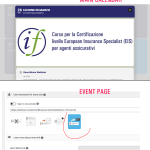
Hi, now click on tile it’s open correctly the event lightbox , but the event it was setted for opening in a single event page!!! (attached images). In addiction if i open the event page from browser i get the error below:
Fatal error: Uncaught TypeError: Cannot access offset of type string on string in /var/www/vhosts/webinar.investimentifinanziari.it/httpdocs/wp-content/plugins/fusion-builder/inc/class-fusion-builder.php:731 Stack trace: #0 /var/www/vhosts/webinar.investimentifinanziari.it/httpdocs/wp-content/plugins/fusion-builder/inc/class-fusion-builder.php(826): FusionBuilder->get_extra_google_fonts() #1 /var/www/vhosts/webinar.investimentifinanziari.it/httpdocs/wp-includes/class-wp-hook.php(324): FusionBuilder->set_extra_google_fonts() #2 /var/www/vhosts/webinar.investimentifinanziari.it/httpdocs/wp-includes/plugin.php(205): WP_Hook->apply_filters() #3 /var/www/vhosts/webinar.investimentifinanziari.it/httpdocs/wp-content/themes/Avada/includes/class-avada-google-fonts.php(94): apply_filters() #4 /var/www/vhosts/webinar.investimentifinanziari.it/httpdocs/wp-includes/class-wp-hook.php(324): Avada_Google_Fonts->init() #5 /var/www/vhosts/webinar.investimentifinanziari.it/httpdocs/wp-includes/class-wp-hook.php(348): WP_Hook->apply_filters() #6 /var/www/vhosts/webinar.investimentifinanziari.it/httpdocs/wp-includes/plugin.php(517): WP_Hook->do_action() #7 /var/www/vhosts/webinar.investimentifinanziari.it/httpdocs/wp-content/themes/Avada/includes/lib/inc/class-fusion-dynamic-css.php(303): do_action() #8 /var/www/vhosts/webinar.investimentifinanziari.it/httpdocs/wp-content/themes/Avada/includes/lib/inc/class-fusion-dynamic-css-helpers.php(374): Fusion_Dynamic_CSS->generate_final_css() #9 /var/www/vhosts/webinar.investimentifinanziari.it/httpdocs/wp-content/themes/Avada/includes/lib/inc/class-fusion-dynamic-css-file.php(113): Fusion_Dynamic_CSS_Helpers->get_dynamic_css_id() #10 /var/www/vhosts/webinar.investimentifinanziari.it/httpdocs/wp-content/themes/Avada/includes/lib/inc/class-fusion-dynamic-css-file.php(180): Fusion_Dynamic_CSS_File->file() #11 /var/www/vhosts/webinar.investimentifinanziari.it/httpdocs/wp-content/themes/Avada/includes/lib/inc/class-fusion-dynamic-css-file.php(55): Fusion_Dynamic_CSS_File->can_write() #12 /var/www/vhosts/webinar.investimentifinanziari.it/httpdocs/wp-content/themes/Avada/includes/lib/inc/class-fusion-dynamic-css.php(212): Fusion_Dynamic_CSS_File->__construct() #13 /var/www/vhosts/webinar.investimentifinanziari.it/httpdocs/wp-includes/class-wp-hook.php(324): Fusion_Dynamic_CSS->init() #14 /var/www/vhosts/webinar.investimentifinanziari.it/httpdocs/wp-includes/class-wp-hook.php(348): WP_Hook->apply_filters() #15 /var/www/vhosts/webinar.investimentifinanziari.it/httpdocs/wp-includes/plugin.php(517): WP_Hook->do_action() #16 /var/www/vhosts/webinar.investimentifinanziari.it/httpdocs/wp-includes/script-loader.php(2262): do_action() #17 /var/www/vhosts/webinar.investimentifinanziari.it/httpdocs/wp-includes/class-wp-hook.php(324): wp_enqueue_scripts() #18 /var/www/vhosts/webinar.investimentifinanziari.it/httpdocs/wp-includes/class-wp-hook.php(348): WP_Hook->apply_filters() #19 /var/www/vhosts/webinar.investimentifinanziari.it/httpdocs/wp-includes/plugin.php(517): WP_Hook->do_action() #20 /var/www/vhosts/webinar.investimentifinanziari.it/httpdocs/wp-includes/general-template.php(3052): do_action() #21 /var/www/vhosts/webinar.investimentifinanziari.it/httpdocs/wp-content/themes/Avada/header.php(21): wp_head() #22 /var/www/vhosts/webinar.investimentifinanziari.it/httpdocs/wp-includes/template.php(790): require_once(‘…’) #23 /var/www/vhosts/webinar.investimentifinanziari.it/httpdocs/wp-includes/template.php(725): load_template() #24 /var/www/vhosts/webinar.investimentifinanziari.it/httpdocs/wp-includes/general-template.php(48): locate_template() #25 /var/www/vhosts/webinar.investimentifinanziari.it/httpdocs/wp-content/plugins/eventON/templates/_evo-template-functions.php(291): get_header() #26 /var/www/vhosts/webinar.investimentifinanziari.it/httpdocs/wp-includes/class-wp-hook.php(324): evotemp_before_header() #27 /var/www/vhosts/webinar.investimentifinanziari.it/httpdocs/wp-includes/class-wp-hook.php(348): WP_Hook->apply_filters() #28 /var/www/vhosts/webinar.investimentifinanziari.it/httpdocs/wp-includes/plugin.php(517): WP_Hook->do_action() #29 /var/www/vhosts/webinar.investimentifinanziari.it/httpdocs/wp-content/plugins/eventON/templates/single-ajde_events.php(18): do_action() #30 /var/www/vhosts/webinar.investimentifinanziari.it/httpdocs/wp-includes/template-loader.php(106): include(‘…’) #31 /var/www/vhosts/webinar.investimentifinanziari.it/httpdocs/wp-blog-header.php(19): require_once(‘…’) #32 /var/www/vhosts/webinar.investimentifinanziari.it/httpdocs/index.php(17): require(‘…’) #33 {main} thrown in /var/www/vhosts/webinar.investimentifinanziari.it/httpdocs/wp-content/plugins/fusion-builder/inc/class-fusion-builder.php on line 731
-
Mar 27,2024 AT 4:11AM -
Posted 2 years ago
- #346887
Fatal error: Uncaught TypeError: Cannot access offset of type string on string in /var/www/vhosts/webinar.investimentifinanziari.it/httpdocs/wp-content/plugins/fusion-builder/inc/class-fusion-builder.php:731 Stack trace: #0…
Unfortunately, we cannot fix this from our side, so please apply this patch to Fusion files:
https://helpdeskx.s3.amazonaws.com/wp-content/uploads/2023/02/08180337/Screen-Shot-2023-02-08-at-5.02.20-PM.png
Please wait while we fix the issue when you don’t need to use ux_val, “but the event it was setted for opening in a single event page!!!” will be fixed as well by removing ux_val from the shortcode.
-
Apr 4,2024 AT 3:35PM -
Posted 2 years ago
- #348892
Also kindly update to latest eventON version 4.6.2 which should also resolve several UX_val issues.
-
Mar 23,2024 AT 11:13AM -
Posted 2 years ago
- #345954