Day indication on start and end time of repeating events
Hello,
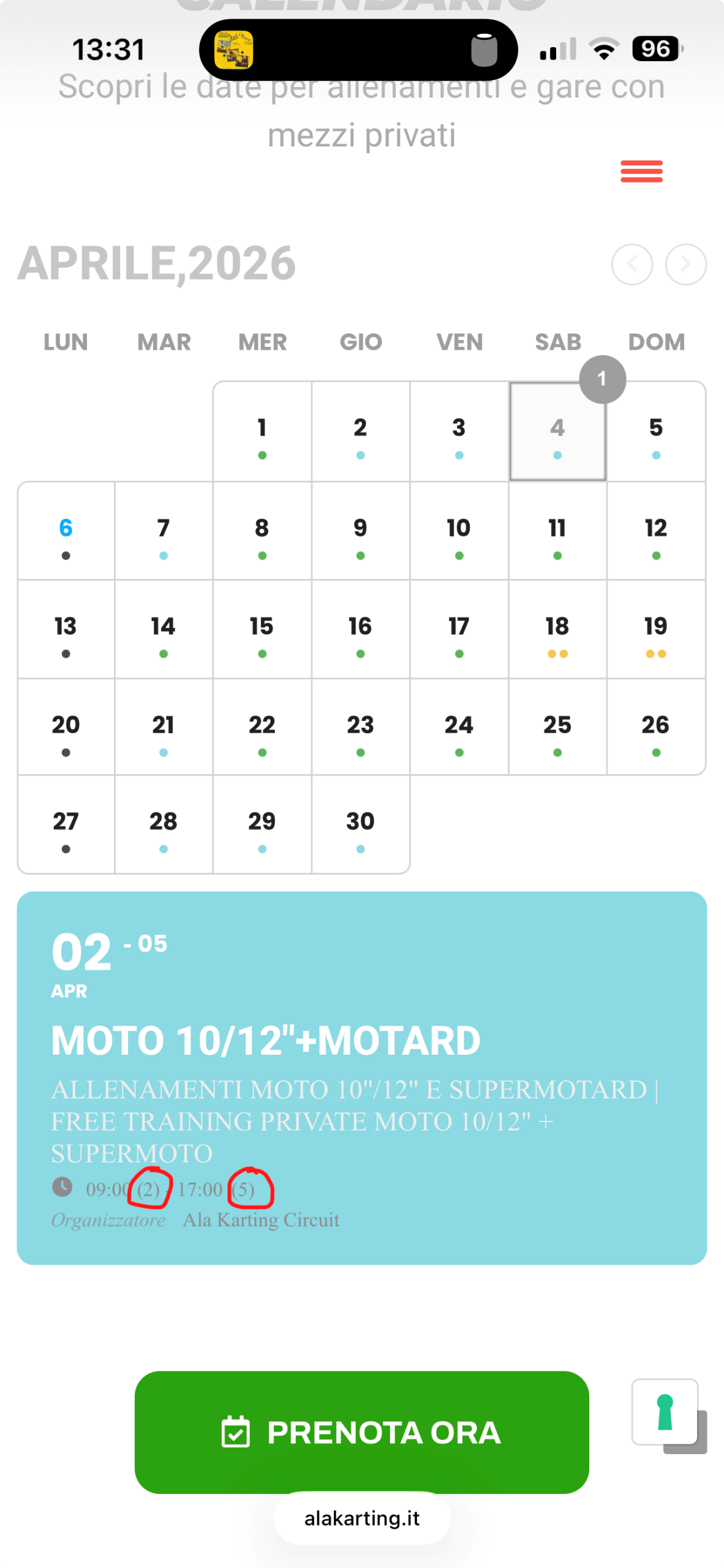
when I make a repeating event over a few days, there is display in () the number of the starting day after the start time and the number of the last day after the end time.
This often confuses customers, because they don't understand what that means. Is it possibile to deactivate this indication?
Because if I deactivate with "hide end time" it hides the end day also in the header of the event box and that is not even a good solution either.
Thank you very much
- Apr 7,2026 AT 1:04AM - 1 month ago-
-
Apr 7,2026 AT 1:05AM -
Posted 1 month ago
- #406311
-
Apr 7,2026 AT 5:25AM -
Posted 1 month ago
- #406321
Hello,
Please add this CSS code to EventON > Styles (If you don’t see any change, EventON > Scripts & Styling > turn off Write dynamic styles to header > save settings > turn on Write dynamic styles to header).
You can also add this code to wp-admin > Appearance > Customize > Additional CSS.
em.evo_endday.evomarl5 { display: none !important; }
The code will hide the last number.
Thank you for your messages!
I am going to escalate this ticket to development to help in here. Please allow us some time to address this, and we truly appreciate your patience. Thank you for being a valued EventON customer!
-
Apr 7,2026 AT 12:20PM -
Posted 1 month ago
- #406378
Your event is start on one day and end on another day. If it shows 09:00 – 17:00 that would make visitors assume the event is on the same date at those times. that is why we have added the indication of the date.
Looks like you have removed the time showing completly on your website. Perhaps that is a better application. We will add custom classes in the future updates to allow you to apply custom CSS to hide that date if you choose to display it in the future.
-
Apr 7,2026 AT 1:05AM -
Posted 1 month ago
- #406311