EventON slider shordcode unable to set external link
If I want to generate the code for the slider, then in the settings (Open events as) there are only the following options:
- Don't Interact
- Single Event Page
- Lightbox popup window
But I need the option to choose an external link
-
-
Dec 18,2023 AT 3:10AM -
Posted 2 years ago
- #334427
Hello,
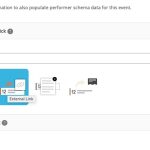
Please remove ux_val parameter from the shortcode. Then go to Edit Event > User Interaction for event click:
-
Dec 19,2023 AT 2:37AM -
Posted 2 years ago
- #334590
I insert the shortcode without ux_val and the link still opens in a popup. I have an external link for all events!
[add_eventon_slider control_style=”lr” slides_visible=”5″ slider_type=”multi” pec=”cd” etc_override=”yes”]
-
Dec 19,2023 AT 7:51AM -
Posted 2 years ago
- #334638
Thank you for your messages, I am going to assign this ticket to Ashan and he will be able to take it from here and find you a solution. Please allow some time for him to get back to you, we greatly appreciate your patience and thank you for being a eventon customer! Also please disable any IP blocking on your site if there are any.
-
Dec 21,2023 AT 1:07AM -
Posted 2 years ago
- #334783
I need help to solve the problem as soon as possible!
-
Dec 23,2023 AT 9:44PM -
Posted 2 years ago
- #334874
kindly update the slider addon to version 2.0.7
should resolve the external links not working 🙂
-
Jan 3,2024 AT 3:18AM -
Posted 2 years ago
- #335255
Thanks, the lines are working now.
Another question, how can I edit the information in the MINI and MICRO slider, should only the title be displayed? At the same time, so as not to throw away the information in the calendar.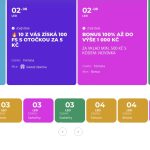
-
Jan 3,2024 AT 11:21AM -
Posted 2 years ago
- #335310
Ales, you can use custom CSS and hide that information as a temp solution. We are planning a big refresh for slider addon in the coming months as soon as the new eventON and eventON lite items are cleared 🙂
-
Dec 18,2023 AT 3:10AM -
Posted 2 years ago
- #334427