Featured image ' fit entire image resized to min height' not working?
When selecting the option "Fit entire image resized to min height", the images on my event pages are getting cropped at top/bottom instead of resizing to fit the box.
The min height I have specified is 400px. If you look at this example you can see the cropping: https://dystopianstories.com/events/hastings-book-festival-writing-competitions/
I created this mockup of what I think this setting should make the image look like: https://dystopianstories.com/wp-content/uploads/2025/06/Octo-Books-Child-Friendly-Writing-Competition-resize.jpg
On some pages, the resizing does seem to work, but I do not understand the logic to it. For example, on this page the featured image does resize to fir the box instead of getting cropped: https://dystopianstories.com/events/tennessee-williams-festival-fiction-contest/
Is this a defect? If not, can you explain the difference between the settings "Fit entire image resized to min height" and "Scaled cropped image to fit the full box" are?
Thank you for your help.
- Jun 10,2025 AT 2:13AM - 1 year ago-
-
Jun 10,2025 AT 3:32AM -
Posted 1 year ago
- #389725
Hello,
https://dystopianstories.com/events/tennessee-williams-festival-fiction-contest/ works because the image has the correct ratio. So EventON doesn’t need to crop it to show in the box that has 400px height.
https://dystopianstories.com/wp-content/uploads/2025/04/HBF_insta_open.png has vertical ratio, so EventON crops it to 400px height.
Is this a defect? If not, can you explain the difference between the settings “Fit entire image resized to min height” and “Scaled cropped image to fit the full box” are?
Thank you for your messages, I am going to assign this ticket to Ashan and he will be able to take it from here and find you a solution. Please allow some time for him to get back to you, we greatly appreciate your patience and thank you for being a eventon customer! Also please disable any IP blocking on your site if there are any.
-
Jun 10,2025 AT 4:34PM -
Posted 1 year ago
- #389881
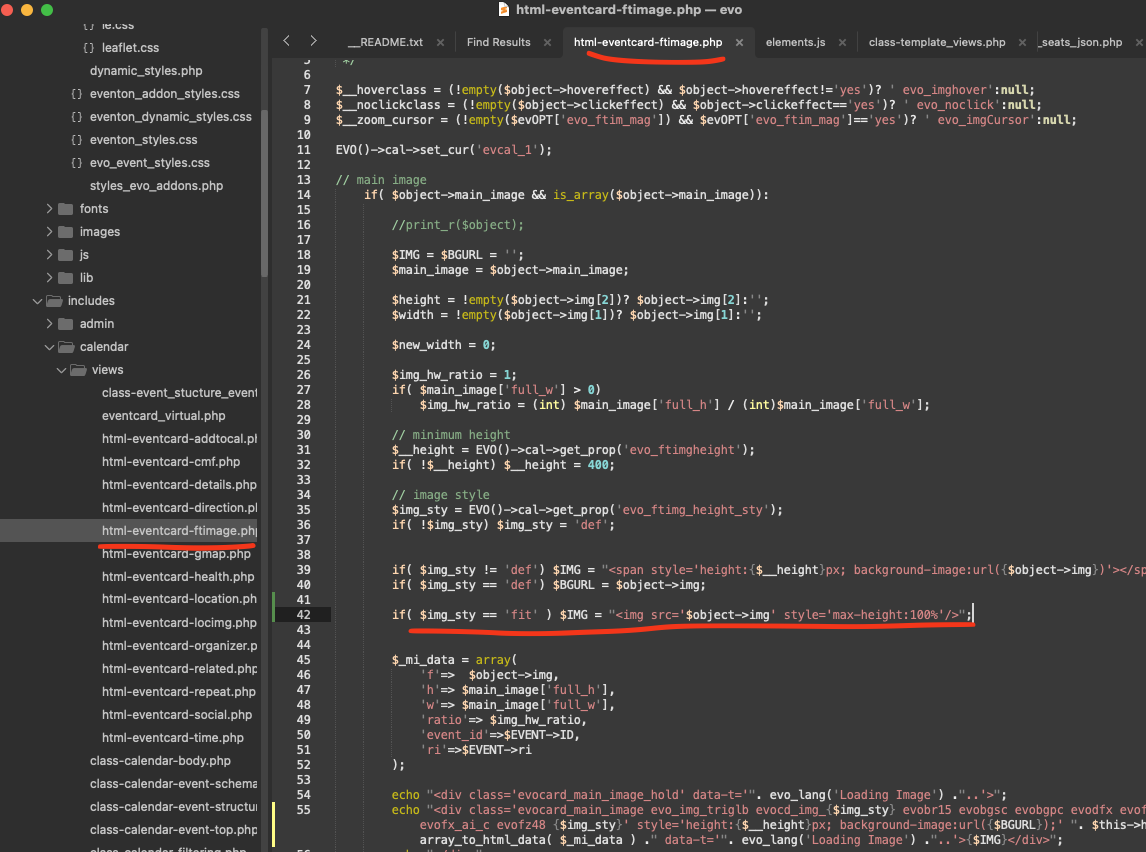
You are absolutely correct. Please make this code change.
code: if( $img_sty == ‘fit’ ) $IMG = “<img src=’$object->img’ style=’max-height:100%’/>”;
-
Jun 10,2025 AT 4:34PM -
Posted 1 year ago
- #389883
We will include this code change in the next version of eventON 🙂
-
Jun 10,2025 AT 3:32AM -
Posted 1 year ago
- #389725