How to change slider tile title colors ?
How (and where) I can change the event title and subtitle color on slider tile ? I have tried all the parameters on the apparence tab with no success.
- Jun 8,2020 AT 3:01PM - 5 years ago-
-
Jun 8,2020 AT 7:12PM -
Posted 5 years ago
- #180123
In myeventon>>>>settings>>>>apearance
under “event top”
-
Jun 10,2020 AT 2:06AM -
Posted 5 years ago
- #180309
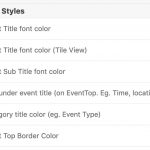
I looks like the “Event Title font color (Tile View) ” is not applied
here is the setup
-
Jun 10,2020 AT 2:08AM -
Posted 5 years ago
- #180311
and the result
the tile title color is not the one I select and I can’t even change it.

-
Jun 10,2020 AT 2:20AM -
Posted 5 years ago
- #180314
Please add this CSS code to EventON > Styles (If you don’t see any change, EventON > turn off Write styles to header > save settings > turn on Write styles to header):
.evosliderbox.ajde_evcal_calendar .eventon_events_list .eventon_list_event .evcal_desc span.evcal_desc2 { color: white; }
.evosliderbox.ajde_evcal_calendar .eventon_events_list .eventon_list_event .evcal_desc span.evcal_event_subtitle { color: white }
The first is for Title and the second is for Subtitle.
-
Jun 10,2020 AT 2:57AM -
Posted 5 years ago
- #180334
Ok, that workaround the issue.
Thx
-
Jun 10,2020 AT 10:30AM -
Posted 5 years ago
- #180371
Could you also try turning off the minifying functionality and then go to EventON > enable Write dynamic styles to header?
-
Jun 11,2020 AT 1:46AM -
Posted 5 years ago
- #180428
I guess I should remove the CSS code for this ?
-
Jun 11,2020 AT 2:04AM -
Posted 5 years ago
- #180431
Ohoh… interesting…
I remove the CSS codes
Turn on the “Write dynamic style to header” and turn off the minifying… tile titles are still white.
Now I change the color to green from setup > apparence > EventTop Style… back to grey title !
-
Jun 11,2020 AT 3:34AM -
Posted 5 years ago
- #180479
Please send us wp-admin access to your site as a private message for us to further assist your situation.
-
Jun 11,2020 AT 3:36AM -
Posted 5 years ago
- #180481
Could you also try cleaning your cache plugin? It seems that it still contain old CSS styles.
-
Jun 8,2020 AT 7:12PM -
Posted 5 years ago
- #180123