How to customize the size of Eventtop?
Hello, after updating EVENTON, the event tops in my calendar have become much taller, which I don't want. Even after searching for a long time, I haven't found a way to change this height. I only need the event tops to be half as high. How can I set this? Here's my calendar in question:
https://wolli-liebt-dich.de/event-directory
If I need to change the CSS code for this, I need detailed instructions for dummies. I would be very grateful if you could help me.
Kind reagrds
Markus
-
-
Aug 31,2025 AT 2:02PM -
Posted 11 months ago
- #395190
Hello,
Do you have a screenshot of the previous look?
If you change featured image’s height then it should change the overall height as well.
Please add this CSS code to EventON > Styles (If you don’t see any change, EventON > Scripts & Styling > turn off Write dynamic styles to header > save settings > turn on Write dynamic styles to header). You can also add this code to wp-admin > Appearance > Customize > Additional CSS.
.eventon_events_list .eventon_list_event .ev_ftImg { height: 100px; width: 100px; }
-
Sep 1,2025 AT 5:03AM -
Posted 11 months ago
- #395241
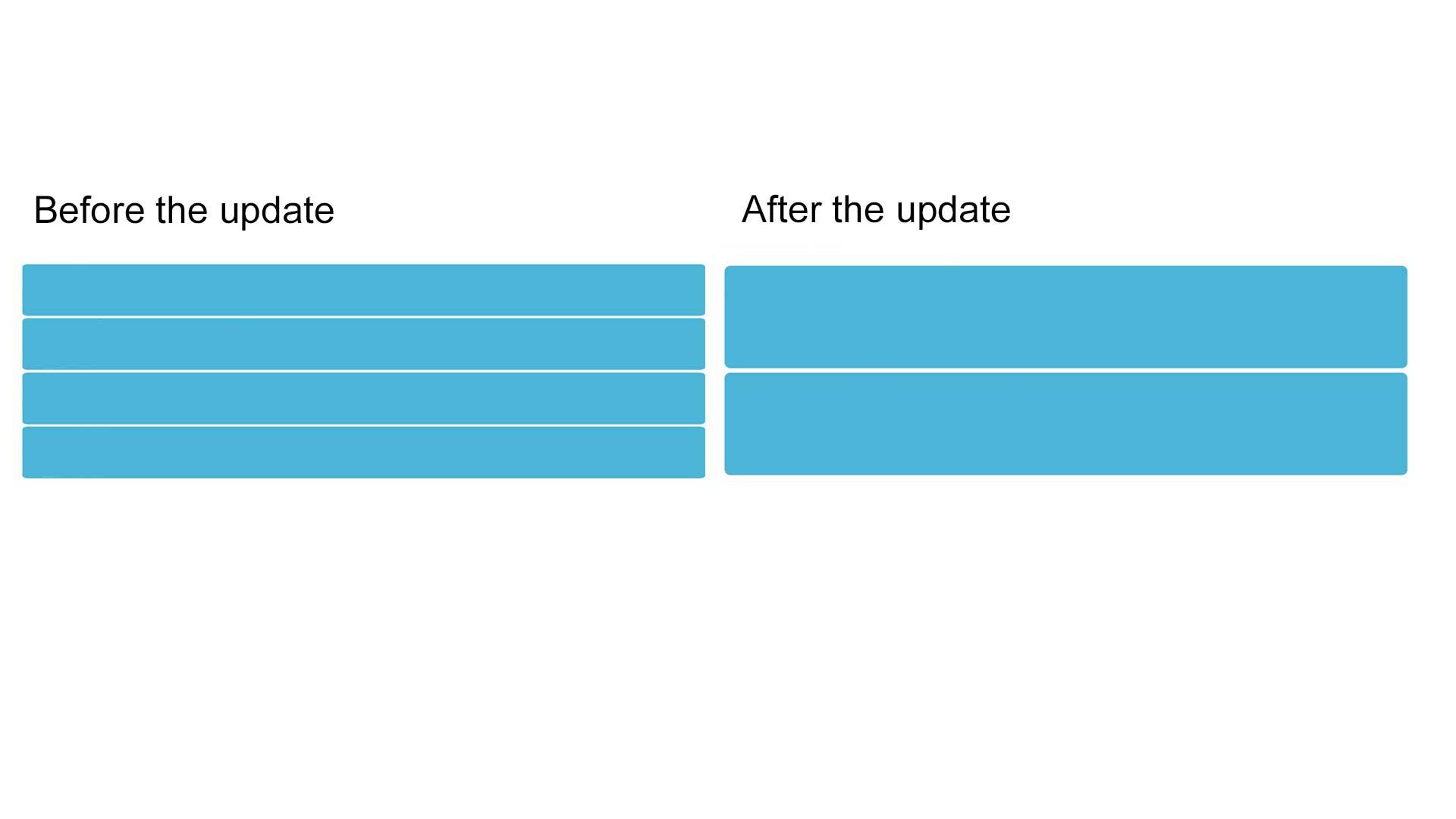
Hello, thank you for your reply. The code you sent me doesn’t change the height of the blue bars. I’ve attached a graphic that illustrates what I mean. After updating EVENTON, the blue bars are twice as high as before, and I’d like to change that. I would appreciate your help. Best regards, Markus
-
Sep 1,2025 AT 9:02AM -
Posted 11 months ago
- #395252
I changed the code a little bit, so bars are smaller now. Please check and let me know.
-
Sep 2,2025 AT 2:15AM -
Posted 11 months ago
- #395275
Hello, thank you so much for your help. Now it looks exactly as I wanted it to. Great. The only thing I want to change is the portrait view of the calendar on my smartphone. The blue blocks are still very tall here. If you can tell me how to change that, I would be very grateful. Best regards, Markus
-
Sep 2,2025 AT 4:09AM -
Posted 11 months ago
- #395279
I also added this code, so it should work now:
@media (max-width: 480px) { .color .eventon_events_list .eventon_list_event .evcal_list_a { flex-direction: row !important; } }
Please check and let me know.
-
Sep 3,2025 AT 6:15AM -
Posted 11 months ago
- #395335
Looks good now. Thanks a lot.
-
Sep 3,2025 AT 11:53AM -
Posted 11 months ago
- #395363
We are glad your issue is resolved, if you have any further questions or concerns please create a new ticket.
If you have a moment, we would greatly appreciate if you could kindly leave us a review at EventON WordPress Page OR Codecanyon. Your review helps us a lot in continuing EventON improvements!
-
Aug 31,2025 AT 2:02PM -
Posted 11 months ago
- #395190