How to filter display of events by time period?
Hi
Currently I am using the following shrtcode to display the list of events
[add_eventon_search number_of_months="12" tile_bg="1" tile_count="3" tile_style="1" search_all="yes" ]
[add_eventon_el tiles="yes" tile_bg="1" tile_count="3" tile_style="1" exp_so="yes" filter_type="select" hide_so="yes" hide_mult_occur="yes" hide_empty_months="yes" hide_past="no" hide_end_time="yes" sep_month="yes" show_year="yes" number_of_months="12" ux_val="2" show_upcoming="1" search_all="yes"]
However I am looking to add 3 more sections including
1. Events happening today
2. Events happening in the future
3. Events event has ended
How do I adjust the shortcode above to create 3 pages as required above?
Thanks
- Nov 19,2025 AT 3:18AM - 5 days ago-
-
Nov 19,2025 AT 12:38PM -
Posted 6 days ago
- #399558
Hello,
1. Please take a look at DailyView add-on:
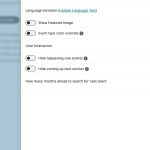
You can also take a look at ”Live Now Calendar View” shortcode that is available without add-ons required:
2. Please try using
[add_eventon_el el_type=”ue” number_of_months=”12” hide_empty_months=”yes” event_past_future=”future”]
I selected these in Shortcode Generator:
Select Event List Type: Upcoming Events;
Hide empty months (Use ONLY w/ event list);
Past/Future Events Filter: Only Future Events.
3. Please use
[add_eventon_el el_type=”pe” number_of_months=”12” hide_empty_months=”yes” event_past_future=”past”]
I selected:
Select Event List Type: Past Events;
Past/Future Events Filter: Only Past Events.
-
Nov 20,2025 AT 4:41AM -
Posted 6 days ago
- #399580
Hi
The shortcode for the request to show the ended events that you suggested is not working, even though I have a lot of ended events, it always says there are no events
So what should I do?
-
Nov 20,2025 AT 8:01AM -
Posted 5 days ago
- #399581
Please send us wp-admin access to your site from ”Access Info” box on right side menu, to further assist your situation.
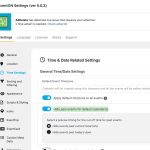
Could you try going to EventON > Time Settings > make sure that Hide past events for default calendar(s) is disabled?
-
Nov 21,2025 AT 12:40AM -
Posted 5 days ago
- #399623
I have provided and here is the link I am testing: https://irace.vn/wp-admin/post.php?post=77146&action=edit
-
Nov 21,2025 AT 11:37AM -
Posted 4 days ago
- #399640
Please disable this to show past events:
-
Nov 19,2025 AT 12:38PM -
Posted 6 days ago
- #399558