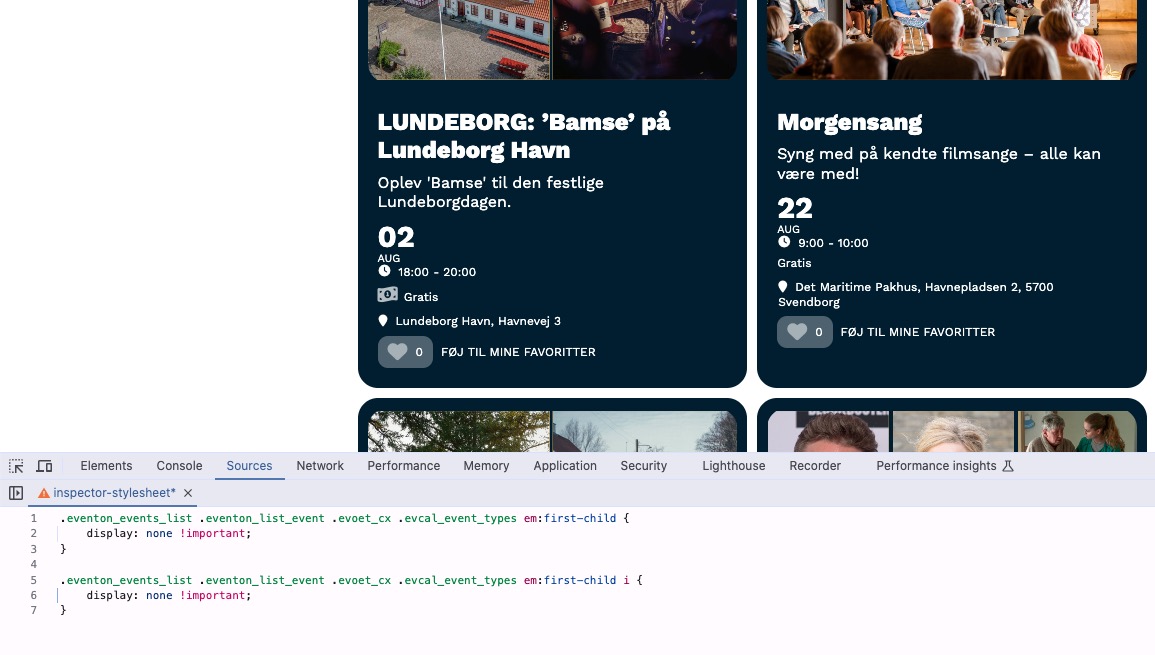
I want the text "Event Type" to not be shown in the Event tile in the calendar, as I want to use a symbol instead of text.
In my calendar, I use event tiles, and I want the price to be shown in the EventTop. I have used Event Type to create a price category. However, instead of displaying the text “Event Type”, I want to use an icon.
I have figured out how to add an icon to the different prices, but in the EventTop the following is shown:
“Event Type [icon] Price”.
How can I hide the “Event Type” label so that only the icon and the price are displayed?
Here is a link to the calendar where you can see the issue on the first event, “LUNDEBORG: Bamse på Lundeborg Havn”. Forthis event, I am using Event Type to represent the price in the EventTop, and I want the money icon to replace the “Event Type” text entirely, making it unnecessary. https://svendfilmdage.dk/program-2025/
- Jan 12,2026 AT 3:21AM - 1 hour ago-
-
Jan 12,2026 AT 4:00AM -
Posted 1 hour ago
- #401980
Hello,
Please add this CSS code to EventON > Styles (If you don’t see any change, EventON > Scripts & Styling > turn off Write dynamic styles to header > save settings > turn on Write dynamic styles to header).
You can also add this code to wp-admin > Appearance > Customize > Additional CSS.
.eventon_events_list .eventon_list_event .evoet_cx .evcal_event_types em:first-child { display: none !important; } .eventon_events_list .eventon_list_event .evoet_cx .evcal_event_types em:first-child i { display: none !important; }
-
Jan 12,2026 AT 4:00AM -
Posted 1 hour ago
- #401980