Jumper Months for List, hide "Jump Months" buttons
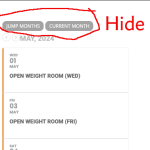
In the Event List, is there a way to hide the buttons "Jump Months" and "Current Month". I'd like to only have the forward & back arrows.
- Apr 10,2024 AT 4:02PM - 10 months ago-
-
Apr 10,2024 AT 4:05PM -
Posted 2 years ago
- #349947
-
Apr 10,2024 AT 8:42PM -
Posted 2 years ago
- #349960
in order for the jump mnth to appear you needed to add the following to the shortcode
jumper=”yes”
simply remove that
-
Sep 29,2025 AT 11:25AM -
Posted 10 months ago
- #396718
Hello. I have the same question. Is there a way to remove “current month” button?
-
Sep 29,2025 AT 3:52PM -
Posted 10 months ago
- #396743
Hello Kaspar Marli,
Please add this CSS code to EventON > Styles (If you don’t see any change, EventON > Scripts & Styling > turn off Write dynamic styles to header > save settings > turn on Write dynamic styles to header). You can also add this code to wp-admin > Appearance > Customize > Additional CSS.
.calendar_header button.cal_head_btn.vis { display: none !important; }
-
Sep 30,2025 AT 4:24AM -
Posted 10 months ago
- #396775
Thank you!
-
Sep 30,2025 AT 4:50AM -
Posted 10 months ago
- #396781
We are glad your issue is resolved, if you have any further questions or concerns please create a new ticket.
-
Apr 10,2024 AT 4:05PM -
Posted 2 years ago
- #349947