Showing different display options for upcoming events
Hi! I recently have been going through and updating our website and I accidentally deleted the short code for our events page that would show the event with the event photo and the name underneath. Can you please send me that short code so I can get this page looking the way it should again? Here is the link to that page that is currently just showing the event name...but not the image.
https://snovalleypride.org/events-directory/
Thanks so much!
Greg
-
-
Aug 26,2026 AT 2:04PM -
Posted 1 hour ago
- #410978
Hello,
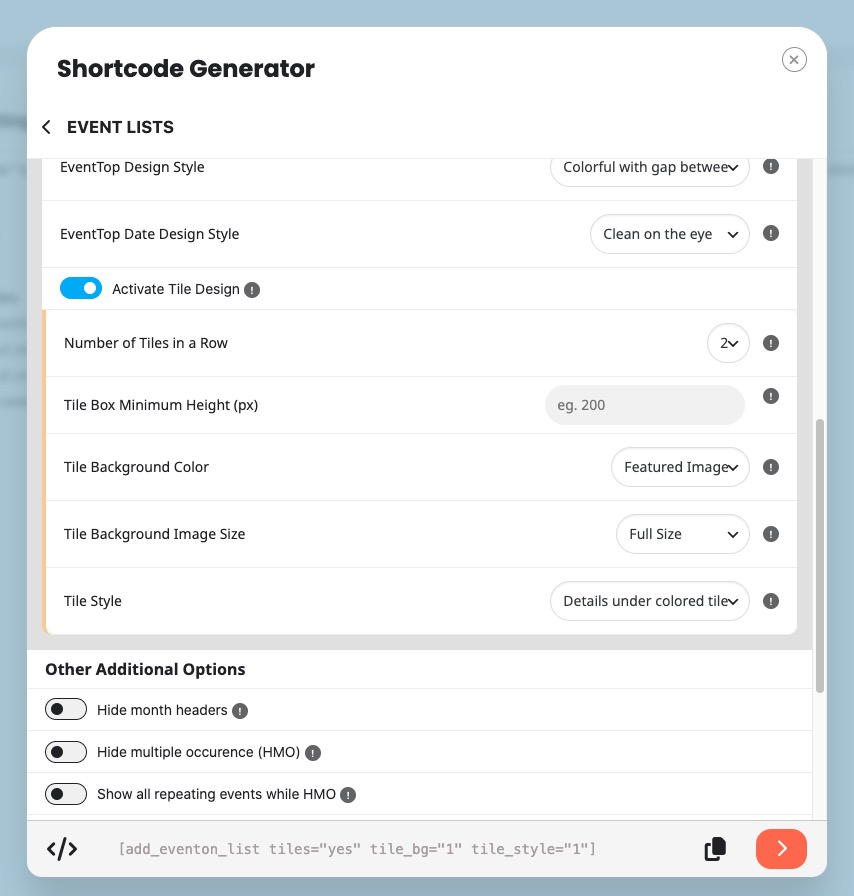
Could you go to EventON > Shortcodes > open Configure Calendar > select following options:
I believe that this should be your shortcode:
[add_eventon_list tiles=”yes” tile_bg=”1” tile_style=”1”]
However, you can try different combinations.
More info:
https://docs.myeventon.com/documentations/shortcode-generator/
-
Aug 26,2026 AT 2:06PM -
Posted 1 hour ago
- #410980
This shorcode also includes 12 months to show:
[add_eventon_list tiles=”yes” tile_bg=”1” tile_style=”1” number_of_months=”12” hide_empty_months=”yes”]
-
Aug 26,2026 AT 2:04PM -
Posted 1 hour ago
- #410978