Update to 4.0, event header has reverted to blue even through white is set in eventtop background color
I've updated to 4.0. The event top is now showing blue (white text) instead of my previous white (dark text) colour - which was set in appearence. I don't seem to be able to make any changes to colors under Appearance tab nor do any changes to the styles page work. I think this happened some time ago and needed a fix. I've been clearing cache and browser cache.
- Oct 8,2021 AT 2:47AM - 4 years ago-
-
Oct 8,2021 AT 6:48AM -
Posted 4 years ago
- #253973
Hello,
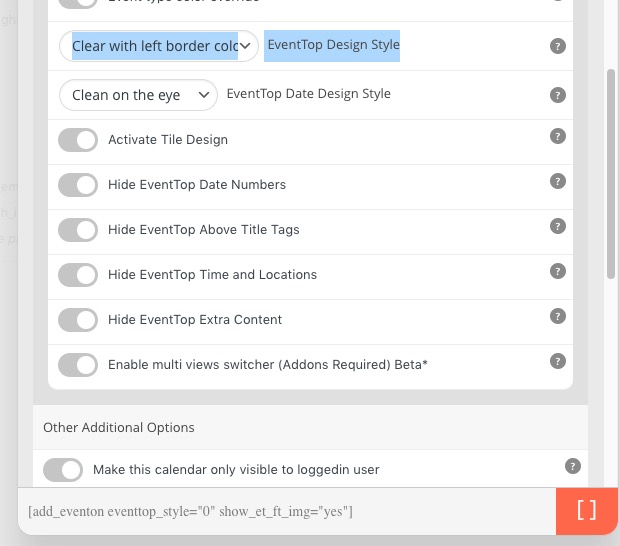
Please add this to the shortcode:
eventtop_style=”0″
-
Oct 8,2021 AT 7:45AM -
Posted 4 years ago
- #254010
Thank you. That worked and I was then able to achieve the same for the single event page by swaping the general setting for a single page from “colorful” to “clean white”.
-
Oct 8,2021 AT 7:57AM -
Posted 4 years ago
- #254017
Perfect! We are sorry for the inconvenience.
We are glad your issue is resolved, if you have any further questions or concerns please create a new ticket.
If you have a moment, we would greatly appreciate if you could kindly leave us a review at codecanyon! from your account > downloads. Cheers!
-
Oct 10,2021 AT 7:56AM -
Posted 4 years ago
- #254207
I’m sorry, but how is this done for single event pages? Inserting the shortcode helps for the general calendar, but single event pages are still blue.
Please advise.
-
Oct 10,2021 AT 8:40AM -
Posted 4 years ago
- #254213
To change single event page eventtop color to old, go to settings> single events > Select eventtop style > clean white
-
Oct 10,2021 AT 8:41AM -
Posted 4 years ago
- #254215
Hello Marek Lewandowski,
Could you go to EventON Settings > Single Events > Select EventTop Style: Clean White?
We are sorry for the inconvenience.
-
Oct 11,2021 AT 8:59AM -
Posted 4 years ago
- #254390
How can I get the single event page eventtop color to match my “event type” category color like on my calendar? I don’t want it to default to a single color (“colorful”) or white (“clean white”), which seem to be the only two options.
-
Oct 11,2021 AT 9:50AM -
Posted 4 years ago
- #254392
Hello,
You can use the custom CSS code below:
.eventon_events_list .evose_repeat_header span.title {
background-color: #83fca6;
color: #808080;
}
Feel free to change the values to match your preference, If that code does not work pleas open your own ticket and include direct link to the single event page.
-
Oct 11,2021 AT 10:18AM -
Posted 4 years ago
- #254410
Hi,
Let us know if you need anything else from us
-
Oct 11,2021 AT 4:48PM -
Posted 4 years ago
- #254500
The new release does not revert back to custom color. Tried your trick of Save changes after update.
Can I please revert back to the old plugin? Too many issues such as appearance change and in mobile its not readable.
-
Oct 12,2021 AT 4:55AM -
Posted 4 years ago
- #254594
Please downgrade the plugin by installing this version: https://helpdeskx.s3.amazonaws.com/wp-content/uploads/2021/10/09115157/eventON-28.zip.
-
Nov 7,2021 AT 12:37PM -
Posted 4 years ago
- #258394
Same problem I’ve been having. Multiple weeks and no resolution.
-
Nov 7,2021 AT 3:21PM -
Posted 4 years ago
- #258413
Hello Joe A,
Please go to EventON Settings > Single Events > Select EventTop Style: Clean White.
After go to your shortcodes and add eventtop_style=”0″.
If you are using Tile Design, replace tile_style=”1″ with tile_style=”2″ in the shortcode.
-
Nov 9,2021 AT 3:08PM -
Posted 4 years ago
- #258799
Hello. I am also interested in this issue. We have been evaluating EventON for several months. We maintain the calendar of a partner organization and they display that calendar on their website through the EventON API at: https://seattlewaterfront.org/whats-happening/
As you can see, the background colors have turned blue on the partner site. There is no shortcode to adjust, so is there an easy CSS fix? I would like to revert to the appearance it had before updating to 4.0.
Similarly, clicking on any event in Map or Search also shows a color change to blue following the 4.0 update, even with the eventtop_style=”0″ added to the shortcode and single page set to Clean White. Here are links to these two fussy calendars https://events.iloveseattle.org/event-map-seattle/ and https://events.iloveseattle.org/search/
Thank you!

-
Nov 9,2021 AT 6:38PM -
Posted 4 years ago
- #258828
Gerard and everyone else please create your own ticket- theres 5 different customers on this ticket already-
-
Oct 8,2021 AT 6:48AM -
Posted 4 years ago
- #253973