WooCommerce orders - when payment method is Express Checkout (Apple Pay or Google Pay) are autocompleting, without tickets in cart.
In your changelog for EventOn Tickets v.2.5.3, there is mention of the autocomplete being fixed to only apply when tickets are in the cart. I am experiencing this issue is still happening to us (orders are being flagged as completed, when no tickets are present) ONLY when customers opt for checkout via an "Express Checkout" as their payment method, like Apple Pay or Google Pay (plugin - WooCommerce Payments.)
I think that the issue is coming from the express checkout (Store API) implementation in this ticket plugin... specifically in the function that handles woocommerce_store_api_checkout_order_processed. I have looked at the code and I can see that it checks whether auto-complete is enabled (evotx_autocomplete) and then I see it directly calls $order->update_status('completed', 'Order auto-completed for ticket generation (express checkout)')... I think that, the problem is --unlike the standard checkout flow, this express checkout function does not check/validate whether the order actually contains any ticket products before forcing the status to “completed”.
So that's why we are only seeing the issue with Express Checkout orders... In the normal WooCommerce checkout flow, the plugin is checking for ticket items (via _eventid meta) and exits early if none are present, so non-ticket orders will remain in “processing”. BUT in the express checkout path (used by Google Pay & Apple Pay in WooPayments plugin) that validation is missing, so then all the orders processed through this pathway are being auto-completed regardless of the products being tickets or not.
Would you be able to investigate this issue/address the Store API so that Express Checkout payment methods are included in the ticket check? Our point-of-sale system can only retrieve WooCommerce orders that are 'Processing', so you can imagine it creates a lot of headaches for our business. Thanks for any help that you can provide.
- Apr 13,2026 AT 11:53PM - 1 month ago-
-
Apr 14,2026 AT 2:02AM -
Posted 1 month ago
- #406632
Hello,
Could you update Tickets add-on to 2.5.6 and see if the issue continues?
I am also going to escalate this ticket to development to help in here. Please allow us some time to address this, and we truly appreciate your patience. Thank you for being a valued EventON customer!
-
Apr 14,2026 AT 3:41PM -
Posted 1 month ago
- #406657
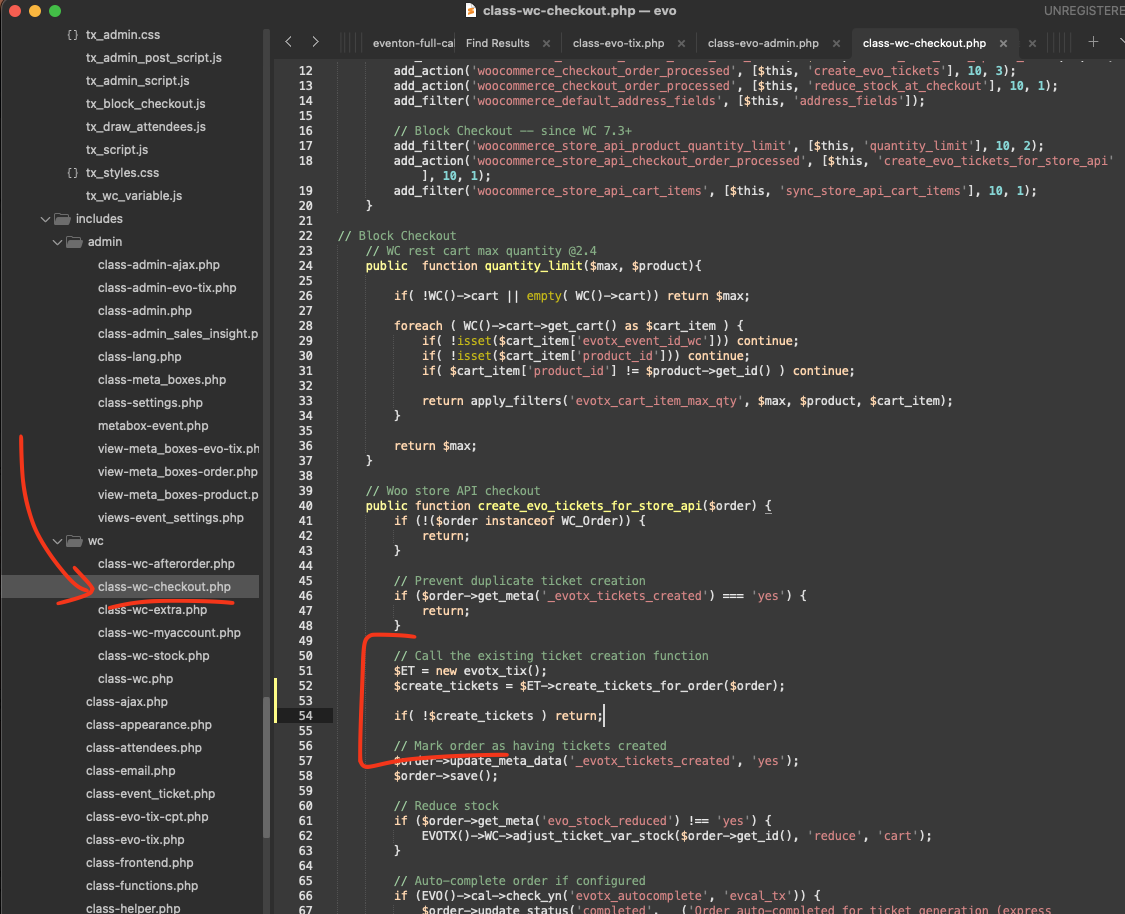
Attaching the screenshot of the code location.
I think you are correct, thank you for pointing this out, after studying the code, I can also tell the code proceed without checking if order has tickets or not.
Please apply this code fix, that will stop if there is no tickets.
code: $create_tickets = $ET->create_tickets_for_order($order);
if( !$create_tickets ) return;
-
Apr 14,2026 AT 2:02AM -
Posted 1 month ago
- #406632