Hello,
Unfortunately, autoupdate is not available for all customers at the moment. Please update EventON manually:
To update eventon to latest version: If you are unable to do autoupdate, you can go to codecanyon your account > download and get the latest eventon version as zip file. Then you can go to your website, deactivate old eventon, activate (Do not delete eventon settings & data when EventON is uninstalled) from eventon settings, delete old eventon, install new one and activate. This link will further explain the process it. Also you can follow us on twitter to get real-time announcements on updates!
Nevermind, the plugin was old 2.4x. Why does auto update not work? The license is active….
Hello Artem, thanks for your answer.
Sorry about that, didn´t realized that the youtube url was incorrect, as it was working at the Single event page.
Do you know why the Flipbook shortcodes don´t work on lightbox?
I tested 4 different plugins, and the same happens with them.
As you see at the Single event page, the Flipbooks are ok, but don´t at the lightbox.
https://zambrano.com.uy/2020/test/
Once again, many thanks, Artem!
We will make it in a way that nothing will be need to change and customizations will stay for you
Thanks – that worked for scheduling on specific dates – is there any way to add exclusions, like holidays? We’re closed on Labor Day, so we won’t be offering services that day.
Customer completed payment of 350 for the job.
Hello Artem, Ok, I will buy and try it.
Thanks
Hi, I have replied to both emails’ addresses and on this platform, as of Friday this matter will be taken out of my hands if it is not functioning on the frontend as agreed. I’m sorry it has come to this but my replacement will not be as patient.
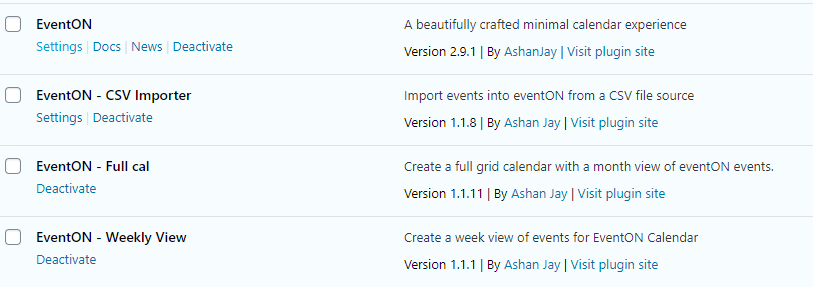
I have, that is why I wrote it in the ticket.
EventON: 2.91
CSV Importer: 1.18
Full Cal: 1.1.11
weekly View: 1.1.1
as you can see I have most of your plugins and all of them are up to date.
Thank you
Hi,
Please download the revised work from the link:
http://momothemes.com/eventON-182001-child.zip
You will need to delete the old one and install this.
We have added a shortcode, so you will need to add it wherever you require it:
[evo_show_upcoming_bookings]