What you recommend to fix it?
Any ugestion to my css?
Link: view-source:https://dentysta.eu/wp-content/themes/dentysta/css/main.css
need to fix this:
#evcal_head a:link .jrAddListing .evo_j_container .evo_cal_above_content .evo_j_months .evo_j_dates .evo_j_years .ajde_evcal_calendar
{

}

#evcal_footer a:link .evcal_btn .evo_bottom .evorss_rss_btn .fa .fa-rss .evo_cal_events
{
	color: #fff important!;
}

#site a:link:not(.jrAddListing, .ajde_evcal_calendar, .evorss_rss_btn .evcal_btn)
{
	color: #25a75f;
}
I mean ‘Reserved Area’.
For example here:
https://www.simonebocchetta.it/web-design/area-riservata-plugin-wordpress/
a series of plugins are indicated to generate the reserved area. Does Eventon work well with anyone in particular (not necessarily with one of these)?
Also, when I try to view My Tickets, it sends me to a dragon ate this page…
Hello,
Every time user RSVP to an event they receive a confirmation email. You can customize this email and make it “Thank you” email. Please follow https://docs.myeventon.com/documentations/customize-rsvp-emails/
You can also send us a customization job request by creating a new ticket in here and selecting Customization Request as the category.
Hello,
Thank you for your messages, I am going to assign this ticket to Ashan and he will be able to take it from here and find you a solution. Please allow some time for him to get back to you, we greatly appreciate your patience and thank you for being a eventon customer!
…reserved space for each user…
Could you tell me what do you mean by “reserved space”?
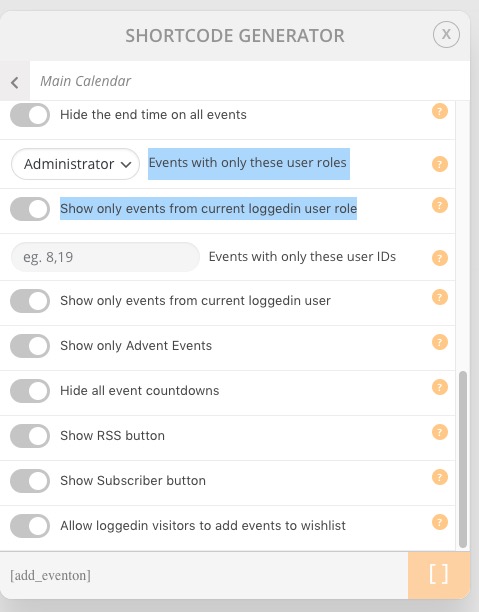
If users can logged-in to your WordPress Installation then they all have “My Account” page where you can put EventON shortcode with enabled “Show only events from current loggedin user role” or “Show only events from current loggedin user”.
Hello,
1. Yes. Please try on http://dev.myeventon.com/wp-admin/
2. No. With Action User Plus you can add use these options:
They allow you show events only from members. Try on http://dev.myeventon.com/wp-admin/
3. With Subcriber add-on https://www.myeventon.com/addons/subscriber/ users receive events they can add to their calendars with “Add to Calendar” button. This is the only option at the moment, I am afraid.
4a. You can choose any email you like from EventON > Subscriber > Email Settings. Try on http://dev.myeventon.com/wp-admin/
4b. They must be subscribed.
5. You need a separate license for each domain.
Please send us wp-admin access to your site as a private message for us to further assist your situation.
Please also check for latest version of this software from here Your issue might be related to an older version you are running and we might have resolved this already in the newer version update. If you are on latest version of our software and the issue still persist please let us know.