You can use any email you like. Just create a new user and then send us Login/Pass.
If you still need one, please use thisboxformail@gmail.com
Replies for tickets on suppota
You can use any email you like. Just create a new user and then send us Login/Pass.
If you still need one, please use thisboxformail@gmail.com
Please check now and let me know.
After i give temp acess, my site was hacked with malware. Your site dont protect the links that i gave you?
my error – the username is eventonadmin, not event
Thank you very much for your response.
For testing purposes, I’ve uploaded the website to a development server.
Here are the details:
URL: https://firebrick-camel-838235.hostingersite.com/wp-admin/
Username: administrator
Password: 6@eZ&1IaHD4
It seems to be working correctly in the test event; I made several bookings without any problems.
In the event we created (https://firebrick-camel-838235.hostingersite.com/events/as-formas-do-amor-2/), even though the ”even” (blue) option is in stock, it’s not added to the cart.
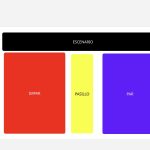
We’ve had this happen before: everything works, and then when we start selling tickets, one of the sections stops adding to the cart, and we can’t find any problem.
Could you look into it?
Thank you again.
Hi Artem, I hope this ticket is still open. I’ve whitelisted your IP address. Do you have an email address I can use to set you up as an admin on the account?
I think RSVP Form Styles do not apply at all in both versions.
Hi, now the reservation form won’t load at all. Only the spinner is visible for a moment.
I’ve ruled back to 3.0.11 and the form loads again.
The previous version was 3.0.11? Can you please send me the previous version quickly if it was higher than 3.0.11?
My apologies…I have no idea why it keeps changing it. I think it resaved it last time as something else.
I have 100% just confirmed the one in the Access Window is working.
Thanks again, this should work!!!
I deactivate now, and is working. So i cannot use the cache Plugin?