Hello,
Please install FullCal add-on first, then you’ll be able to enter the license key. You can download latest eventon addons from myeventon > my account. Then you can go to your website and install new one. This link will further explain the process.
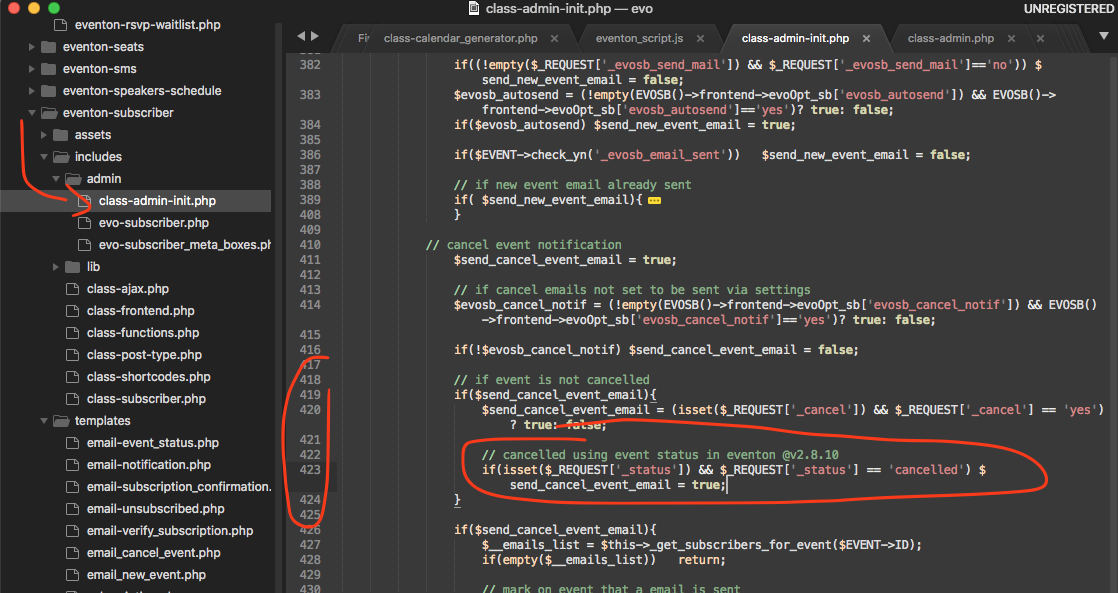
please apply this patch fix for create room not working.
this is inside eventON plugin

Please share wp-admin access info for your site
It may be the case that it uses part of location name to see if location exists. But this is not something we created. We are using term_exists() to check if a location exists using the location name. Anyways thank you for reporting this to us, we do not have an immediate solution for this and we will keep looking into this and if we have a work around to this we will release a new version update with this work around 🙂
Thank you stephan for raising this issue for us!
Can you share your website address?
Hi Corinna,
Thank you for your message.
We have asked our CEO to review the ticket for you.
Hi Anna,
We have re-assigned the ticket and changed priority.
Here is a patch fix to resolve this isue/
I am really sorry for the delay in refund. I have processed it for you now.
Vasim sorry for the delay. Please use discount code EVO20T at the checkout and that will get you 20% discount on the whole order 🙂 If you have more questions, kindly send us a new ticket and we would be more than happy to help you resolve your issues!