Hi, I tried to find this file in the back end and can’t find it it also says that it is not editable. Where was this file generated?
Archives: Replies
Replies for tickets on suppota
Reply to: tickets(187298)
9. admin can check the history record of sending Whatsapp notification.
- the one who receives the notification
- the time each message sent
- each notification content
Many thanks!
Reply to: tickets(187717)
Please send us wp-admin access to your site as a private message for us to further assist your situation.
Reply to: tickets(187298)
- admin can enable or disable send whatsapp notification to the following role before the event start
- course-related event teacher and course-related event student
- admin
- Custom
- admin can control when to send the message
- how many minutes / hours / days before or after each event starts
- at a custom time on the event day (say 8:30 a.m. )
- admin can edit the WhatsApp notification for each event
- admin can set /edit a defaulted notification template
- If the event repeats say daily / weekly, send the notification each time before each event starts
- admin can set muti notifications at different times for single event, say the first one is 24 hours before; the second one is 1 hour before; the third one is 15 mins before.
- If muti notifications for a single event, admin can edit each notification content.
- In notification content, can show the event name and recipient name. (like email tokens, for your reference: https://codex.buddypress.org/emails/email-tokens/)
Reply to: tickets(187956)
Hi Artem, and thanks for your reply.
Is there any way that I can achieve this with https://www.myeventon.com/addons/seats/
I need to check before purchase, sorry
appreciate your time
kind regards
Marko
Reply to: tickets(186579)
We are glad your issue is resolved, if you have any further questions or concerns please create a new ticket.
If you have a moment, we would greatly appreciate if you could kindly leave us a review at codecanyon! from your account > downloads. Cheers!
Reply to: tickets(187782)
Please remove/rename this file: https://isaaclomman.com/wp-admin/theme-editor.php?file=eventon%2Farchive-ajde_events.php&theme=thrive-theme
Reply to: tickets(186579)
Hi,
it works! thanks for the help!
You can close the topic.
Regards
Reply to: tickets(179968)
Great! Please keep us updated.
Reply to: tickets(187956)
Hello,
With Variations add-on https://www.myeventon.com/addons/ticket-variations-options/ you can set Ticket Variation Stock Quantity for each variation:
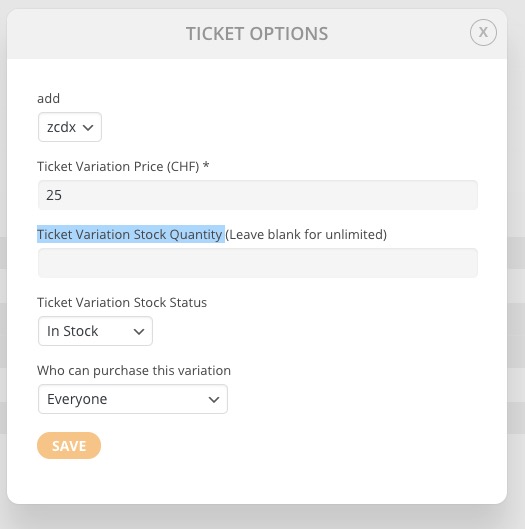
Try on http://dev.myeventon.com/wp-admin/
However, you cannot set it for a specific user role. You can send us a customization job request by creating a new ticket in here and selecting Customization Request as the category. Maybe one of our developers can extend this to make it work for user roles as well.