I see that events now are coming in with images, success!
However, when I go into edit or change the image on an event, my changes do not appear. When I select an image to set, it doesn’t change once I leave the file selection.
Replies for tickets on suppota
I see that events now are coming in with images, success!
However, when I go into edit or change the image on an event, my changes do not appear. When I select an image to set, it doesn’t change once I leave the file selection.
it works – thanks !
Hi Artem,
Didnt see that there is an update – now it works
Thanks !
Hi Artem,
My clients are getting nervous about this as they would like to publish new events to be able to plan ahead.
Any news ???
The problem is obvious and I think this shouldnt be taht hard to fix it !
Thanks
Marcin
Heya Team! update attached with latest errors. any idea how to get these maps working??
dinosauradventurelive.com
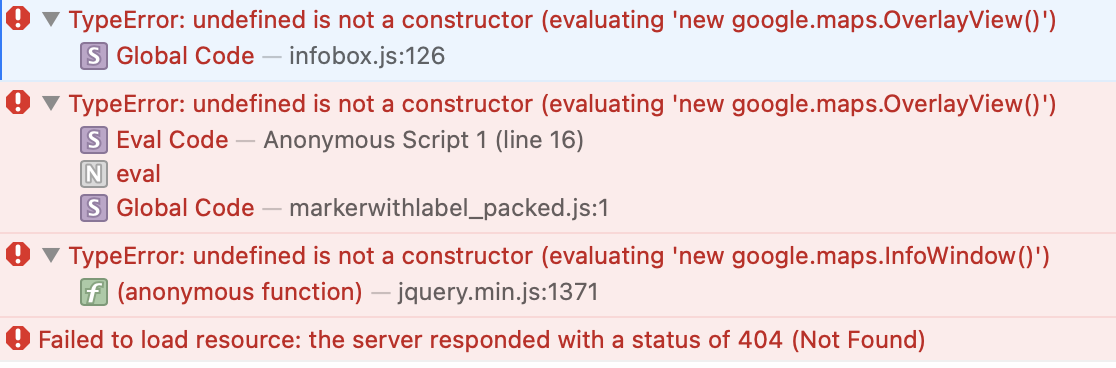
Thanks. I have made those changes to enable the cache and change the communication method.
Access info was there last night . Something must have deleted it overnight. I have restored it.
Perfect! Please keep us updated.
“Access Info” is empty.
Could you try going to EventON > Advanced > enable Cache calendar events list data? Also try switching “Select which HTTP server communication method to use for calendar” on the same page.
Please also try increasing memory limit:
https://docs.myeventon.com/documentations/increasing-wordpress-memory-limit/
Perfect! Please keep us updated.
You are trying to use Main Calendar to show multiple months, but please take a look at Event Lists. So replace add_eventon with add_eventon_list and also add number_of_months=”12″ hide_empty_months=”yes” to the shortcode.
Please try and let us know.