Hey, Login do not work for me, I tried the new
Archives: Replies
Replies for tickets on suppota
Reply to: tickets(182973)
Hey Basilis. Actually I figured out a way. I just realized what was going on. I added event_order=’DESC’ to the shortcode and it worked perfectly.
[add_eventon_el number_of_months=”12″ event_count=”5″ event_count_list=”yes” hide_empty_months=”yes” el_type=”pe” ux_val=”4″ tiles=”yes” tile_count=”5″ tile_height=”325″ hide_month_headers=”yes” tile_bg=”1″ event_type=”345″ month_order=’DESC’ event_order=’DESC’]
Reply to: tickets(172701)
Sorry for the delay, getting it into a staging environment took longer than I expected. With Brizy disabled, it works. With Brizy enabled, I get counter errors on Brizy.
From what their support says, your counter objects collide with the names of their counter functions for putting countdowns on the site using Brizy objects. It looks like it’s a compatibility issue between EventOn and Brizy.
Is there any chance to rename the objects that collide to ensure compatibility? I know it’s a long shot, but I thought I’d ask. Thanks!
Reply to: tickets(184848)
Hello,
Could you try this patch fix to resolve the issue:
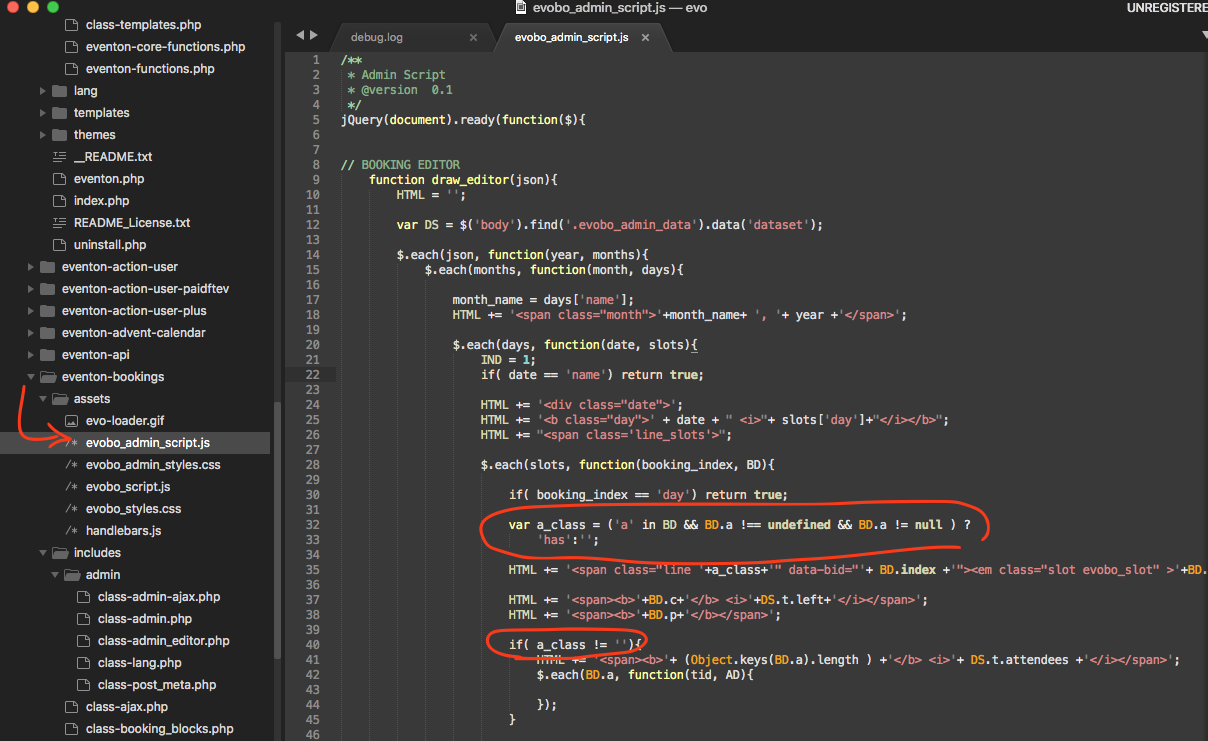
Make sure to change code where it is circled. should resolve the issue and we will release this in the next update to booking addon.
Reply to: tickets(181277)
1. Please go to EventON > Action User > enable Allow event image upload to non logged-in visitors (Not recommended).
2. You can enable more fields from EventON > Action User > Form Fields.
3. Please check https://docs.myeventon.com/documentations/how-to-use-event-types-to-do-more/. They can also search from the search box you can enable from EventON > Search Events > Enable Search on all calendars by default AND Enable additional search queries (may not work for all sites).
Reply to: tickets(184821)
Hello,
Please go to EventON > Shortcodes > [ ] GENERATE SHORTCODE > Event Lists: Ext > Select Event List Type: Date Range OR use:
[add_eventon_el el_type=”dr” start_range=”2020/01/01″ end_range=”2020/01/01″]
Reply to: tickets(182651)
Can you please send us a direct link to the page with the widget? This link http://bfk.ufw.mybluehost.me/elinbreitholtz/?page_id=39 shows:
Error thrown Call to undefined function esch_html_e()
Reply to: tickets(184813)
Hello,
Only by manually adding Price, Price Range and Date Range, I am afraid. More info: https://docs.myeventon.com/documentations/how-to-use-event-types-to-do-more/
Reply to: tickets(184312)
Sorry about that. Please also add this code:
.evotx_success_msg span { display: none !important; }
Reply to: tickets(184561)
Unfortunately, the only solution is to customize the source code. Please send us a customization job request by creating a new ticket in here and selecting Customization Request as the category.