By default they work on title and description. However, if you go to EventON > Search Events > enable Enable additional search queries (may not work for all sites), it will also include custom meta data, category values and comments into search query pool.
Archives: Replies
Replies for tickets on suppota
Reply to: tickets(183345)
Hello,
Please add this CSS code to EventON > Styles (If you don’t see any change, EventON > turn off Write styles to header > save settings > turn on Write styles to header):
.ajde_evcal_calendar.boxy.boxstyle1 #evcal_list .eventon_list_event .desc_trig { background-color: white !important; }
Reply to: tickets(183347)
Hello,
Kindly use this patch fix to resolve this issue:
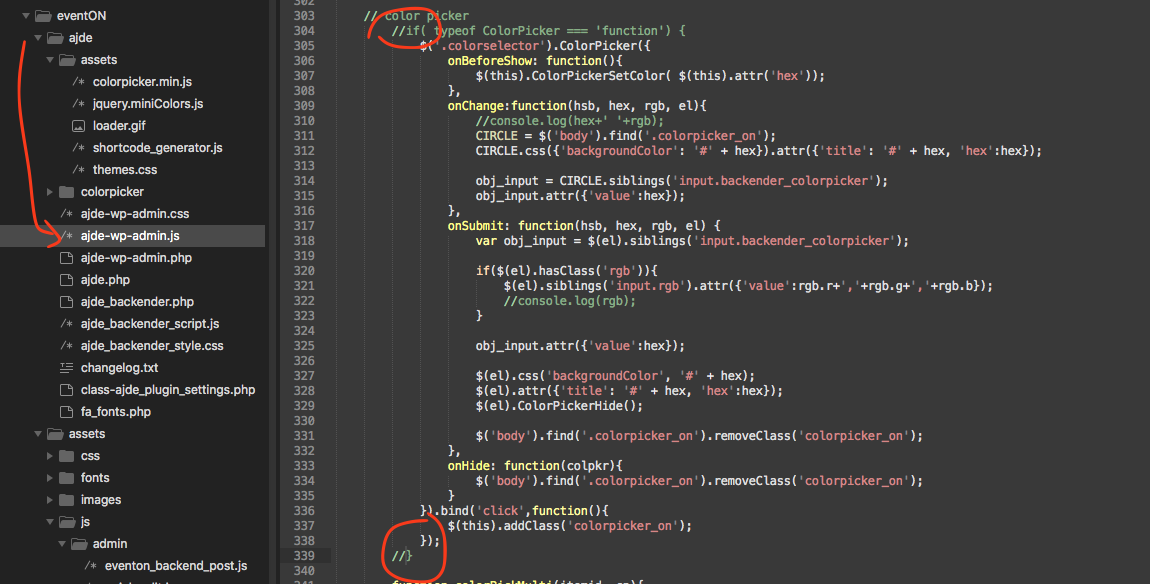
Basically comment out the circle spots in the code.
Reply to: tickets(175996)
What fields do the search work on
1. title and description
2. just title
3. tags
4. categories
5 organiser name
Reply to: tickets(183187)
Yes please! That would be great.
: )
Reply to: tickets(182732)
Hi Victor,
Please review now and let us know.
Reply to: tickets(183328)
Hi Michael,
have you added any plugin that is related to the WooCommerce Order Status?
Reply to: tickets(183187)
Hey Zoe,
I have noticed others reporting this issue, not sure if it is something from our side or not, but we do need some time to review that please, so we can report you back.
Reply to: tickets(183332)
Hi Tammy,
This seems to be because of your theme CSS.
Reply to: tickets(178844)
Hi
I made the change and it did not work. I tried just to replace the ‘prev’ and ‘next’ and it worked.
.on(‘click’,’.evcal_btn_prev’, function(){
cal_id = $(this).closest(‘.ajde_evcal_calendar’).attr(‘id’);
run_cal_ajax(cal_id,’next’,’switchmonth’);
})
.on(‘click’,’.evcal_btn_next’,function(){
cal_id = $(this).closest(‘.ajde_evcal_calendar’).attr(‘id’);
run_cal_ajax( cal_id,’prev’,’switchmonth’);
})
Problem solved, I guess..
An issue came up:
I decided to check with your code again, and this is where I’m stuck.
I made a syntax error (on line 895) and fixed it, but the browser keeps on loading (on my machine) the file with the error on this address:
https://mitzpe-ramon.co.il/wp-content/plugins/eventON/assets/js/eventon_script.js?ver=2.8.10
while the file is in this address:
https://mitzpe-ramon.co.il/wp-content/plugins/eventON/assets/js/eventon_script.js
Of course I cleared cache million times and checked on three browsers, but this issue continues..
What am I doing wrong?
Thanks