Hi Marc,
You can always modify it your self if you prefer, you can use a plugin for example like csshero and find the CSS variables or click and change the fields by picking and changing them.
No, it is not basic features, it is editing of the design on the other hand so any further help on that is marked as customization
Hey Timothy,
Is it possible for you to re-upload the plugin please?
Hi Maikel,
That depends with the field you want to match from the DB.
So, as you want to import to the fields from Speaks and Schedule, you need to find the DB fields of that, match them on how you can grab the values and add it.
This guide https://docs.myeventon.com/documentations/import-additional-fields-using-hooks/ only tell us how you can customize the ics import. Unfortunately, it doesn’t say how to add the support for speakers/schedule. You need to add this yourself or send us a customization support request.
Hi,
We understand, it is Monday he will do check the ticket and he will do come back to you.
Please be patient, we try our best to support but weekends ( where u also received replies ) everyone is getting a rest.
We appreciate your patience and understanding.
Thanks looking forward with working with this product!
In regards to the first question using hooks, what would be the name of the additional field for adding additional images? (I see you can add add additional images thru the Event page, put don’t know what the filed name would be to use the CSV import).
If you don’t mind can you please send me the code that would need to be added to the functions.php to make the above work?
Thanks
Vasim
Please try adding this CSS code to EventON > Styles (If you don’t see any change, EventON > turn off Write styles to header > save settings > turn on Write styles to header):
.evoTX_wc.tximg .evotx_image img { max-height: 100px; }
.evoTX_wc.tximg .evotx_image { /* float: right; */ text-align: right; }
Try comment/uncomment float: right.
We are glad your issue is resolved, if you have any further questions or concerns please create a new ticket. If you have a moment, we would greatly appreciate if you could kindly leave us a review at codecanyon! from your account > downloads. Cheers!
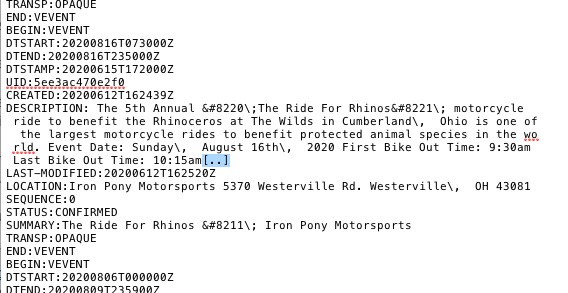
The problem is in [..]:
 Could you remove this symbol from the file and try to import?
Hi Rommel,
The location is not a Meta Field, but it is pulled through a Term ( as locations are created as a Term field ).
I have created the following snippet, where I do pull the term for locations to added to related events, you can take a look at the code and use it if you like:
https://gist.github.com/Basilakis/0352a2fe8f23b42abd09e2cfb1077477
if you can not make it work, then it would require to create a customization request where we can see how we can create a function that pulls a custom field or a shortcode with the current event location.
Let us know if you need any further help.