Hello,
Please go to wp-admin > Settings > select Week Starts On: Sunday.
Replies for tickets on suppota
Hello,
Please go to wp-admin > Settings > select Week Starts On: Sunday.
Hello,
Thank you for your great suggestion, at the moment it is not supported. However please create a new ticket and select Feature Request as category so others can vote on your idea and get it moved into development faster.
OR You can send us a customization job request by creating a new ticket in here and selecting Customization Request as the category.
You can also try using Event Type for this: https://docs.myeventon.com/documentations/how-to-use-event-types-to-do-more/
Great! If you have any further questions or concerns please create a new ticket.
We are glad your issue is resolved, if you have any further questions or concerns please create a new ticket.
If you have a moment, we would greatly appreciate if you could kindly leave us a review at codecanyon! from your account > downloads. Cheers!
That was slightly more than I expected. Can you meet me at 100?
Hey Kevin,
Can you share us access to WordPress so we can review the results for this one please?
thank you
Hey Ben,
We can do that for $150 for you.
Let me know if it does work out and we can start.
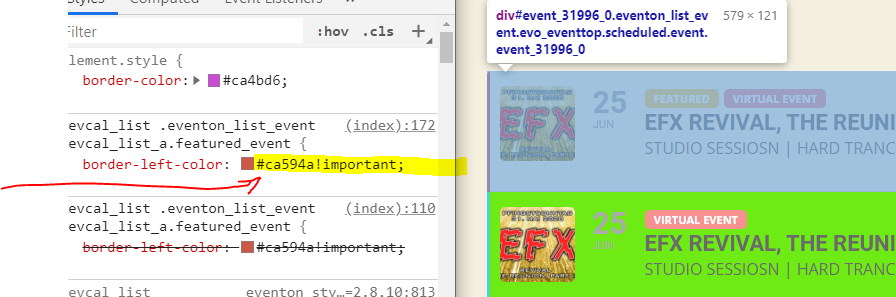
Yes.
But it did not apply your chosen color to the design in the frontend!!
Your chosen color was: #fa2408

The color of the border in the frontend https://work.electronic-dance.net/eventon/
is: #ca594a

Go ahead and press SAVE again and it will be the right color on the websites frontend.
I cleared my browser cache and retried it. Result:
Event Top > background color default state > I set it to pink. Saved it once.
Have a look at https://work.electronic-dance.net/eventon/
Does the default event background color look pink for you? For me it looks green, though pink is the chosen color.
The problem is NOT, that I cant pick a color. The problem is that i have to save TWICE to make the changes appear and that all custom colors get lost as soon as i switch between the themes (default / dark)
🙁
Thank you very much. I’ll proceed with the codecanyon feed.