You can send us a customization job request by creating a new ticket in here and selecting Customization Request as the category. Maybe one of our developers can help you with this.
Archives: Replies
Replies for tickets on suppota
Reply to: tickets(180905)
Hello,
Could you tell us more about your importing process? How do you import events from Eventbrite to EventON?
The only possible solution is to go to Edit Event > User Interaction for event click > enable External Link > copy the URL from Learn More.
Reply to: tickets(180877)
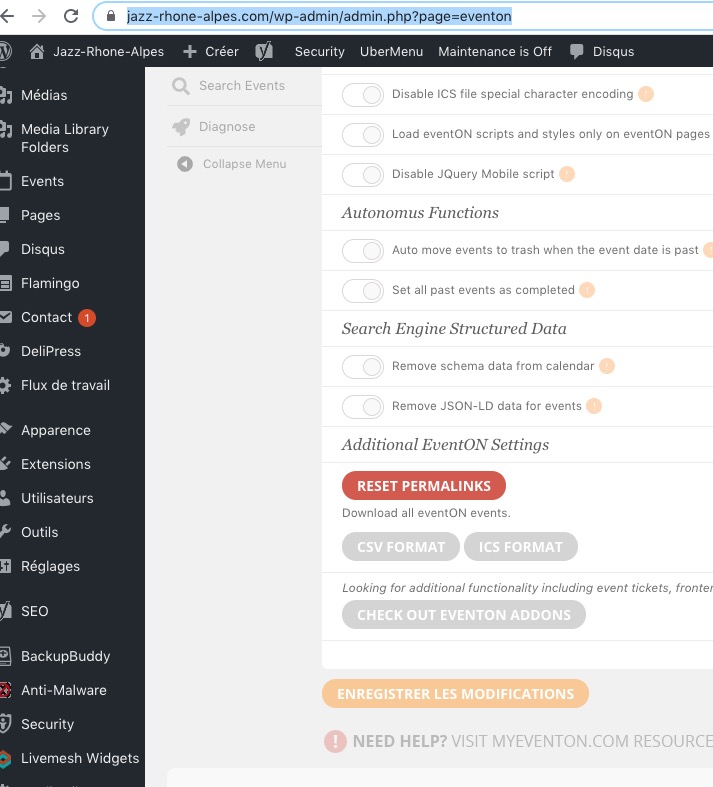
Please go to https://www.jazz-rhone-alpes.com/wp-admin/admin.php?page=eventon > Download all eventON events:
Reply to: tickets(180495)
Hi Artem,
Ok then – I give up 🙂 I still believe something happened on eventon’s side, but i’ll let you guys investigate further if you think it’s worth it. I’ve managed to solve the issue of the square embeds by installing “Embed Plus for YouTube” plugin and simply enabling “centering” for youtube videos. YouTube videos now embed properly.
Thanks again for your time,
Kind regards
Timur
Reply to: tickets(180861)
Hi .. I would like to avoid endless discussions .. I could have named way more things.
But I`ll try to explain again..
- The main problem and the main deal-breaker is the search functiononality. Filters are not adjusting while refining the search – this is a huge problem!! – and the more events, locations and categories you have the bigger the problem becomes and the more a well working search is literally obligatory – and since I intend to work with a big selection of events – the plugin is not useful for my purposes.
The more you refine a search (and this is standard behaviour) the easier it should become and the more you should be able to find what you are looking for – but the opposite is the case here – the more I am refining the search the harder it gets to infact find what I am looking for – the more I want to refine my search the more I end up with endless lists that are all over the place and not only leads to empty search results (even though there are plenty relevant results available) but also leaves the customer in a huge “guessing-game” – which is highly user unfriendly and completly not feasible – this is not how a sophisticated search should work and you know this.
Example: lets say I have “only” 100 events with their own dedicated location all over a region, country, or world (you name it) – and maybe only 6 categories. Now I want to find events in a certain category nearby or in the city/district I`m at (PS: this is what I meant, when I talked about location search – I didnt talk about an endless list of venues or as you call it – locations).
NOW – if I choose category “1” all the other filters should adapt – meaning they should only show options that are connected to category “1” and vice versa (which is standard behaviour – but you know this) – this is how I am able to refine my search. What happens instead is the opposite – I choose category “1” and all the other filters continue to show me all existing 100 locations (from “all over the world”), labels aso – in disregard of what I just choose. This leads to a very high possibility (more often than not) of empty search results – renders a search functionallity completely useless and leaves the customer completly clueless and frustrated. Refining your search on a second level or even third level is completely impossible and turns into a gamble with very bad odds.
How it should work – (again, you know this and if not then let me tell you that this is standrad behaviour – which you can double check on ALL comercially used relevant well known websites) – If I choose category “1” ALL the other filters should adapt and only show options that are connected to category “1” – from there I can filter even further on a second and maybe even on a third level – until I have only nearby results in the category I am looking for, with the content I am interessted in aso.
- Am I able to connect these custom fields for example to the respective location image field and or organizer image field? I already opened a ticket, where the response was “That this is not possible and that its a great idea. I should open another ticket and suggest that as a feature” – so you already contridicted yourself … what gives?
Also .. its not like the form is manifested and pre-built I can choose the elements I want to show in the form myself – so I basically decide how complex the form is or not – because you give the option to turn certain fields on and off – so why did you stop with the images? If I pay so much money for an addon I expect it to at least give me the same options like the backend form, without any workarounds and I think I dont expect to much – esspecially while all the other plugins do exactly that. And again – the complexity of a form is not defined by the pre-built scheme but rather by the content I choose to show in this form or not.
But even If this would be fixable – the “search-problem” outweighs it all.
- I think there might a missunderstanding. I didn`t mean your actual “loaction-filter” which is a list of ALL available locations/venues. I meant a search field (most likely a text-field) where I can search for an adress, a region, city or country. Again I am not asking for an edge-case-feature but a standrad feature available in basically ALL map centered applications and similar plugins.
Again … when I pay so much for a dedicated addon I expect it to at least have the basics and also some bells and whistles.
– again … proximity search is missing
– no map filtering
– no geo-location settingI mean you could call all the features above “edge-case” features – ask a 1000 people and you`ll get a 1000 answers on how to implement this and that feature – BUT – lets be real for a second – many many people would call these features above as standard – because – AGAIN – there are used like that in basically all map-centered applications and similar plugins.
And if facetWP (a search plugin) offers me this kind of functionallity where I only pay a single price for all its functionallity – com`on .. do we really need to discuss this.
And by the way … you said it yourself in your HelpDesk articles … If people don`t agree with the pricing .. I can just leave it and go on. You had to say it because (based on your own statement) you had these discussion tons of times – so obviously I am not the only one.
And I am pretty sure that you had these kind of discussion many many times.
Again I would like to issue a refund – and I would appriciate to no longer stay in an endless cycle of back and forth – because I am not going to use your product – because it doesn`t fit my needs – needs that people could very well expect and see as standard because they are infact standards – from a plugin with this kind of a price tag.
I would appriciate if you would issue this refund without any further dissussion. I explained myself, the situation aswell as the reasons extensivly to tell you how and why I made this decission.
Thank you very much,
Martin
Reply to: tickets(180877)
Hello Artem
Thank you very much for this answer on sunday (I appreciate).
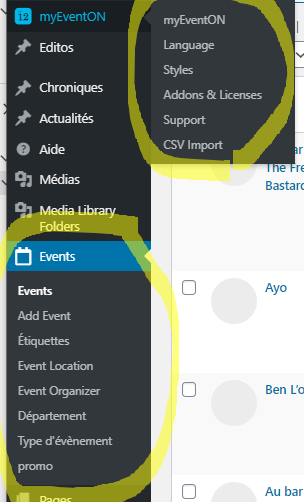
I do not see on my site what you call”EventON > Download all eventON events. > CSV FORMAT”which could be in fact very usefull to check my CSV struture.
See the screen capture
Best regards
Pascal
Reply to: tickets(180872)
Hi Artem!
For some reasons I did not get the latest release when I upgraded the first time.
Now it is working!
Thanks!
Torsten
Reply to: tickets(179639)

Thanks Artem,
See print screen: I would like to show a series of concerts with the location and possibly other details. As now it’s unclear. Where can I find the overview with the Extend LIst shortcodes?
Kind regards,
Roel
Reply to: tickets(180788)
Great, if you have any further questions or concerns please create a new ticket.
Reply to: tickets(180872)
Hello,
Could you update EventON to 2.8.10, clean your cache and check once?