Perfect! If you have any further questions or concerns please create a new ticket.
Archives: Replies
Replies for tickets on suppota
Reply to: tickets(384140)
It’s every repeating event, and I unfortunately, I can’t give access as there is sensitive information on the backend that violates our privacy policy and local privacy laws.
Reply to: tickets(383934)
you can use this exemple :
https://cleophas.org/wp-admin/post.php?post=33468&action=edit
the event start the 30/04/2025 at 11AM
I have put the publication date to 10/10/2024
it’s note appear in the full cal on url : https://cleophas.org/horaires/le-calendrier-du-doyenne/
but if you change the “publication date” in the event for a most recent date it will appear in the full cal
Reply to: tickets(382671)
We have now found another solution.
Reply to: tickets(384112)
Hi, I am now back to the simple 2 Woocommerce shortcodes for Cart and checkout and the issue is persistent. That means that ApplePay cannot be used with Event Tickets / seats. What is not good as I see this an interesting payment method.
In fact if you use ApplePay the billing information are automatically filled what is great.
The payment works, but the order then appears as a Non-Ticket order and the seat is being released after 10 minutes.
For me an issue to be fixed. Actually I deactived ApplePay as payment method again as I had in the very beginning a first payment already with that payment method.
Reply to: tickets(384012)
I Have a snippet code added in order to give a dynamic behavior to the “event subtitle” field: we calculate the years of employee length of service.
The custom code is this:
add_filter( ‘eventon_eventcard_boxes’,’addfield_001′ , 10, 1);
function addfield_001($array){
$array[‘extra1’]= array(‘evoextranuovo’,__(‘campiextra’,’eventon’));
return $array;
}
add_filter(‘eventon_eventcard_array’, ‘addfield_002’, 10, 4);
add_filter(‘evo_eventcard_adds’, ‘addfield_003’, 10, 1);
function addfield_002($array, $pmv, $eventid, $__repeatInterval){
$array[‘extra1’]=array(
‘event_id’ =>$eventid,
‘pmv’=>$pmv,
‘__repeatInterval’=>(!empty($__repeatInterval)? $__repeatInterval:0)
);
return $array;
}
function addfield_003($array){
$array[] = ‘extra1’;
return $array;
}
add_filter(‘eventon_eventCard_extra1’, ‘addfield_004’, 10, 2);
function addfield_004($object, $eventid) {
$event_post_meta_values = $object->pmv;
$event_id = $object->event_id;
$unix_start_ev = isset($object->pmv[‘_unix_start_ev’][0]) ? $object->pmv[‘_unix_start_ev’][0] : null;
// Verifica se l’evento ha il tipo “Ricorrenza assunzione” (termine di tassonomia con ID 97)
$event_types = wp_get_post_terms($event_id, ‘event_type’); // Assumi ‘event_type’ come nome della tassonomia
$is_ricorrenza_assunzione = false;
foreach ($event_types as $event_type) {
// Verifica se l’ID della tassonomia è uguale a 11 per “Ricorrenza assunzione”
if ($event_type->term_id == 97) { //97
$is_ricorrenza_assunzione = true;
break;
}
}
if (!$is_ricorrenza_assunzione) {
return 0; // Non eseguire il calcolo se il tipo di evento non è “Ricorrenza assunzione”
}
if (!$event_id) {
return 0; // Nessun ID evento trovato
}
// Recupera il valore di evcal_repeat dal database
$evcal_repeat = isset($object->pmv[‘evcal_repeat’][0]) ? $object->pmv[‘evcal_repeat’][0] : null;
// Verifica se l’evento è ripetuto
if ($evcal_repeat == ‘yes’) {
// Recupera il valore di evcal_srow dal database (campo event start value)
$evcal_srow = $unix_start_ev;
if ($evcal_srow) {
// Ottieni l’anno corrente
$current_year = date(‘Y’);
// Ottieni l’anno di evcal_srow
$event_start_year = date(‘Y’, $evcal_srow);
// Calcola il numero di anni
$number_of_years = $current_year – $event_start_year;
// Mostra il messaggio appropriato in base al numero di anni
if ($number_of_years === 1) {
ob_start();
echo “<span class=’complimentilist’>” . __(‘Congratulazioni per aver compiuto’, ‘eventon’) . ” ” . $number_of_years . “”;
echo ‘ anno di collaborazione</span>’;
return ob_get_clean();
} elseif ($number_of_years > 1) {
ob_start();
echo “<span class=’complimentilist’>” . __(‘Congratulazioni per i tuoi’, ‘eventon’) . ” ” . $number_of_years . “”;
echo ‘ anni di collaborazione</span>’;
return ob_get_clean();
} else {
return 0; // Non mostrare nulla se il numero di anni è inferiore o uguale a 0 (non dovrebbe verificarsi in questo caso)
}
} else {
return 0; // Campo evcal_srow non trovato
}
} else {
return 0; // L’evento non è ripetuto
}
}
Reply to: tickets(383968)
ok thanks, i will open a ticket to Avada Fusion builder
Reply to: tickets(383828)
Is it possible that this is caused by the server itself being in UTC+2 and the daily view creating a transient cache entry for the event?
Reply to: tickets(383828)
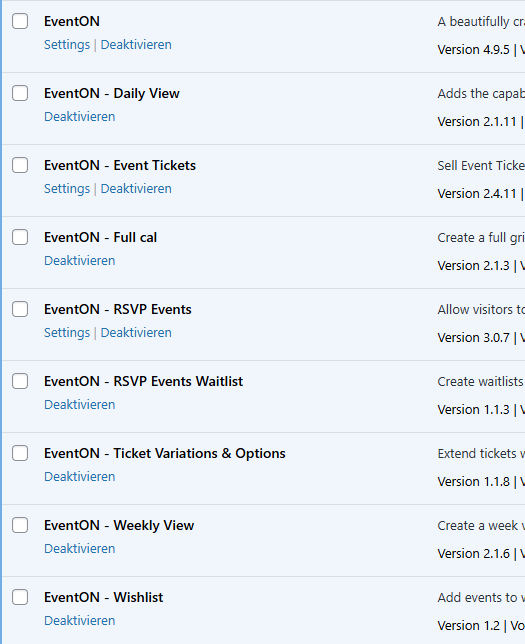
Updated all the plugins to the latest version, issue persists.
It doesn’t happen on your test site, as the events are all full day
Reply to: tickets(356456)
Hello Artem,
that worked!
Thank you very much.