Hello, it seems to working properly now. Thank you.
Replies for tickets on suppota
Hello, it seems to working properly now. Thank you.
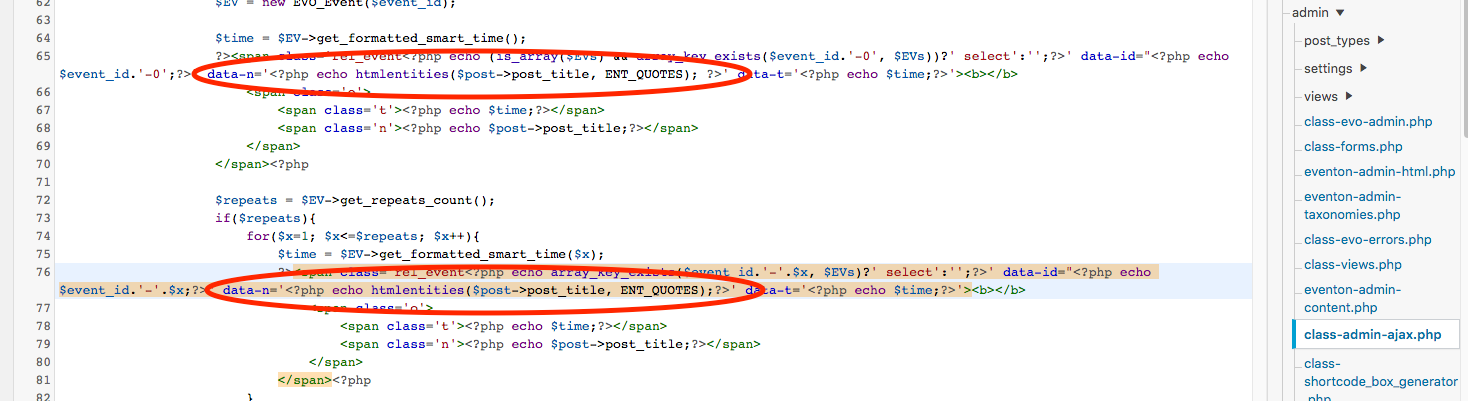
But wait there is more.
You’re solution got me thinking that this was a solution just for me, and it would break if someone used double-quotes in the title of another event, similar to this one on my same site. https://www.confolens.fr/evenement/soiree-60-ans-de-lo-gerbo-baudo/
I tested it, and yep, same problem. Unfortunately I need a solution that works whether there are single or double quotes in the title.
So I looked for a “better” solution to help you busy guys out and I think I found one. Instead of changing the single-quotes to double quotes in the code, I added the “htmlentities” function with the flag “ENT_QUOTES”.
data-n='<?php echo htmlentities($post->post_title, ENT_QUOTES);?>’
This seems to be a better permanent solution for you guys. Hopefully you guys can verify it and push it out in the next update. Hope this helps!
Thanks!
Hello,
Please go to Edit Event > User Interaction for event click > enable Open in new window.
Try our products on http://dev.myeventon.com/wp-admin/
Hello,
You can enable Tile Design by adding this to the shortcode: tiles=”yes” tile_bg=”1″ (works for Main Calendar and Event Lists: Ext)
Please check these two add-ons for Weekly and Daily View:
https://www.myeventon.com/addons/weekly-view/
https://www.myeventon.com/addons/daily-view/
You can add multiple calendars (Weekly, Daily, Monthly) on one page by in different Tabs or similar elements and allows users to choose between them by clicking on tabs.
Hello,
Please follow this guide: https://docs.myeventon.com/documentations/why-my-site-and-eventon-page-loading-slow/
Hello,
Please go to EventON > Action User > enable Allow event image upload to non logged-in visitors (Not recommended)
Hello,
1. Please go to wp-admin > Edit Event > change Event Color.
2. Please go to EventON Settings > enable Hide past events for default calendar(s) OR Add this to the shortcode: event_past_future=”future”
You can also replace one event with repeats for each date by following https://docs.myeventon.com/documentations/setting-up-repeating-events/
3. Please add this to the shortcode: jumper_offset=”2″
There is no direct compatibility between EventON and WPForms, Contact Form 7 or Gravity forms. Since EventON loads events with Ajax there are can be issues with shortcodes from other third-party plugins.
The only possible solution is to open events as Single Event Page. Please add this to the shortcode: ux_val=”4″