Hello,
Thank you for your reply.
The etc_override = “yes” works well for categories.
What I would like to do is assign a color to a location to display it on the calendar.
Example, PARIS in blue …
Cordially
Replies for tickets on suppota
Hello,
Thank you for your reply.
The etc_override = “yes” works well for categories.
What I would like to do is assign a color to a location to display it on the calendar.
Example, PARIS in blue …
Cordially
Hi Artem,
Sorry, but that does (as usual 😉 ) not answer my question.
I already know how to set up repeating events. The problem I have is that the repeat events generated from this do not show up in the events list in the backend.
i.e. I set up an event called xyz on Monday starting on 01 April, weekly repeat for the same day and time. Event xyz only shows up in the backend events list for 01 April, but not for 08 April, 15 April, 22 April and so on.
Does the repeat customizer rectify this? It is not clear from the description.
Thanks,
Michaela
awesome,. I tried and it works of course
my best
jakob
I can install EventON 2.8.8 alongside with EventON 2.7.3 on your current server. Please send us FTP and wp-admin access to your site.
Please send us a customization job request by creating a new ticket in here and selecting Customization Request as the category.
Hello,
Please check https://docs.myeventon.com/documentations/setting-up-repeating-events/ > Custom Repeats.
OR Use https://www.myeventon.com/addons/repeat-customizer/ add-on to customize each repeat.
Hello,
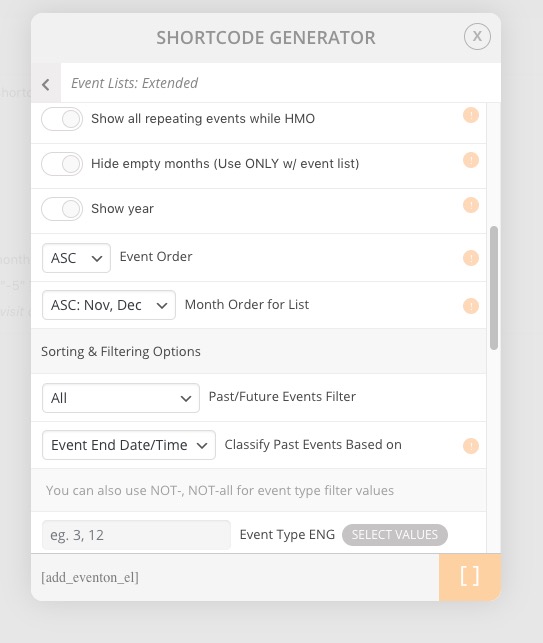
Please open Shortcode Generator and check Event Order and Month Order for List options:
Before I gave you access, everything worked fine – I even tested everything making sure that it was working.
Except you upgraded your PHP version to 7.2, correct? Please try restoring it’s previous version.
Hello,
The only option that allows you to change EventON’s URLs is described in this guide: https://docs.myeventon.com/documentations/change-events-slug/
You can also send us a customization job request by creating a new ticket in here and selecting Customization Request as the category.
Please also try changing this from WordPress’ Permalinks: https://www.elegantthemes.com/blog/tips-tricks/wordpress-permalinks
Could you remove this from the shortcode:
show_et_ft_img=”yes”