What version have you updated from?
Archives: Replies
Replies for tickets on suppota
Reply to: tickets(173135)
Thank you for your messages, I am going to assign this ticket to Ashan. Maybe there is some kind of solution to this. Please allow some time for him to get back to you, we greatly appreciate your patience and thank you for being a eventon customer!
Reply to: tickets(173135)
Ashan,
I am not sure how to translate Datepicker either (translating with Loco Translate didn’t help). Could you help?
Reply to: tickets(173185)
Hello,
wp-login.php leads to:
No Results
Found The page you requested could not be found. Try refining your search, or use the navigation above to locate the post.
Could you check?
After updating, I have repeatedly received 500 internal server errors when going to EventOn settings.
Please follow the instructions in this documentation to activate debug in your site to see any PHP errors recorded that can provide insight on to whats going on. Please reply with a link to debug.log file. If you are not able to do this please send us FTP access to your site so we can do this for you.
The featured images are all 662×400 px.
tiles=’yes’ tile_bg=”1″ tile_style=”1″ options show full size image in tiles:
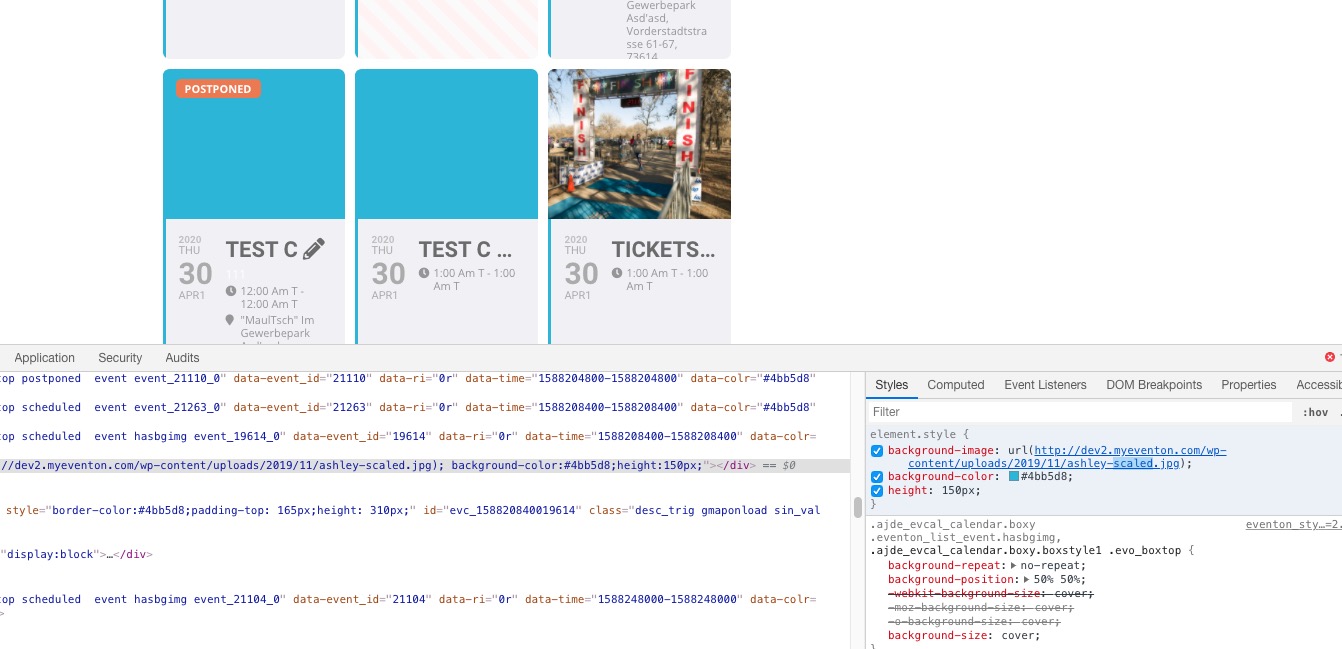
Image link: http://dev2.myeventon.com/wp-content/uploads/2019/11/ashley-scaled.jpg

Could you send us a screenshot?
The event title , date and other information on the grid have much more space below than they should
We changed this to you can show more info in EventTop from EventON > Event Top.
However, after switching months from April to May, when an event is clicked, the image is cropped and much too tall until clicked upon, then it reverts to correct size and aspect ratio.
Please go to EventON > EventCard > Feature image display style > set Direct image.
I had carefully added CSS to customize the event titles to match the site fonts
Please try adding the code to wp-admin > Appearance > Customize > Additional CSS. You can also change fonts from EventON > Appearance > Calendar Font family.
Reply to: tickets(172034)

Thanks Artem,
I followed the custom code, and it worked to a degree but there seems to be a section missing as to what to do with that information once the field is created. in the case the of the test field (on/off switch) i have name it “is this an online event” so if the answer is yes I would like to do something (show an online banner on the event top) but not do something is it says no.
Or.. I am happy to use the custom meta fields, but as mentioned earlier. it does not work correctly. When I select the Button option in the settings for the field I would expect a button on the form – instead I get 2 text fields? i have added a screenshot so you can see this odd behaviour
Both options require something to happen if it is turned on. Please can you supply some further code to add the missing
or. Finally, I am happy to use the location fields as you first mentioned, but i need to be able to show some locations to all users and the user added locations are private for only them to see. Actually i am a little surprised this does not happen by default ..
Basically I just need to get a working moved to online solution, and so far it is seeming quite a difficult (but should be easy) task
thank you!
Reply to: tickets(171956)
Ashan,
User: thisboxformail@gmail.com
Pass: umQHZNcqJM1B#c!jHRCdIW%(
Please check Apr 15,2020 AT 7:42AM – Posted 4 Days Ago – #172615. On dev2 you can achieve a similar error by unchecking Event Locations then press Load More multiple times until you get No Event and then press Apply Filters:
http://dev2.myeventon.com/21341-2/
Reply to: tickets(171956)
Thank you for your messages, I am going to assign this ticket to Ashan and he will be able to take it from here and find you a solution. Please allow some time for him to get back to you, we greatly appreciate your patience and thank you for being a eventon customer! Also please disable any IP blocking on your site if there are any.
Reply to: tickets(172301)
Hi Basilis,
Reply to: tickets(172301)
Hi,
This is ready 🙂
https://nimb.ws/hKQBlA
Reply to: tickets(172556)
Ok thank you.
First we have to update myEventon because, subscriber doesn’t work right now with the actual version…
So, we’re going to do that, see the subcriber possibilities and we will let you know if we need a custom but thank you again for your help.
Best regards
Agence Sweep