I apologize for the incorrect login. Here’s the correct one:
Login: https://bbts.spokendesigns.com/wp-login
Username: spokendesigns@gmail.com
Password: E*%u&87.bApeSut
Replies for tickets on suppota
I apologize for the incorrect login. Here’s the correct one:
Login: https://bbts.spokendesigns.com/wp-login
Username: spokendesigns@gmail.com
Password: E*%u&87.bApeSut
Thank you very much!
Same hier – Switch to “postponed” – and the Events are also shown as “cancelled”.
Please update EventON to 2.8.7 and after go to EventON > Google Maps API > add Google maps API Key (Required).
Please check this guide: https://elfsight.com/blog/2018/06/how-to-get-google-maps-api-key-guide/
Also before update please backup EventON’s data.
To update eventon to latest version: If you are unable to do autoupdate, you can go to codecanyon your account > download and get the latest eventon version as zip file. Then you can go to your website, deactivate old eventon, activate (Do not delete eventon settings & data when EventON is uninstalled) from eventon settings, delete old eventon, install new one and activate. This link will further explain the process it. Also you can follow us on twitter to get real-time announcements on updates!
Also sometimes this happens because of the server. Could you try following this guide: https://docs.myeventon.com/documentations/why-my-site-and-eventon-page-loading-slow/?
Please try adding this to the shortcode:
cal_init_nonajax=”yes”
Hello,
I went to EventON > Tickets > Default event ticket stop selling time base > selected When Event Ends.
Please check now and let me know.
Hello,
I hope there is an opportunity to see the category hierarchy within the filtering drop down menu.
Thank you for your great suggestion, at the moment it is not supported. However please create a new ticket and select Feature Requestas category so others can vote on your idea and get it moved into development faster. OR You can send us a customization job request by creating a new ticket in here and selecting Customization Request as the category.
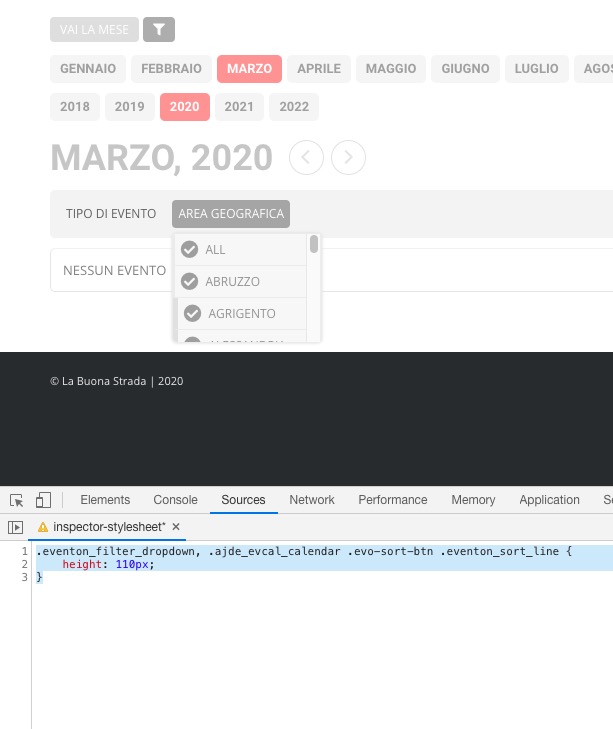
Could you make it scrollable?
Please add this CSS code to EventON > Styles (If you can’t see any change, EventON > turn off Write styles to header > save settings > turn on Write styles to header):
.eventon_filter_dropdown, .ajde_evcal_calendar .evo-sort-btn .eventon_sort_line { height: 110px; }
Hello,
Please go to EventON > Select calendar event content filter type > EventON Content Filter or Default WordPress Filter.
In better hands with your team.
Best