How do I get to that code in the website https://gaydesertguide.com I do not know how to access the actual code like that or if I actually have access. let me know the steps to get
I have this code:
$_value = ( !empty( $field['id']) && !empty($data[$field['id']]) && !is_array($data[$field['id']])) ?
stripslashes( $data[$field['id']] ):null;
$field['value'] = $_value;
$rightside .= EVO()->elements->get_element( $field );
It seems that some of our styling needs update to fully support Dark theme.
I am going to assign this ticket to Ashan and he will be able to take it from here and find you a solution. Please allow some time for him to get back to you, we greatly appreciate your patience and thank you for being a eventon customer! Also please disable any IP blocking on your site if there are any.
Issue two with colour picker does not get resolved.
Ashan will check this as well.
It doesn’t show any purchases associated with the email. Do you have any invoices you can show us?
Hello,
You have two plugins: EventON and EventON Lite. Before activating EventON, did you disable EventON Lite?
Hello,
Please update EventON to 4.9,2.
To update eventon to latest version: If you are unable to do autoupdate, you can go to codecanyon your account > download and get the latest eventon version as zip file. Then you can go to your website > make sure “Delete eventon settings & data when EventON is uninstalled” is Deslected from eventon settings, delete old eventon, install new one and activate. This link will further explain the process it. Also you can follow us on twitter to get real-time announcements on updates!
Sorry for not offering this in the first place. Just figured it out.
We are glad your issue is resolved, if you have any further questions or concerns please create a new ticket.
If you have a moment, we would greatly appreciate if you could kindly leave us a review at Codecanyon. By going to your account > Downloads. We are very grateful for your kind review!
Hello,
Please try going to EventON > Time Settings > enable Enable custom event time format on eventCard > add:
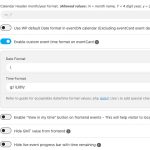
Make sure to update EventON to 4.9.2.
Hello,
Please take a look at this instruction:
Other specific RSS feed links You can use a custom links like http://yoursite.com/evofeed?event_type=63 to get events only for certain event type. Other supported fields by default are event_type_2, event_type_3, event_location, event_organizer. You can pass value similar to inside eventon shortcodes.
Instead of event in event_type_2=event, please use Event Type ID.
We are glad your issue is resolved, if you have any further questions or concerns please create a new ticket.
Thanks Ashan!
Really glad to be able to contribute something back to an already great plugin.
Let me know if you have any questions — I only know just enough coding to get myself in trouble… lol.
One idea for making this official in the future:
Maybe on the admin Edit Event screen, just add a field like “Custom Thumbnail” with a media selector — super easy for users to upload a square or alternate image.
Then include some checkboxes for where it should be used:
☑️ Single Event Page
☑️ Tiles View
☑️ Calendar List
☑️ List View, etc.
We use a wide image for the featured image but they get cropped weird on the EventTop. Since we already make square versions for ticketing on AXS.com, it’d be nice to just drop one in and have it display nicely wherever needed — without affecting the main Featured Image (which still looks great on tiles). But other people might want it turned on or off on certain views
Thanks again for taking time to consider this!