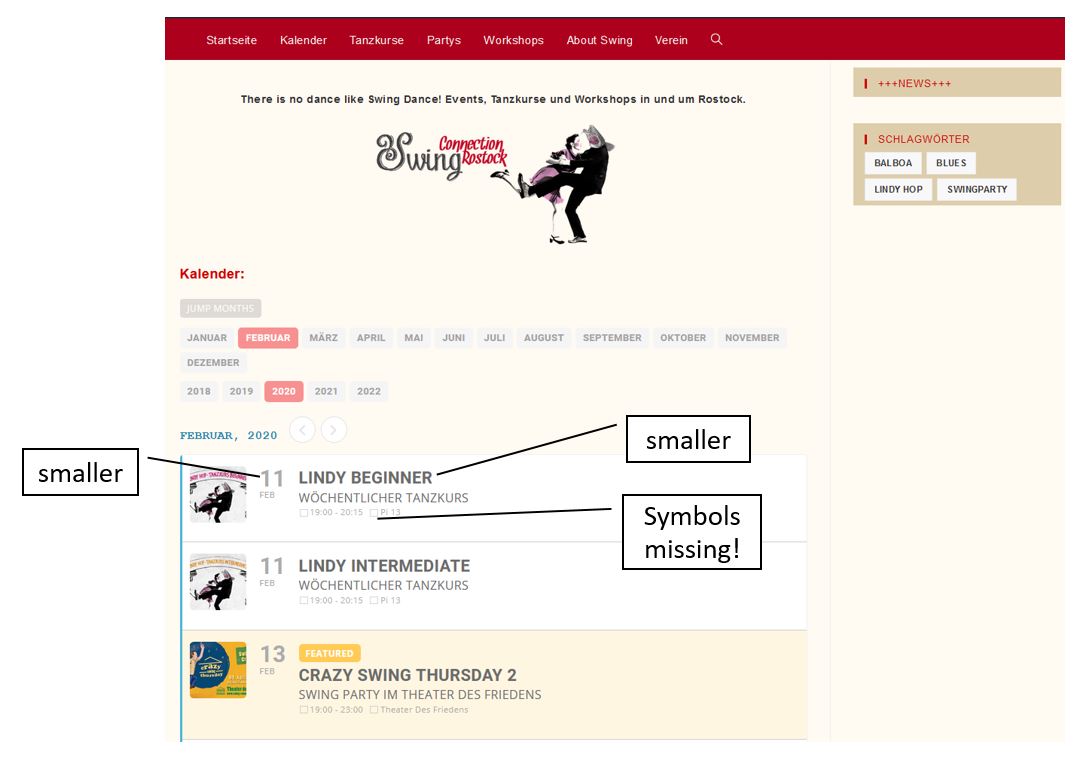
Hi!
Thanks for your help.
1. I attached a screenshot where I desribe what I would like to change. I am not so familiar with adding CSS styles.
2. Sorry that I asked this question. But I was unable to find it in the documentation.
Greetings, Lars
Replies for tickets on suppota
Hi!
Thanks for your help.
1. I attached a screenshot where I desribe what I would like to change. I am not so familiar with adding CSS styles.
2. Sorry that I asked this question. But I was unable to find it in the documentation.
Greetings, Lars
Ah yes, sorry. These options are only available for Action User Plus add-on: https://www.myeventon.com/addons/action-user-plus/. Try on http://dev.myeventon.com/wp-admin/
Ashan,
Customer installed Action User Plus before WooCommerce and now you cannot buy Paid Submissions. Is this because Products is empty?
Thank you for your messages, I am going to assign this ticket to Ashan and he will be able to take it from here and find you a solution. Please allow some time for him to get back to you, we greatly appreciate your patience and thank you for being a eventon customer! Also please disable any IP blocking on your site if there are any.
Ah ok. I thought more in a way to filter only complete month blocks.
So it would be easier to see events f.e. one year in the future & don’t have to scroll down that much.
No problem,
The font sizes and types for example, are different.
So, here’s a standard page:
https://yorkshireairmuseum.b.wpstage.net/exhibits/world-war-two-aircraft/handley-page-halifax-iii/
Here’s an event page:
https://yorkshireairmuseum.b.wpstage.net/events/thunder-day-nimrod-anniversary-special/
The fonts in the description are quite small and don’t seem to be picking up the theme fonts etc.
Does that make sense?
NW
Hello,
Could you elaborate more? With screenshots if possible.
If you want to change the page layout please check this guide: https://docs.myeventon.com/documentations/customize-single-events-page/
We didn’t add this feature since if you have 1000 events then there is no point of showing them all because users won’t be able to check them anyway. If you have 10 events then it’s better for you if users scroll to their month because they will check not only their event but also other events.
Hello,
thanks for the reply.
I would add that for a future update. Thought this is a standard feature in such a big plugin.
Thanks, Markus.
Hi Shawn,
This depends on which plugins you will need.
Please look at our Bundles so you can get the best for you 🙂