You can customize the source code. Please send us a customization job request by creating a new ticket in here and selecting Customization Request as the category.
OR Create your own links by following one of these guides: https://docs.myeventon.com/documentations/show-additional-custom-data-eventcard/ and https://docs.myeventon.com/documentations/setup-use-custom-meta-fields-events/
Hello,
You have 3 events assigned to 641 and one of them is past since it’s March 8th. Please disable EventON > Hide past events for default calendar(s) to show it.
Also, it’s not populating the event photos like it does on our main events grid
Could you elaborate more? Are you referring to Tile Design like on this page: http://indrasgrace.com/workshops-events/? If so please add this to the shortcode:
tiles=”yes” tile_count=”3″ tile_bg=”1″ tile_style=”1″
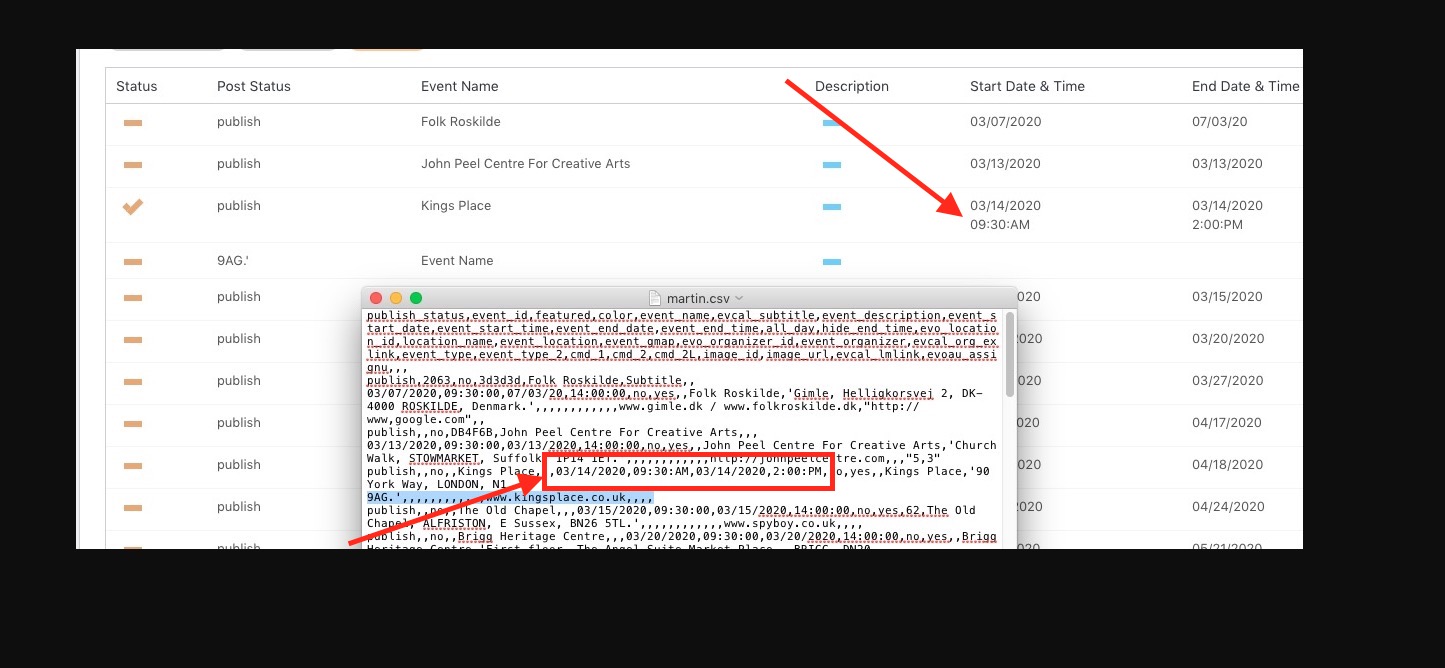
So on the CSV file do I enter 09:30:AM as text rather than as a time format? And similarly with the date – 03/14/2020 as text?
Hello,
Could you tell us on which product did you request a cancelation? Please send us Order ID.
You can see the correct format on this screenshot:
Date: 03/14/2020
Time: 09:30:AM
Hello,
After you added events from Action User Submission Form please go to Edit Event > enable Email to Subscribers > press Update.
Hello,
1. I am sorry, the access information you have provided did not work for us. Please check them and post the correct login information as a private message, thank you!
2. Please press Enable booking blocks for this ticket > now press Update > now you can add Booking Blocks. More info: https://docs.myeventon.com/documentations/general-user-guide/
1. Please replace your current shortcode on this page https://carshowsuk.com/event-directory/ with the one I provided. Upgraded it a little bit:
[add_eventon_list number_of_months=”12″ hide_empty_months=”yes” search=”yes” cal_id=”id1″ ft_event_priority=”yes” ux_val=”3″ show_et_ft_img=”yes”]