It is doable but you will need to provide a mockup / illustration of how you want the new design to be. This way we can provide you with accurate quote.
Archives: Replies
Replies for tickets on suppota
Reply to: tickets(165138)
Glad to assist in the ongoing development of headaches. ROFL 😉
Reply to: tickets(165092)
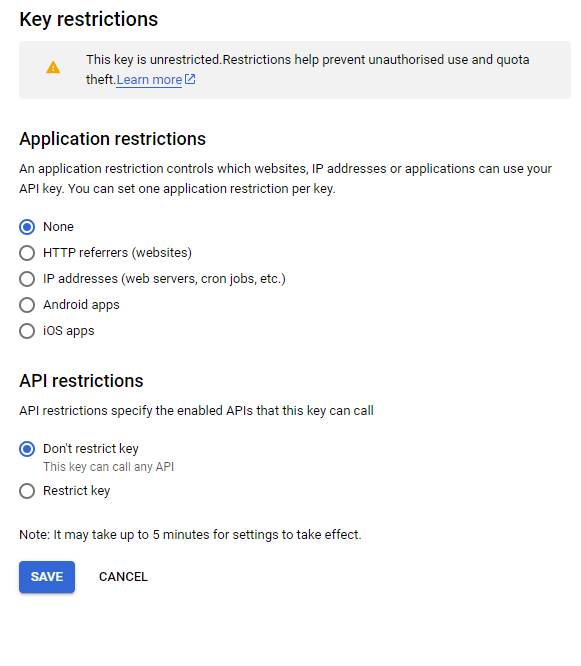
Check that the API key restrictions you may have restricted it and then not listed the site in the restrictions.
Reply to: tickets(165138)
Thank you Rod greatly appreciate your understanding 🙂
Good news I got the issue resolved. Just have few things to test out and then will release the new eventON version with the fix. 🙂 Just be sure to keep old version saved when you update so if something breaks you can always revert back to old version.
Reply to: tickets(165138)
Hi All,
Thanks for your replies, I understand that these things can take time as there can be so many different variables.
Hoping to hear from you soon.
Thanks
Rod Miller
Reply to: tickets(165138)
thank you for reporting this. I will need more time to debug this issue and will release a new version of eventON which will have resolution for this issue.
Reply to: tickets(164864)
Access appears to be functioning correctly. I was able to log in with your user and only reach the EventOn component.
- Go to https://oureventstream.wpcomstaging.com/
- Select LoginPopup in the upper right
- Enter the credentials as described above
Please be advised that I am working with the login system at the moment, but I will try to keep this avenue open for you.
Reply to: tickets(164941)
Thanks for trying. If necessary, then I will do as described above: I deactivate EventON, I make the changes and then I reactivate your plugin.
Thanks again,
rob
Reply to: tickets(162486)
Reply to: tickets(162486)