Hello,
Thank you for your messages, I am going to assign this ticket to Ashan and he will be able to take it from here and find you a solution. Please allow some time for him to get back to you, we greatly appreciate your patience and thank you for being a eventon customer!
Hello,
I changed EventON > Select calendar event content filter type to EventON Content Filter so now it should work. Please check and let me know.
Thank you for your messages, I am going to assign this ticket to Ashan and he will be able to take it from here and find you a solution. Please allow some time for him to get back to you, we greatly appreciate your patience and thank you for being a eventon customer! Also please disable any IP blocking on your site if there are any.
Please also note that you need to add my CSS code to EventON > Styles OR Appearance > Customize > Additional CSS and not instead of the widget shortcode.
None of your events have Event Category classes in the HTML code: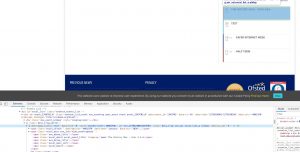
So unfortunately, my code won’t work.
Could you or may I please try the instructions mentioned in this documentation? Maybe your theme or a third-party plugin remove Event Categories classes from the code.
Hello,
How can I check the shortcode? I cannot find it in Edit Page: https://calendarkiddo.com/wp-admin/post.php?post=68&action=edit
Could you also check if you have the same issue without “Daily/Monthly” Tabs?
fc_script.js?ver=1.1.9:46 Uncaught TypeError: Cannot read property ‘start_of_week’ of undefined
at draw_fullcal (fc_script.js?ver=1.1.9:46)
at HTMLBodyElement.<anonymous> (fc_script.js?ver=1.1.9:422)
at HTMLBodyElement.dispatch (jquery.js?ver=1.12.4-wp:3)
at HTMLBodyElement.r.handle (jquery.js?ver=1.12.4-wp:3)
at Object.trigger (jquery.js?ver=1.12.4-wp:3)
at Object.a.event.trigger (jquery-migrate.min.js?ver=1.4.1:2)
at HTMLBodyElement.<anonymous> (jquery.js?ver=1.12.4-wp:3)
at Function.each (jquery.js?ver=1.12.4-wp:2)
at a.fn.init.each (jquery.js?ver=1.12.4-wp:2)
at a.fn.init.trigger (jquery.js?ver=1.12.4-wp:3)
Unfortunately, no. However you can check how it works on http://dev.myeventon.com/wp-admin/
Hi,
The event photos box is well checked.
However I still don’t see the location of the “add additional Images”.
Now, please really try with our environment taking as an example the “test” event and, please, fix the problem.
Regards,