I’ll let you know on Monday after the time change how it will look.
Archives: Replies
Replies for tickets on suppota
Reply to: tickets(382972)
Dear Artem,
Thanks again for the fast response.
Have updated the RSVP add-on, not able to add the bundles.
Kind regards,
Wiebe
Reply to: tickets(375323)
Dear Ashan Perera,
Thank you for your reply.
A credit note is an official document that serves as a record for issuing a refund or making an adjustment to an invoice. It essentially acknowledges that a correction has been made in the amount invoiced.
For our case, the credit note must include the following information:
-
Refund Details: Please specify the date of the refund and note that the refund was processed via PayPal.
-
Tax Information: It should contain both my fiscal details and your fiscal details.
-
Refund Amount: Indicate the exact amount that was refunded.
This detailed documentation is important for our administrative and fiscal records. If you require an example or further clarification, please let me know.
Thank you for your cooperation.
Best regards,
Davide
Reply to: tickets(382671)
All right, so if we set the limit, will people be put on the waiting list straight away? Can I set the limit to 0 and then people will automatically go on the waiting list?
Reply to: tickets(381287)
Well, everything was going wrong, all pages with eventon were not showing the eventon plugin so I restored a back up I made two days ago. That is before I updated elementor pro and before I changed the code you sent.
So now I am back to square one.
Reply to: tickets(381287)
make sure you are on latest eventon 4.9.1 for the ICS issue. Yes the same
For 1st day – please try clear cache on your browser after changes to the js code. You can open console and see if the changes you made were loaded on the web page. Clered cache, still the same
There is a bigger problem now. Now the eventon calendars do not show if I have elementor pro active.
Deactivate elementor pro and the calendar appears – but the rest of the page is wrong.
What happens now?
Reply to: tickets(382419)
Could you apply the patch from this message from Ashan:
Thank you for letting us know. Event though it shows as london the value is saved in settings. Just the correct saved value is not showing. We will correct this in the next version update. In the mean time here is the patch fix to resolve this issue.
code:
https://dev2.myeventon.com/codeshare/Wv1YD1jvnKMN/
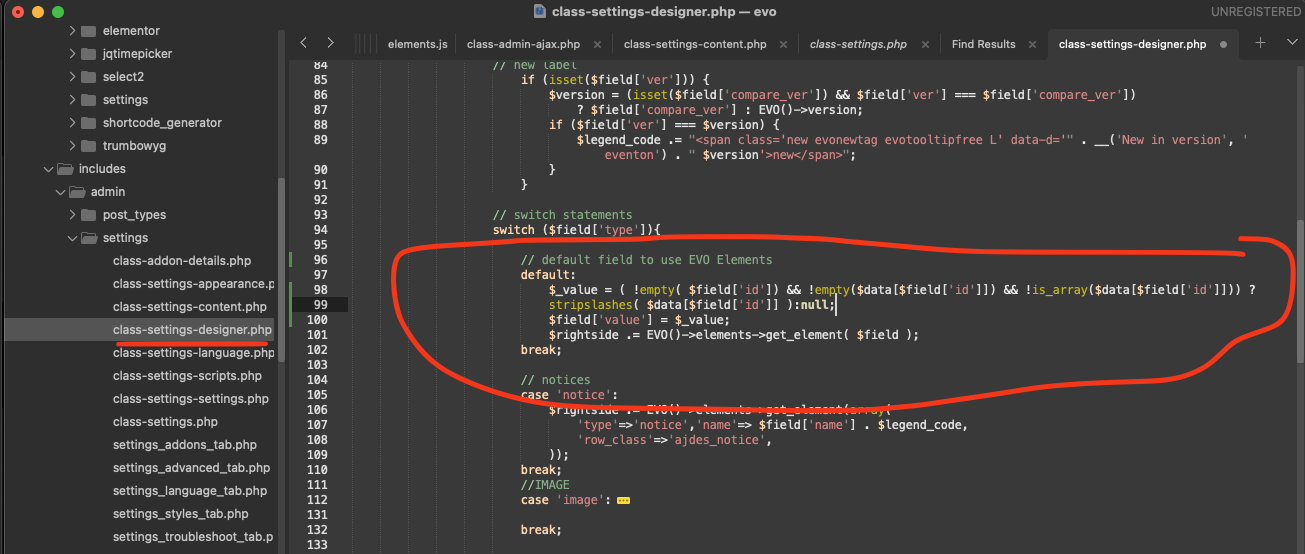
It’ll fix the issue with EventON > Time Settings > Default Event Timezone. You’ll be able to select the same as in wp-admin > Settings.
Reply to: tickets(381755)
Perfect! Do you need our help with anything else or can I close the ticket?
Reply to: tickets(382972)
Ashan,
I cannot re-create this on dev2 because it has EventON – RSVP Points 1.0 installed.
But only 0.4 is available to download:
https://docs.myeventon.com/documentations/changelog-for-rsvp-points-addon/
Could you check?
Reply to: tickets(382972)
Could you update RSVP add-on?
I am also going to assign this ticket to Ashan and he will be able to take it from here and find you a solution. Please allow some time for him to get back to you, we greatly appreciate your patience and thank you for being a eventon customer!