That’s the version I have now.
Archives: Replies
Replies for tickets on suppota
Reply to: tickets(159109)
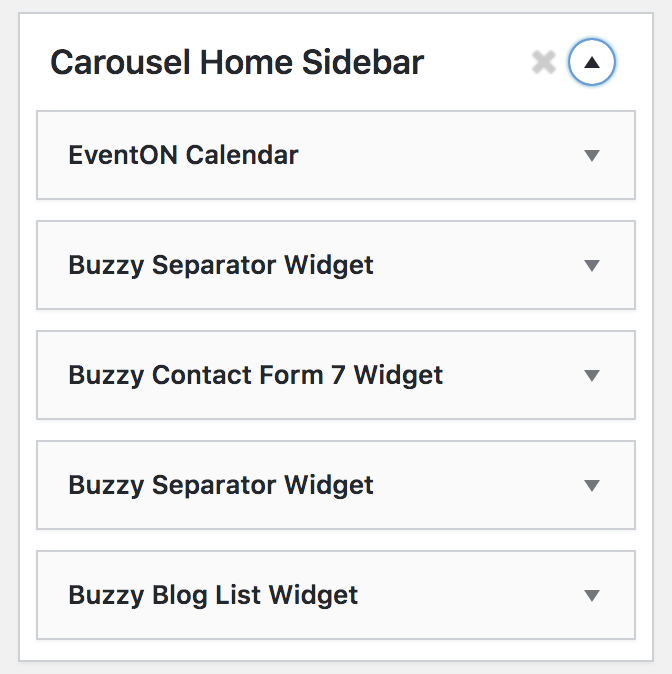
I realised this morning that there are too many widget locations to easily find it.
Ive attached a screen shot showing the widget block name and widget
Reply to: tickets(159410)

Reply to: tickets(159118)
You can buy because you’re connected with Admin wp. You need to do this without login. For example with private navigation. I did that because I must to test like a new customer. Everybody should be able to buy on the website. When you’ll do that you’ll see the message “You must be identified to order.” Here : https://drive.google.com/open?id=1c-oEz50KPH_LSSm-dH8IO5-NbzwV87-e
Before the update I newer saw this message, I can buy with problem.
Thanks.
Reply to: tickets(159118)
Ok, here : https://drive.google.com/open?id=1c-oEz50KPH_LSSm-dH8IO5-NbzwV87-e
Thanks
Reply to: tickets(158966)
You may try the options. I tried them and was not able to find a solution.
I did see several entries of this message in the debug.log:
[21-Jan-2020 15:16:08 UTC] PHP Fatal error: Uncaught Error: Call to undefined function wc_get_orders() in /home/sinclai3/gshstheatre.com/wp-content/themes/generatepress-child/functions.php:83
Stack trace:
#0 /home/sinclai3/gshstheatre.com/wp-includes/class-wp-hook.php(288): auto_update_orders_status_from_processing_to_completed(”)
#1 /home/sinclai3/gshstheatre.com/wp-includes/class-wp-hook.php(312): WP_Hook->apply_filters(NULL, Array)
#2 /home/sinclai3/gshstheatre.com/wp-includes/plugin.php(478): WP_Hook->do_action(Array)
#3 /home/sinclai3/gshstheatre.com/wp-settings.php(523): do_action(‘init’)
#4 /home/sinclai3/gshstheatre.com/wp-config.php(93): require_once(‘/home/sinclai3/…’)
#5 /home/sinclai3/gshstheatre.com/wp-load.php(37): require_once(‘/home/sinclai3/…’)
#6 /home/sinclai3/gshstheatre.com/wp-cron.php(44): require_once(‘/home/sinclai3/…’)
#7 {main}
thrown in /home/sinclai3/gshstheatre.com/wp-content/themes/generatepress-child/functions.php on line 83
That line seems to be code that an EventON support staff member added to the functions.php to automatically close virtual orders.
I cleared the debug.log and was only able to get one additional entry to it.
[21-Jan-2020 18:18:30 UTC] PHP Warning: DateTime::modify(): Failed to parse time string (2019″-12″) at position 4 (�): Unexpected character in /home/sinclai3/gshstheatre.com/wp-content/plugins/eventON/includes/calendar/class-calendar-shell.php on line 212
This was generated when I looked at the Tickets page on my site.
I was not, however, able to get any errors or entries to the debug.log file when duplicating an event. Do you have any other suggestions or fixes for this issue? Is a downgrade of the EventON plugin necessary? Is this
I have enabled a “We will return shortly” plugin on my site, so you can test as you wish without disrupting the public facing side of my site.
Reply to: tickets(158403)
I tried again… and I thought I set the slug correctly. I even cleared my browser cache. It’s almost as if WordPress is stuck on recognizing the old page as the archives page. But maybe I’m not understanding what the archives page actually is and that’s why it’s not working properly…
Reply to: tickets(159184)
In your original question you said that you need help with “No Events.”. Could you show us where did you put “HOURS”?
Reply to: tickets(159184)
Thanks, but that won’t solve the issue as it gives me no control over the line breaks. The plugin doesn’t allow me to have something as simple as this:
HOURS:
Monday – Friday
10am-8pm
Sunday
Sunday brunch until 3pm
Happy hour until 9pm
Reply to: tickets(159294)
Yes, please check https://docs.myeventon.com/documentations/au-changelog/ > v 2.1.17 (2019-11-12):
FIXED: location and organizer create new buttons not showing up in the form