Ok, well the reason I was using the woo products page is because we need to be able to invite “guests” a meeting. We have recurring meetings setup but can’t let anyone buy a ticket more than 1 week out. So, how would I set that up and provide a link to something that allows a guest to buy a ticket to that specific meeting?
Archives: Replies
Replies for tickets on suppota
Reply to: tickets(162332)
Hello,
thanks for the fast reply. I guess, you didn’t fully understand my point. Thats no problem 🙂
I didn’t mean the display of past events in Google Search, we don’t need such a feature.
My point is the following:
Our users are able to see the link (https://glycktest.david-muehlberg.de/wordpress/events/qigong/) because we link it via button “Zum Kurs anmelden” on this site:
https://glycktest.david-muehlberg.de/wordpress/qigong/
So the event card shows up with the first repeat instance of the event which is already in the past.
So my question is: Is there a possibility to generate a dynamic URL (via PHP) for the button link to get the right repeat instance which should be the first which is not in the past?
Something like this:
https://glycktest.david-muehlberg.de/wordpress/events/qigong/var/ri-1/
but the URL part /var/ri-1 should be dynamic to show the first repat instance which is not in the past.
I’m not very familiar with the eventon data model to identify the right repeat instance to create the URL on my own 🙂
I saw following ticket which is facing the same issue I think:
https://helpdesk.ashanjay.com/ticket/single-link-to-repeating-event/
Best regards
David
Reply to: tickets(162813)
Hello,
Please replace add_eventon with add_eventon_list and add this to the shortcode:
number_of_months=”12″ hide_empty_months=”yes”
Reply to: tickets(162810)
Hello,
Please go to EventON > Google Maps API > disable Make all event location information visible only to logged-in users.
Reply to: tickets(162803)
Hello,
Please add this CSS code to EventON > Styles (If you can’t see any change, EventON > turn off Write styles to header > save settings > turn on Write styles to header):
@media (max-width: 768px){ .ajde_evcal_calendar.boxy.box_4 .eventon_list_event, .ajde_evcal_calendar.boxy.box_4 .evoShow_more_events, .ajde_evcal_calendar.boxy .eventon_list_event{ width: 49.5% !important; margin: 0 .25% .5% !important; } }
@media (max-width: 650px){ .ajde_evcal_calendar.boxy.box_4 .eventon_list_event, .ajde_evcal_calendar.boxy.box_4 .evoShow_more_events, .ajde_evcal_calendar.boxy .eventon_list_event{width: 100% !important;} }
Reply to: tickets(162783)
Reply to: tickets(162783)
Thanks, that worked perfectly.
Reply to: tickets(162792)
Hello,
Please go to EventON > EventCard > set Feature image display style to Direct Image.
Reply to: tickets(162352)
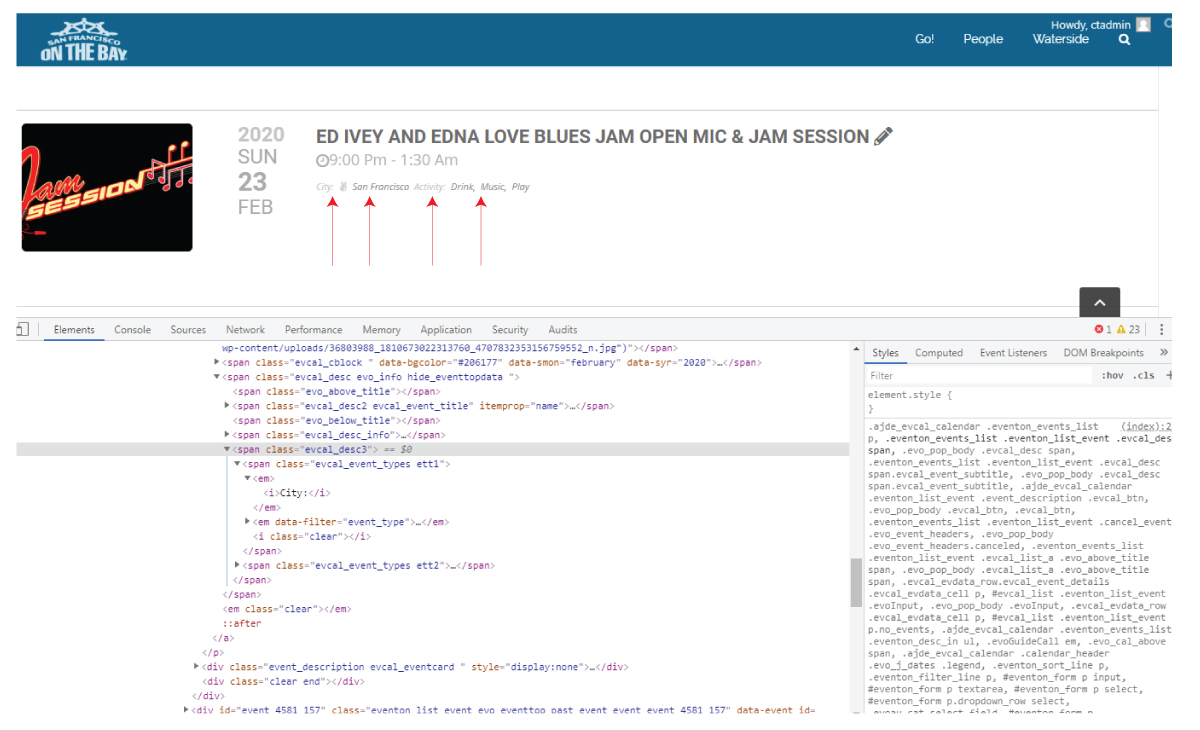
Hi, thank you. for some reason, the css that wasn’t working before is working now – and I had cleared cache and checked different browsers, etc. so I’m good – all except the attached. can you provide the selectors for the 4 objects shown? thank you.
Reply to: tickets(161983)
Hi there,
Thank you very much indeed for the custom code, i will forward this onto the developer.
In addition to my original problem, i have also be experiencing a few more problems….
a. When the event slider pauses on an event, it also shows approx 25% of the next upcoming event also.
b. Dashboard – Events – All months. The drop down menu is only displaying events form Jan 2020 – Sept 2020, Oct, Nov & Dec 2020 are missing from the list.
c. Apperance – EventTop Styles – Background colour – I am unable to change the background colour for repeat events, despite selecting an alliterative colour.
Your help would be greatly appreciated.
Thank you,
Jon