Please replace “ja” with “yes” in the shortcode.
Archives: Replies
Replies for tickets on suppota
Reply to: tickets(374429)
Here’s the issue, I believe:
[03-Mar-2025 11:11:14 UTC] PHP Fatal error: Uncaught TypeError: Unsupported operand types: string + int in /home/yogainveradmin/public_html/wp-content/plugins/eventon-tickets/includes/class-functions.php:371
Stack trace:
#0 /home/yogainveradmin/public_html/wp-content/plugins/eventon-tickets/includes/class-integration-woocommerce.php(748): evotx_functions->update_repeat_capacity()
#1 /home/yogainveradmin/public_html/wp-content/plugins/eventon-tickets/includes/class-integration-woocommerce.php(678): EVOTX_WC->adjust_ticket_var_stock()
#2 /home/yogainveradmin/public_html/wp-includes/class-wp-hook.php(326): EVOTX_WC->reduce_stock_at_checkout()
#3 /home/yogainveradmin/public_html/wp-includes/class-wp-hook.php(348): WP_Hook->apply_filters()
#4 /home/yogainveradmin/public_html/wp-includes/plugin.php(517): WP_Hook->do_action()
#5 /home/yogainveradmin/public_html/wp-content/plugins/paypal-for-woocommerce/ppcp-gateway/class-angelleye-paypal-ppcp-checkout.php(118): do_action()
#6 /home/yogainveradmin/public_html/wp-content/plugins/paypal-for-woocommerce/ppcp-gateway/class-angelleye-paypal-ppcp-front-action.php(658): AngellEYE_PayPal_PPCP_Checkout->angelleye_ppcp_create_order()
#7 /home/yogainveradmin/public_html/wp-includes/class-wp-hook.php(324): AngellEYE_PayPal_PPCP_Front_Action->maybe_start_checkout()
#8 /home/yogainveradmin/public_html/wp-includes/class-wp-hook.php(348): WP_Hook->apply_filters()
#9 /home/yogainveradmin/public_html/wp-includes/plugin.php(517): WP_Hook->do_action()
#10 /home/yogainveradmin/public_html/wp-content/plugins/woocommerce/includes/class-wc-checkout.php(983): do_action()
#11 /home/yogainveradmin/public_html/wp-content/plugins/woocommerce/includes/class-wc-checkout.php(1290): WC_Checkout->validate_checkout()
#12 /home/yogainveradmin/public_html/wp-content/plugins/paypal-for-woocommerce/ppcp-gateway/class-angelleye-paypal-ppcp-front-action.php(200): WC_Checkout->process_checkout()
#13 /home/yogainveradmin/public_html/wp-includes/class-wp-hook.php(324): AngellEYE_PayPal_PPCP_Front_Action->handle_wc_api()
#14 /home/yogainveradmin/public_html/wp-includes/class-wp-hook.php(348): WP_Hook->apply_filters()
#15 /home/yogainveradmin/public_html/wp-includes/plugin.php(517): WP_Hook->do_action()
#16 /home/yogainveradmin/public_html/wp-content/plugins/woocommerce/src/Internal/Utilities/LegacyRestApiStub.php(166): do_action()
#17 /home/yogainveradmin/public_html/wp-content/plugins/woocommerce/src/Internal/Utilities/LegacyRestApiStub.php(95): AutomatticWooCommerceInternalUtilitiesLegacyRestApiStub::maybe_process_wc_api_query_var()
#18 /home/yogainveradmin/public_html/wp-includes/class-wp-hook.php(324): AutomatticWooCommerceInternalUtilitiesLegacyRestApiStub::parse_legacy_rest_api_request()
#19 /home/yogainveradmin/public_html/wp-includes/class-wp-hook.php(348): WP_Hook->apply_filters()
#20 /home/yogainveradmin/public_html/wp-includes/plugin.php(565): WP_Hook->do_action()
#21 /home/yogainveradmin/public_html/wp-includes/class-wp.php(418): do_action_ref_array()
#22 /home/yogainveradmin/public_html/wp-includes/class-wp.php(813): WP->parse_request()
#23 /home/yogainveradmin/public_html/wp-includes/functions.php(1336): WP->main()
#24 /home/yogainveradmin/public_html/wp-blog-header.php(16): wp()
#25 /home/yogainveradmin/public_html/index.php(17): require(‘/home/yogainver…’)
#26 {main}
thrown in /home/yogainveradmin/public_html/wp-content/plugins/eventon-tickets/includes/class-functions.php on line 371
It’s referring to paypal-for-woocommerce plugin. However, could you also try updating Tickets add-on?
Reply to: tickets(381898)
Hello,
Could you try updating EventON to 4.9.1 and try again?
To update eventon to latest version: If you are unable to do autoupdate, you can go to codecanyon your account > download and get the latest eventon version as zip file. Then you can go to your website > make sure “Delete eventon settings & data when EventON is uninstalled” is Deslected from eventon settings, delete old eventon, install new one and activate. This link will further explain the process it. Also you can follow us on twitter to get real-time announcements on updates!
Also try a different browser or PC/Mac.
If the issue continues, please send us wp-admin access, email and also license code, so we can try activating it on your website.
Reply to: tickets(381347)
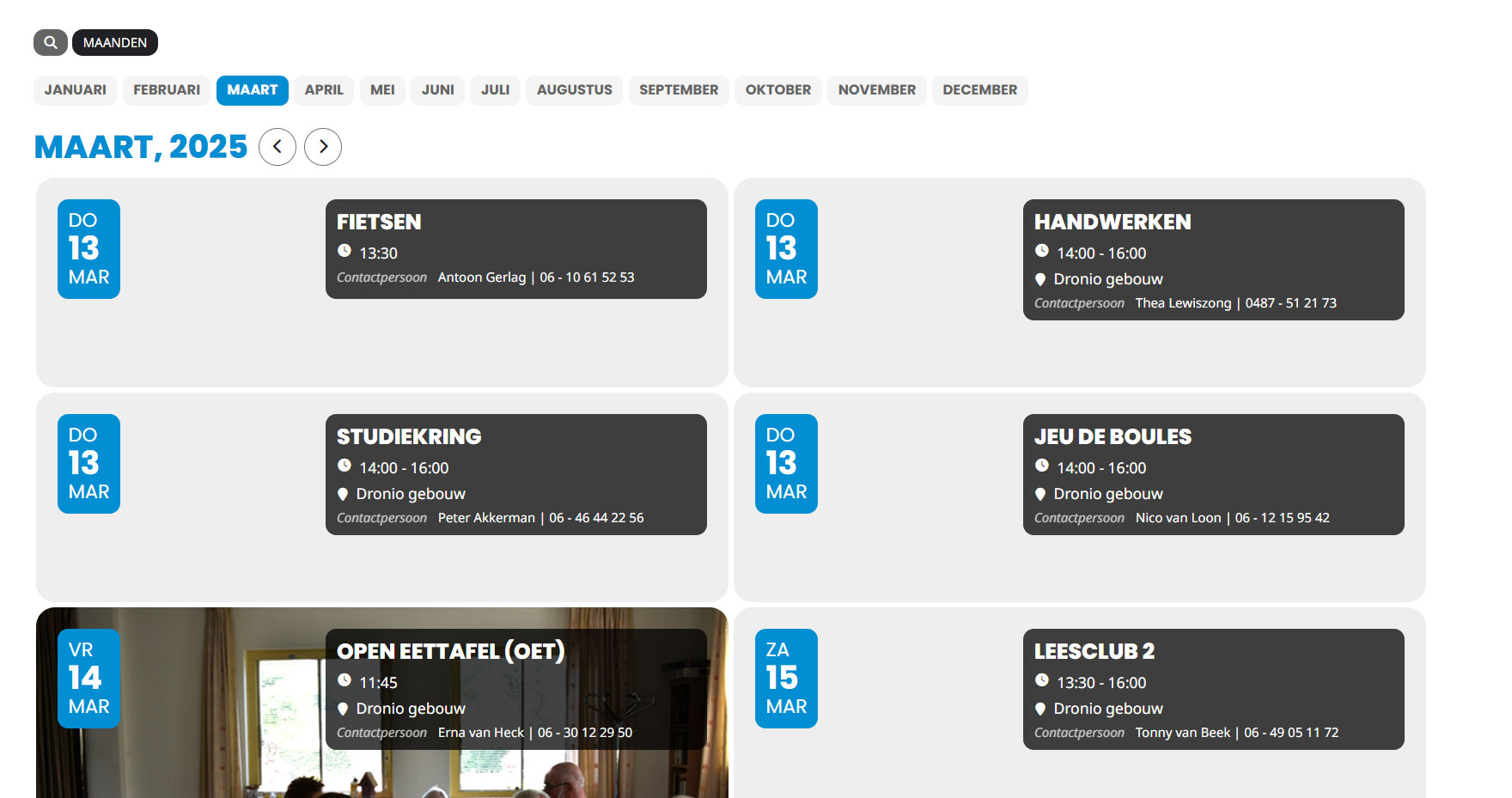
Why does it still show the old dates? what am I doing wrong? See attachment
https://droniodruten.nl/inloglink
User: eventon
Password: &VX3FJpwZpH0UisccZtAdD7j
Page
https://droniodruten.nl/activiteiten
Reply to: tickets(381780)
We are glad your issue is resolved, if you have any further questions or concerns please create a new ticket.
Reply to: tickets(374429)
Hi Artem,
this issue has recurred after a period when we thought we had resolved it. I have check all plugins and theme up to date and still not resolved. It is impossible to edit an event or create a new event because the only block to display is the title block. Nothing else loads. It is vitally important that we are able to edit events at short notice and this is hugely frustrating. Please can you look again at our site and use the admin login details supplied to you previously in this thread to check what happens.
Please let me know when you have checked in, thanks
Reply to: tickets(381468)
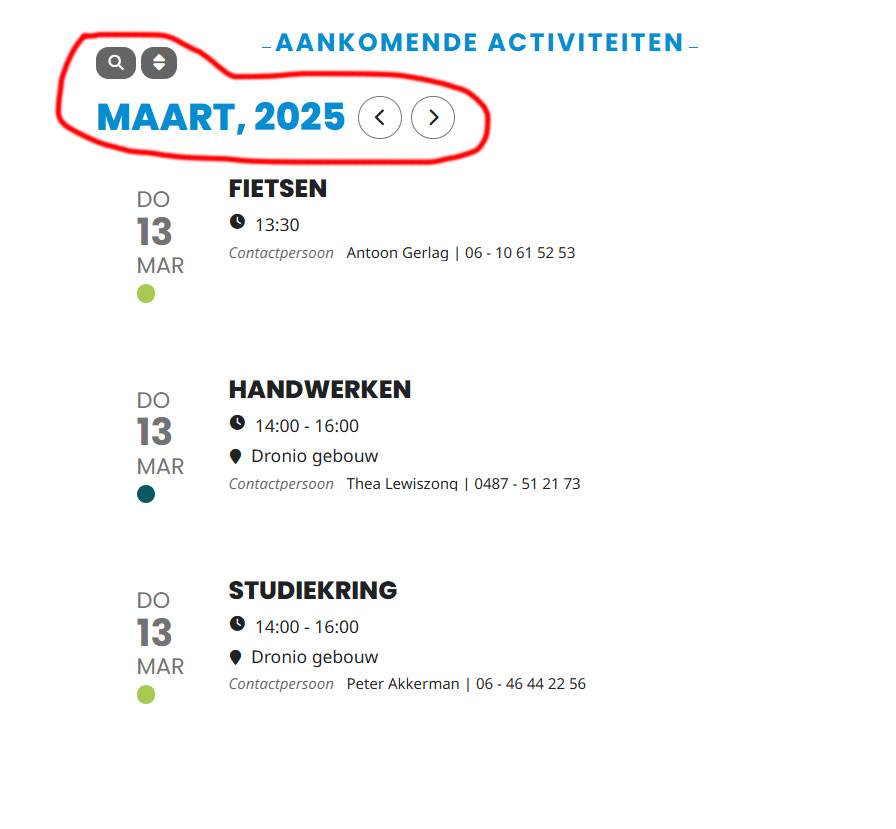
See attachment! How do I remove the red circled? I did enter it, but it doesn’t apply it…and it doesn’t show the Show more events button, how do I make it visible? I used the code below…
[add_eventon event_count=”3″ show_limit=”ja” hide_arrows=”ja” livenow_bar=”ja” hide_so=”ja” filter_hide_indicator=”ja” eventtop_style=”5″ show_et_ft_img=”ja” filter_show_set_only=”ja” etc_override=”ja” show_limit_redir=”/activiteiten” eventtop_date_style=”1″ hide_et_dn=”ja” hide_et_tags=”ja” hide_et_tl=”ja” hide_et_extra=”ja” view_switcher=”ja”]
Here is the login
https://droniodruten.nl/inloglink
Username: eventon
Password: &VX3FJpwZpH0UisccZtAdD7j
Page
https://droniodruten.nl/home
Reply to: tickets(381399)
Alright, the problem, as I told you, is that I can’t apply the EventON update on the live site because it causes another bug. When purchasing an event, the confirmation icon for adding to the cart is bugged. I don’t know how to solve this issue.
Reply to: tickets(380496)
how is this possible? Before, a few months ago, this wasn’t the case … so what can I do? What are the solutions?
Reply to: tickets(381886)