fixed
in myeventon>>>settings>>>event top
I set Configure text color for colorful & Image eventtops to auto detect
Replies for tickets on suppota
fixed
in myeventon>>>settings>>>event top
I set Configure text color for colorful & Image eventtops to auto detect
Fixed
in myeventon>>>settings you had enabled language corresponding events
and on the event itself you had selected L2 as the language. I changed it to L1 and its now appearing
as that weekly view defaults to L1 if you don’t add anything
We are glad your issue is resolved, if you have any further questions or concerns please create a new ticket.
If you have a moment, we would greatly appreciate if you could kindly leave us a review at Codecanyon. By going to your account > Downloads. We are very grateful for your kind review!
I’ll learn to live with it then. But I don’t really understand what drives a decision to put these fields behind a couple of extra mouseclicks/popup window. That does not seem good UI/UX design to me.
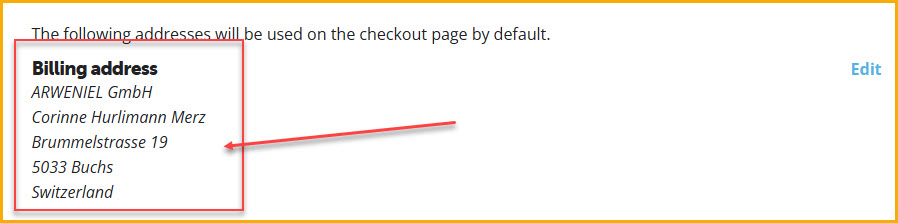
As I mentioned, I did change the address prior to the renewal.
But I haven’t seen the checkmark for the “apply it to all …”
So please update Invoice 42034 with the correct billing address for me. As naturally it did not change …
I thank you in advance.
Best Regards, Claude
Past events should disappear like now. But none of my repeating events is shown – why? Last month it was the same and it was solved on its own. But I miss atendees if they cannot sign up for a class.
Dave,
If we have to do away with the top bar, (the black one) then so be it. I am not stressed about it for this component; really!
If we can get the menus back to the white instead of black, focus on the page background (as mentioned above) and the footer, then really I am prepared to sacrifice the top black bar! It’s not the end of the world ( I can turn it off completely as well in the nav settings)
I’m really not worried about it. If you want to keep challenging yourself, by all means, but otherwise, just continue on everything else.
I see the header is still a work in progress, but feel we are on the home straight with it? Its the right colours including the menu which is great to see.
You’re doing a great job! When this is all over and done with, I’ll be sure to post a glowing review for your support and we may have another 2 sites coming on board to purchase licences for as we’re certainly happy with the product this far.
I guess I was a bit anxious to start with, but we’re getting there!
Thanks for that!
I worked it out with the Custom Meta data and card designer and have the fields working as I need them!
Kubio have replied, heres a copy and paste:
__________________
We took a look and found that the issue is due to the website not using a Kubio-compatible theme.
The header/footer on those post type posts do not come from our plugin. It’s actually a Kadence template.
You
could consider switching to the Kubio theme, but you will probably need
to redo the header and footer. If necessary, we can attempt a migration
first thing Monday morning.
Thank you and we apologize for any inconvenience!
______________________
but I disagree with them, because the theme is working with their headers- so its not a “Kubio doesn’t work with theme” issue
My theory
but it could be a kadence (your theme) issue
Kubio (your header) is picking up Kadence (theme) made pages
so we need to get the custom post type integrated with the theme- at which point the Kubio will recognise eventon
but I am not sure
The next issue if I am right is: Its a pro feature of the kadence theme and you don’t have the pro version
Kadence do offer 30 day refunds, then we have 30 days to figure out how to do this:
https://www.kadencewp.com/help-center/docs/kadence-theme/how-to-display-custom-post-types-with-kadence-elements-templates-and-the-post-grid-carousel/
sorry not great news
before we do anything I’ll speak to Ashan the creator of event to see his insight
2 ways
simply use the “learn more” field on the event
and in languages>>>> in the upper right search fiel type in “learn more”
then you will see on the left learn more- where you can change the wording to book tickets or whatever you want
that sounds more complicated than it is
if you are using the learn more for another reason you can create a button with custom meta data- that adds another complexity which I can walk you through so if you are not using the learn more- use it