Please go to My Account > Downloads and get the latest version copy. But only if you verified the purchase of purchased the plugin from us directly.
Archives: Replies
Replies for tickets on suppota
Reply to: tickets(408074)
Hello,
Thank you for your messages!
I am going to escalate this ticket to our account manager to help in here. Please allow us some time to address this, and we truly appreciate your patience. Thank you for being a valued EventON customer!
Reply to: tickets(408011)
Could you confirm that you downloaded the latest version of EventON right before creating this ticket or re-downloaded it after I asked to re-update it?
I just checked the issue on our website and I can search for location without any issues, so just need to make sure:
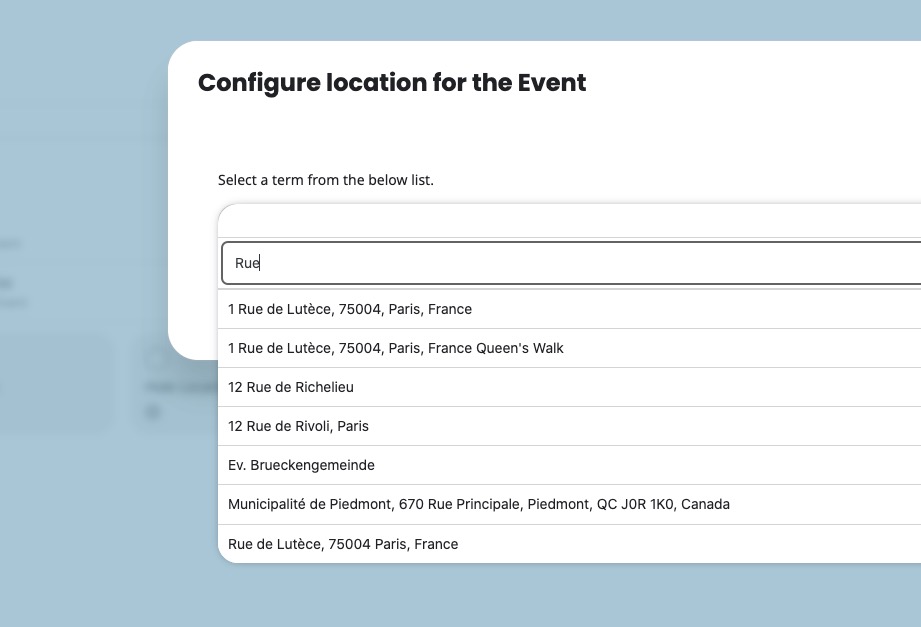
Reply to: tickets(408011)
Thank you for your messages!
I am going to escalate this ticket to development to help in here. Please allow us some time to address this, and we truly appreciate your patience. Thank you for being a valued EventON customer!
Reply to: tickets(408044)
we have tied both automatic update which results in the err i already send you, and manual, where latest package we get is 5.0.6
Verify Codecanyon Purchase link does not lead to a resolution as we dont know where to find the download for the latest version….
Please provide a DIRECT link to download what we need ASAP.
Thank you
Reply to: tickets(407425)
ok its working fine now. may be due to cache it was not showing. Thank you for all your support.
Reply to: tickets(408011)
Hi,
Your helpdesk doesn’t allow video uploads, so I have uploaded the screen recording directly to my server. You can watch it here:
https://www.planconpeques.com/wp-content/uploads/2026/05/Grabacion-de-pantalla-2026-05-26-093231.mp4
As you will see in the video, the issue is not that the popup closes when saving. The bug is that as soon as I click inside the search bar to type and filter a location, the popup window instantly crashes and closes automatically, making it completely impossible to change or select any location.
The patch included in the current 5.0.10 download has not fixed this.
Since I cannot manage locations or custom repeats properly, my live site is severely affected. Please, stop asking me to reinstall this version and provide the direct download link for the previous stable version immediately so I can downgrade while your team fixes these interface and database bugs.
Best regards,
Reply to: tickets(408050)
ok
Reply to: tickets(408050)
You need to purchase DailyView add-on.
But if you are eligible for the refund (”You are within the first 30 days of the original purchase of the plugin.”), please create a new ticket under Billing & Accounts and be sure to include the order ID for which you need a refund for and the reason for requesting a refund.
Reply to: tickets(408009)
Ashan,
Could you check
Is it something planned in a roadmap, or someting that we can easily achieve with the actions provided during import?
They are referring to ”Does CSV Importer plugin support Tickets Variations plugins?”.