That worked perfectly. Thank you
Archives: Replies
Replies for tickets on suppota
Reply to: tickets(403295)
Hello, and thank you for this. Now I have a blue border at the top and bottom of the image. How can I remove it? It is particularly large in the mobile version. Thank you very much for your efforts. br Andi
Reply to: tickets(403233)
Hi there. So why are the events not showing up on the calendar still?
Reply to: tickets(403227)
Here is a possible workaround…
If I Clone an Event… and then I also clone a Woocommerce Product/Ticket…. would I be able to assign the event to the WC Product?? I tried to do that, but I keep getting the message….
Assign Different WC Product
You do not have any items saved! Please add new!
Reply to: tickets(402906)
Connor do let us know which domain we can use for ftp and if its SFTP or FTP.
Reply to: tickets(403235)
Hi, I can see my three add ons:
RSVP Events, RSVP Events Waitlist, Reminders but I can’t find the main download for Eventon to cancel that as well? Is it possible that you have a reseller that I need to contact? Thank you for your help!
Reply to: tickets(402492)
We are investigating this issue at the moment my friend. Will get an update out as soon as we can!
Reply to: tickets(403291)
We will be sure to include this code change in the next version and also run more tests on this before next release.
Reply to: tickets(403291)
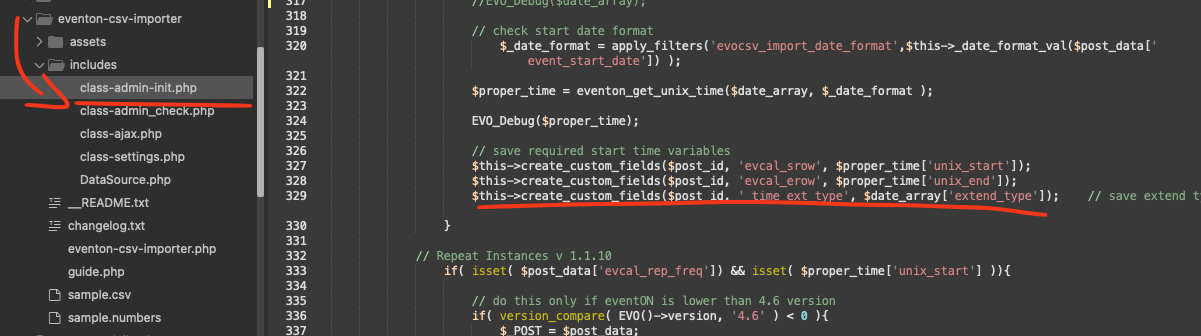
Kindly add this patch fix to your CSV importer addon and that will fix the extended type value not saving
code: $this->create_custom_fields($post_id, ’_time_ext_type’, $date_array[’extend_type’]);
Reply to: tickets(402269)
It’s on our main page. I had to remove it from here, this URL. The grid format does not work. https://bellavistapoa.com/ I could not use it or the Full Cal plugin. Both had the same problem. They worked at first. I have the weekly view set for list and that kinds works.