I solved #1 in my issues listed above. Still need help with #2 & #3.
Thank you
Replies for tickets on suppota
I solved #1 in my issues listed above. Still need help with #2 & #3.
Thank you
FYI, in reference to #2 in my above problems. The event I added which is not displaying is this one:
https://movementafters.com/wp-admin/post.php?post=780&action=edit
Thank you Artem,
Just added the FR here.
Thank you for your reply, I fixed user/login and now they works.
I tried to refresh permalinks but it didn’t work, also it’s a 500 error, not 404.
Thank you
Unfortunately, we cannot ask the customers. There is only the option to pay via PayPal. Some work, some don’t. Is it possible that the Borlabs plugin (Cookie Consent Manager) triggers something like this? For example, if cookies are not accepted? Because it is noticeable again that the source of the non-ticket orders is always “Unknown”. And if so, how can we solve this?
To use Webhooks, you need to use RSVP or Tickets add-ons. Then you’ll be able to use these hooks: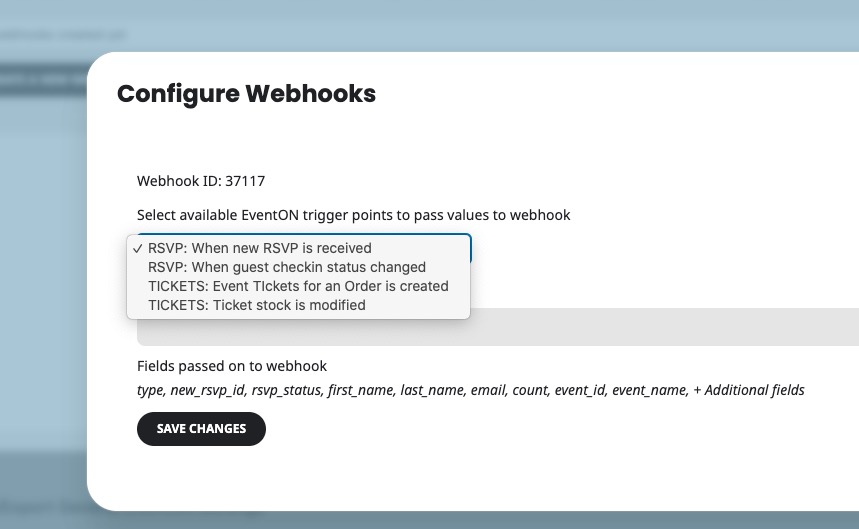
Wouldn’t it be better if Include Anything worked directly within EventON instead of just as an option in a standard WordPress post?…
Please create a new ticket and select Feature Request as category so others can vote on your idea and get it moved into development faster.
I have tried configuring this using the Custom Repeat option, but the results are not optimal.
Custom Repeats are only option:
https://docs.myeventon.com/documentations/setting-up-repeating-events/
Why aren’t they optimal? Could you elaborate?
I would like to know how to add the timeline shown in the attached image to events in EventON.
Please go to EventON > EventTop > add Event Progress Bar. Now all your events in Progress will show the bar.
Ashan,
The customer has this issue:
https://helpdeskx.s3.amazonaws.com/wp-content/uploads/2024/12/07081617/Baav-Outlook-layout-not-OK-1.jpg
When they receive emails from WooCommerce in their Outlook up it strips formatting from Details.
I tried to test this on my Mac Outlook but cannot re-create the issue:
https://helpdeskx.s3.amazonaws.com/wp-content/uploads/2025/02/05155015/Screenshot-2025-02-05-at-23.47.02.jpg
Do you have access to any of this:
It’s Microsoft Office LTSC Professional Plus 2021. I suspect my client (who has the same issue) has Office 365.
Thank you for your messages, I am going to assign this ticket to Ashan and he will be able to take it from here and find you a solution. Please allow some time for him to get back to you, we greatly appreciate your patience and thank you for being a eventon customer! Also please disable any IP blocking on your site if there are any.